



Hybrid extension installation status code -160!
Hi All,
I'm working on a hybrid extension for Indesign CC2022 application. I have followed and tried all the steps mentioned in the documentations and "Getting-Started-guides"(from GitHub). Still, I'm getting -160! error for installation. I'm abled to install html zxp file but when I trying to intall it with the native plug-ins, it returns -160! status code. Please suggest me if I'm missing something.
MXi File Data:
<?xml version="1.0" encoding="UTF-8"?>
<macromedia-extension
id="com.example.cepidtest"
name="CEPIDTestPkg" requires-restart="true" version="17.0.0">
<author name="mediawide"/>
<description><![CDATA[For Test]]></description>
<license-agreement><![CDATA[Test]]></license-agreement>
<products>
<product familyname="InDesign" maxversion="" primary="true" version="17.0"/>
</products>
<files>
<!-- The HTML panel, for 17.0 onwards -->
<file destination=""
file-type="CSXS"
products="InDesign64"
maxVersion="17.9" minVersion="17.0"
source="Extension/CEPIDTest.zxp" />
<!-- WIN plugin, 64bit -->
<file source="SDKSample/BasicDialog.sdk.pln"
destination="$indesign/Plug-Ins/SDKSample"
products="InDesign64"
maxVersion="17.9" minVersion="17.0"
platform="win"
shared="true" />
<file source="SDKSample/(BasicDialog.sdk Resources)"
destination="$indesign/Plug-Ins/SDKSample"
products="InDesign64"
maxVersion="17.9" minVersion="17.0"
platform="win"
shared="true" />
</files>
</macromedia-extension>
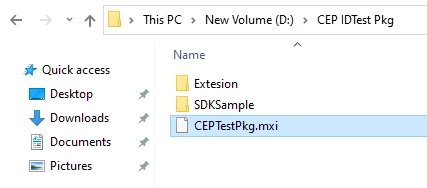
Pkg Folder Structure -
 AdChoices