



I am unable to bring UI design in the Illustrator Extensions
Hi,
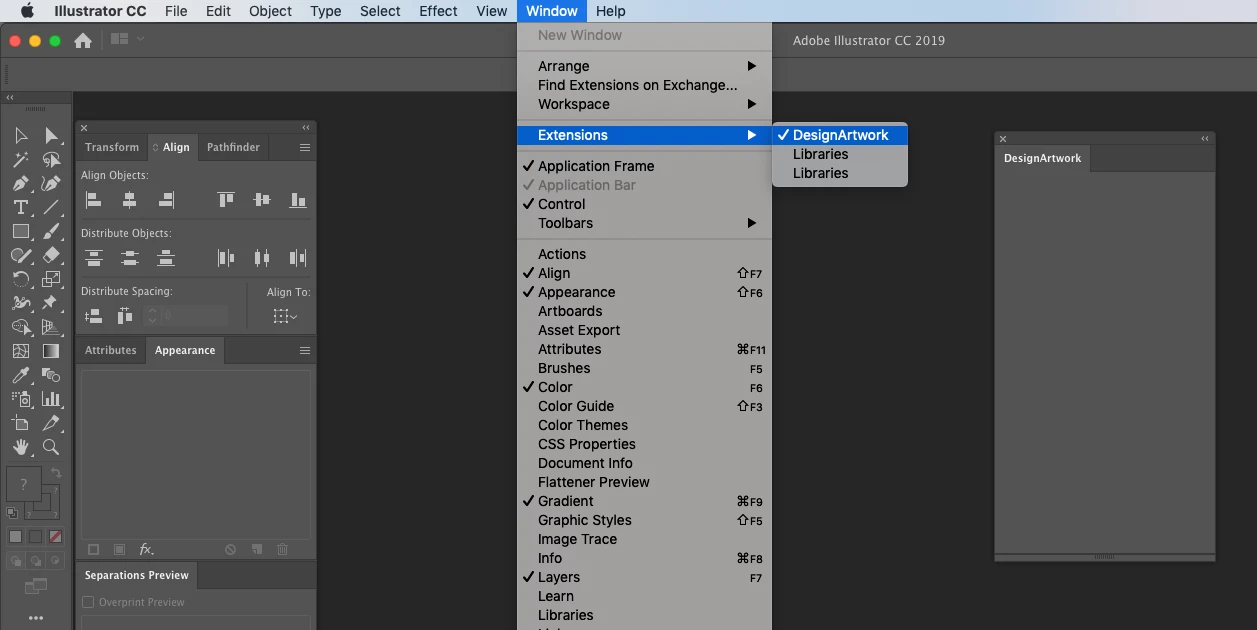
I am created illustrator extensions and copied the respective path"Macintosh HD ▸ Library ▸ Application Support ▸ Adobe ▸ CEP ▸ extensions". But it is displaying the blank menu. Here with i have attached the screenshot and coding. Please check my coding and help me.
manifest.xml
<?xml version="1.0" encoding="UTF-8"?>
<ExtensionManifest Version="6.0" ExtensionBundleId="com.example.DesignArtwork"
ExtensionBundleVersion="2.6.0.113" ExtensionBundleName="Design Artwork"
xmlns:xsi="http://www.w3.org/2001/XMLSchema-instance">
<ExtensionList>
<Extension Id="com.example.DesignArtwork"
Version="2.6.0.113" />
</ExtensionList>
<ExecutionEnvironment>
<HostList>
<Host Name="ILST" Version="[23.0,99.9]" />
</HostList>
<LocaleList>
<Locale Code="All" />
</LocaleList>
<RequiredRuntimeList>
<RequiredRuntime Name="CSXS" Version="6.0" />
</RequiredRuntimeList>
</ExecutionEnvironment>
<DispatchInfoList>
<Extension Id="com.example.DesignArtwork">
<DispatchInfo>
<Resources>
<MainPath>./index.html</MainPath>
<ScriptPath>./design.jsx</ScriptPath>
</Resources>
<Lifecycle>
<AutoVisible>true</AutoVisible>
</Lifecycle>
<UI>
<Type>Panel</Type>
<Menu>DesignArtwork</Menu>
<Geometry>
<Size>
<Height>400</Height>
<Width>220</Width>
</Size>
<MaxSize>
<Height>600</Height>
<Width>400</Width>
</MaxSize>
<MinSize>
<Height>380</Height>
<Width>220</Width>
</MinSize>
</Geometry>
</UI>
</DispatchInfo>
</Extension>
</DispatchInfoList>
</ExtensionManifest>
index.html
<!doctype html>
<html>
<head>
<meta charset="utf-8">
<script src="./ext.js"></script>
<script src="./lib/CSInterface-6.0.0.js"></script>
<script src="./lib/jquery-2.1.4.js"></script>
<script src="./lib/shortcut.js"></script>
<script type="text/javascript">
window.oncontextmenu = function () { return false; }
</script>
<link id="Link1" rel="stylesheet" type="text/css" href="./css/newButtonStyles.css">
<link id="ppstyle" rel="stylesheet" type="text/css" href="./css/style.css">
<link id="ppstyle" rel="stylesheet" type="text/css" href="./css/them.css">
<title>DesignArtwork</title>
</head>
<body onload="onLoaded()">
<div id="content" unselectable="on">
<ul>
<li>
<button class="myButton" id="btn_PR"
onclick="onClickButton('PR')">
Mergetext</button></li>
<li>
<button class="myButton" id="btn_FIT"
onclick="onClickButton('FIT')">
Overprint black</button></li>
</ul>
</div>
</body>
</html>
design.jsx
if(typeof($)=='undefined')
$={};
$._ext = {
//Evaluate a file and catch the exception.
evalFile : function(path) {
try {
$.evalFile(path);
} catch (e) {alert("Exception:" + e);}
},
// Evaluate all the files in the given folder
evalFiles: function(jsxFolderPath) {
var folder = new Folder(jsxFolderPath);
if (folder.exists) {
var jsxFiles = folder.getFiles("*.jsx");
for (var i = 0; i < jsxFiles.length; i++) {
var jsxFile = jsxFiles;
$._ext.evalFile(jsxFile);
}
}
}
};
This post moved from Illustrator to Extensions / Add-ons Development. [Moderator]
 AdChoices