



erinferinferinf
Adobe Employee
Adobe Employee
December 2, 2020
Answered

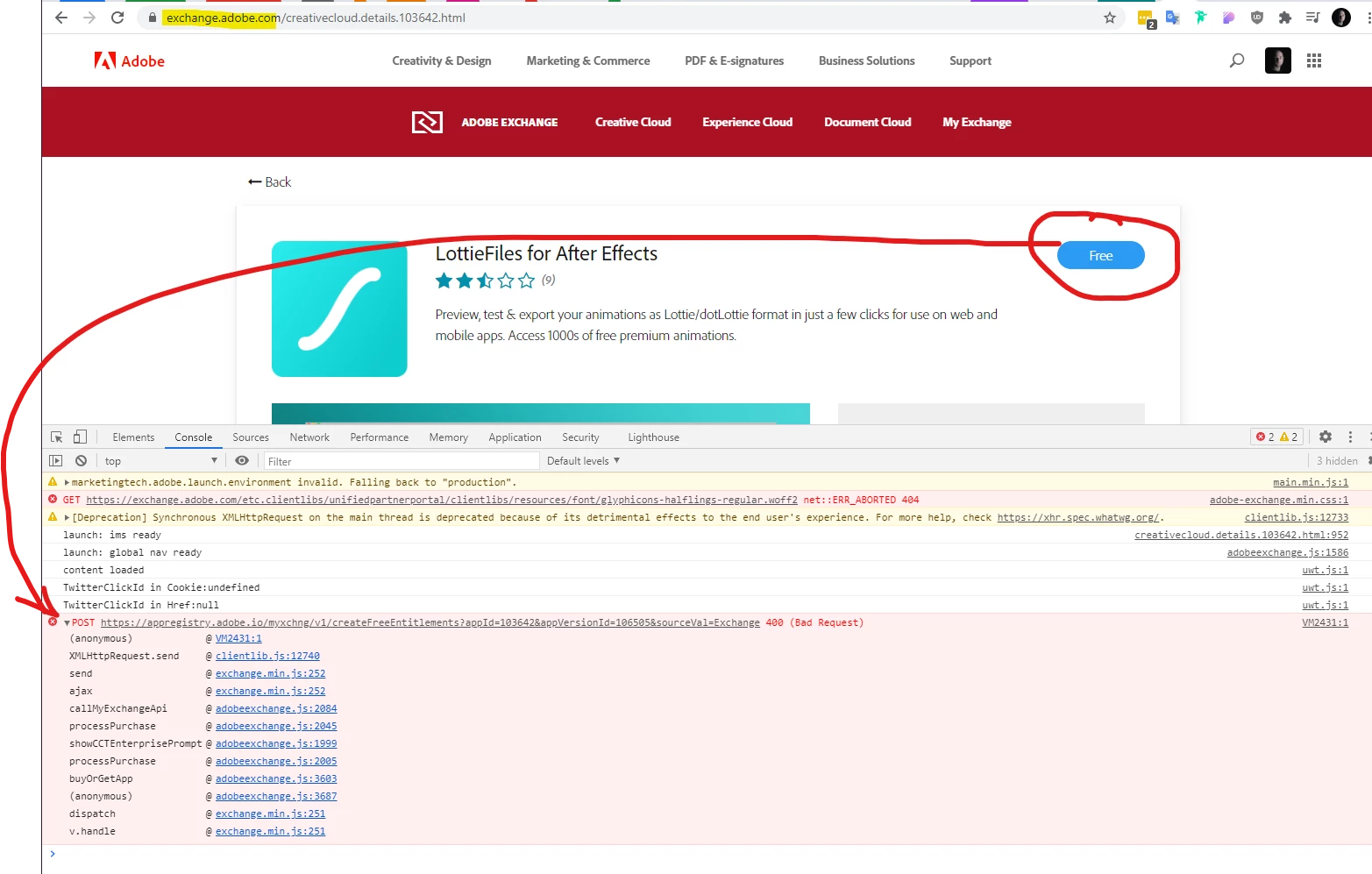
Impossible to download extensions "400 Bad Request" error

  • December 2, 2020
  • 13 replies
  • 6330 views

If you're having this problem, where even free downloads from the Exchange don't seem to load, please let us know here.
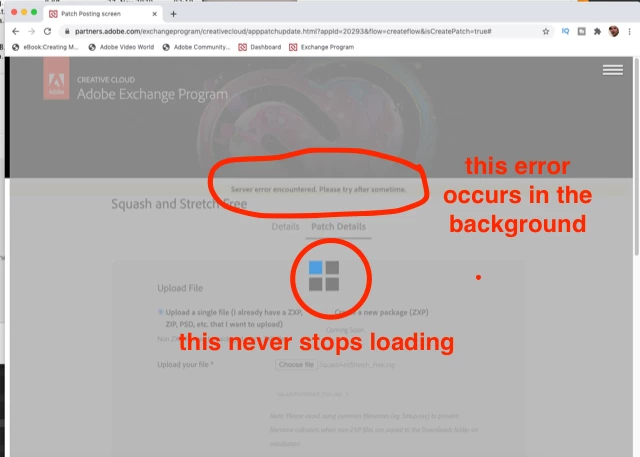


Edited, as these steps haven't helped: The current fix is to try deleting all adobe.com cookies from your browser. Check out this page, in the subsection "Delete cookies from a site" for Chrome.


You may also try using different browsers or "incognito" mode. 


If these steps don't help, try logging out of the Creative Cloud desktop app. You may also try updating, and/or uninstalling and reinstalling the Creative Cloud Desktop app.


Let me know in this thread and via this survey if none of these steps help. It's helpful to know which extensions you tried and what browser you're using.

This topic has been closed for replies.
Correct answer erinferinferinf

@Leandro Markframe 


If I'm reading the JIRA ticket correctly, the fix should roll out on or around February 17th.


In the meantime, one workaround is to find and remove any special characters from anywhere in your profile (including the billing address), as in turning "ü" to "u" or similar. This works for some users.


Other users (above) imply that it's an account billing issue, and that free accounts allow you download plugins.


Neither workaround is great, but again, I'm expecting to see a fix as early as next week. 


Hello again!


The engineering team has rolled out a fix. You can - and should - try to acquire plugins again, with all kinds of characters in your name or billing address, and reply on the thread to let us know if it isn't working.


The engineers are concerned special characters may not have been the only cause of the problem, so they'd like users to test it out.


13 replies

Participant
June 3, 2022

Hi,

I tried all the steps mentioned here and i still cant download any extensions from exchange.

erinferinferinf
Adobe Employee
Adobe Employee
June 3, 2022

Are you getting the 400 error?


Did you reach out to asupport@adobe.com?

Participant
June 4, 2022

Yes, the 404 error. I tried everything for 3 days and today finally seems to be resolved, i don´t know what of every change made it work. 

Participant
May 17, 2021

if anyone wants the BodyMovin extension, click on this link
Install Instructions (adobe.com) and click the blue Download Bodymovin  button there. Drag and Drop the zxp file that will be downloaded into the ZXP installer for Adobe which can be downloaded from here. Let me know if it works 🙂 

Participant
April 7, 2021

Hi! 


Had the same issue, even after clearing cookies, the bridge between Adobe Exchange webpage and my Creative Could didn't seemed to work. Tried disable Adbock, using an other browser.. nothing worked.
I found a workaround : find the extention in the marketplace directly in Creative Cloud and I could install it from there. Hope this helps! 

Participant
February 8, 2021

Same problem here.


Edu M.
Participant
February 9, 2021

Same problem, please fix this

erinferinferinf
Adobe Employee
Adobe Employee
February 9, 2021

@Leandro Markframe 


If I'm reading the JIRA ticket correctly, the fix should roll out on or around February 17th.


In the meantime, one workaround is to find and remove any special characters from anywhere in your profile (including the billing address), as in turning "ü" to "u" or similar. This works for some users.


Other users (above) imply that it's an account billing issue, and that free accounts allow you download plugins.


Neither workaround is great, but again, I'm expecting to see a fix as early as next week. 

Participating Frequently
January 27, 2021

Just to let you know - did some experimentation: created myself a brand new account, and activated a trial for Creative Cloud. Managed to install free plugins without any issues.. or at least without this particular issue.


Investigating now if my current subscription can either be transferred to a new account, or cancelled.


So, definitely an account issue. 

Participating Frequently
January 27, 2021

Celebrated too soon. This fix worked for a couple of hours, and then the same problem is back.


In case Adobe Employees are reding this thread, this is what I did:

* Created a new account, started with a trial subscription and managed to install a couple of plugins. Didn't try more than that, as I believed things would work from now on.

* Got my my existing subscription cancelled on my prevoius account and purchased subscription for the new account

* After the purchase (a few hours later), tried to install new plugins, and got the very same "400 Bad request" response.


To me, sounds very much like an account issue. And might have something to do with billing? Something definitely goes wrong at the backend, possibly at the time when ful subscription is purhcased.


Hopefully my experimentation provides at least some further pointers, and truly hope this will get forwarded to the respective tech team.

Inspiring
January 29, 2021

Got an email from Erin Finnegan yesterday suggesting the problem might be a special character in my billing address or anywhere in my profile. So I looked everywhere and didn't find any (I didn't see a billing address). But strangely, there was a permanent message in a narrow banner on top of the web page, asking me if I want to convert my Adobe plan to CDN currency (I live in Canada). There was an update button and an X to close the banner. Clicking on the X repeatedly produced no result so I clicked on update. And guess what: it reinitialized my account... So I have to go back to setting a subscription plan again.


Did someone say there's an issue with the user account? 😃

A_Cortes
Known Participant
January 23, 2021

I need urgent solution to my problem. Cant install this plugin and I need to continue working. 

Please, it is urgent.

https://exchange.adobe.com/creativecloud.details.105006.motion-bro.html

A_Cortes
Known Participant
January 23, 2021

Same issue.

Trying to download motion bro and it is not working. 

No response from Adobe at all. Sometimes It seems that they don't care about the client.

https://exchange.adobe.com/creativecloud.details.105006.motion-bro.html 

Participating Frequently
January 20, 2021

Tried to reinstall apps, CC, cleared cookies, tried multiple computers with different OS and browser(s), chatted with support (and they tried to help remotely) with no luck, still experiencing the very same problem. Trying to install any free plugin at the Adobe Exchange leads to same end result: spinning arrow wheel and then nothing. Network logs show error 400, and no plugins are visible in My Exchange.

erinferinferinf
Adobe Employee
Adobe Employee
January 20, 2021

That sounds awful, @Jussi_FI, I'm particuarly sorry you had to reinstall Creative Cloud, since I know that takes time. 


The engineering team looking into this issue thinks it may be tied to particular Adobe accounts. For you and other people experiencing this issue, I've created this survey.


Because Adobe ID's are tied to email addresses, and email addresses fall under different privacy laws, I've tried my best to use an Adobe-approved tools (Microsoft Forms and Sharepoint) to collect the information. The collected email addresses will be deleted as soon as this issue is closed.

Participating Frequently
January 25, 2021

Any estimates on getting this solved? I'd really appreciate any solutin at the moment, don't mind if my Adobe account get's demolished / my licenses get transferred to a brand new account etc. Really desperately need a fix.

Participating Frequently
December 21, 2020

Still an issue for me. I had to switch devices as well as operating systems, so CC Desktop App, Lightroom, and Browser were installed on a fresh system. Seconds before writing this, I tried to use the exchange marketplace website for a free lightroom preset and again: 400 Bad Request. So deleting cookies doesn't seem to be the solution. Reinstalling CC or any of adobe apps (lightroom classic in this case) doesn't seem to make the cut.

Participant
December 17, 2020

Hi,

I just bought Adobe today and would love to install some extensions. Sadly I get the same Errors as the others in this thread. I wanted to install the icons8 Extension and got redirected to the exchange Website. There I signed in to my Adobe account and clicked on the "FREE" Button. Then I get these Responses:


The spinning Cirlce shows up and then disappers. Without the console I wouldn't get any response.
I use Windows 10 with Opera, also tried EDGE and deleted all Cookies multiple times.

Are there any solutions up to now or are you all still experience the problem.