


Inspiring
March 3, 2022
Answered

Incompatible extensions - Adobe support not responding! Help needed!

  • March 3, 2022
  • 1 reply
  • 275 views

A week ago I bought an extension package (#1.ENTIRE Photo Overlays Store/Photo Effects Store) through the Creative Cloud marketplace. Now I'm not able install that, as the package is informed to be incompatible! Importantly, I contacted 6 days ago both Adobe and the provider indicated in the bill (asupport@adobe.com and support@photoeffects.store) for support but haven't got any response! It is really strange that 1) it is possible to by through the Adobe marketplace an incompatible extension package (they do know my stuff), 2) nobody responds to my inquiries, and 3) overlays are just images, getting them shouldn't be this difficult. I have the latest MacOS in my two year old iMac. What would you do?
This topic has been closed for replies.
Correct answer erinferinferinf

Hi there,


Usually asupport will help issue a refund pretty quickly... I think there was a holiday in India this week, though, perhaps delaying things. 


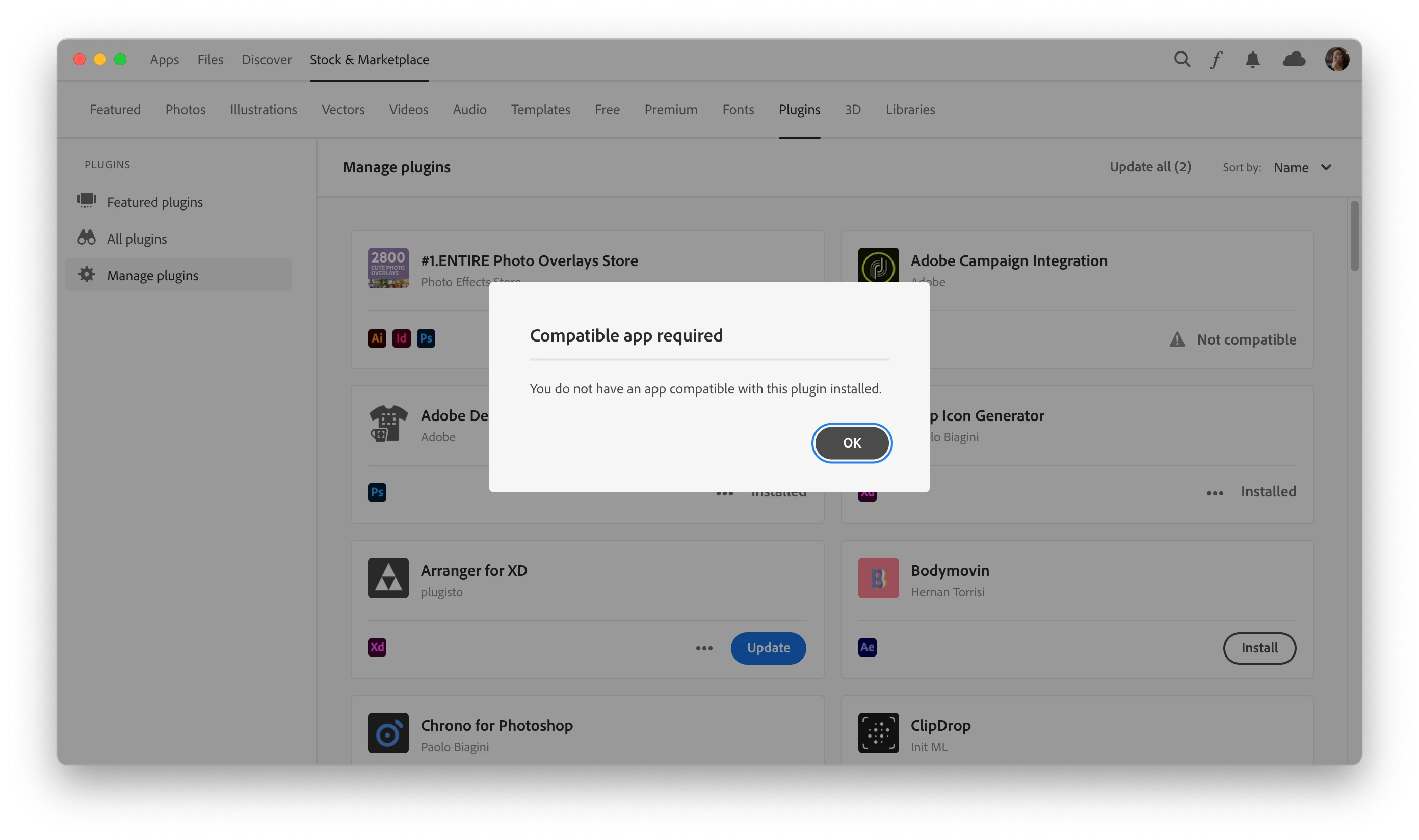
Out of curiousity I tried downloading the pack and got this:

Here's what's going on. The developer has specified these apps as being compatible:

  • Photoshop CC (2018) 19.0 - CC (2019) 20.0
  • InDesign CC (2014) 10.0 - CC (2019) 14.0
  • Illustrator CC 17.0 - CC (2019) 23.0


I don't have those installed, I think you can only go back as far as Photoshop 22.0 at the moment.


I tried downloading it through the help menu anyway, because  if you go to the "Where to find it" section, they say:


  • 3. Unzip the archive into a folder. Do not be discouraged if it is only PDF. There is a way to download.
  • After unzip, you will have the PDF file named 'AE Download Links - ENTIRE STORE by PhotoEffects.Store.pdf'


Please open the PDF and press one of the buttons: Download from Dropbox or Download from Mega


🤦🏻‍  I don't think that's allowed... Also, I was unable to extract the PDF from the download.


You should definitely get a refund and I'll flag that listing...

1 reply

erinferinferinf
Adobe Employee
erinferinferinfCorrect answer
Adobe Employee
March 4, 2022

Hi there,


Usually asupport will help issue a refund pretty quickly... I think there was a holiday in India this week, though, perhaps delaying things. 


Out of curiousity I tried downloading the pack and got this:

Here's what's going on. The developer has specified these apps as being compatible:

  • Photoshop CC (2018) 19.0 - CC (2019) 20.0
  • InDesign CC (2014) 10.0 - CC (2019) 14.0
  • Illustrator CC 17.0 - CC (2019) 23.0


I don't have those installed, I think you can only go back as far as Photoshop 22.0 at the moment.


I tried downloading it through the help menu anyway, because  if you go to the "Where to find it" section, they say:


  • 3. Unzip the archive into a folder. Do not be discouraged if it is only PDF. There is a way to download.
  • After unzip, you will have the PDF file named 'AE Download Links - ENTIRE STORE by PhotoEffects.Store.pdf'


Please open the PDF and press one of the buttons: Download from Dropbox or Download from Mega


🤦🏻‍  I don't think that's allowed... Also, I was unable to extract the PDF from the download.


You should definitely get a refund and I'll flag that listing...

Inspiring
March 5, 2022

Hi, thanks for your comments! After a week waiting for a response, not that (only) one suggesting to experiment this and that, I suddenly was responded (yesterday) so that I didn't even figure out that I had a RESPONSE!!! In my email box: I was refunded! This was a nice news because I felt I was left in the dark. And looking at my credit card account, the money was there. As to the Adobe Exchange purchasing, I feel that the marketplace is not functioning in a fair manner: You can buy things but the marketplace doesn't take any responsibility if your purchase is functional! They do know what Adobe apps you have. If I had had a response from Adobe in a decent time, I hadn't felt such irritated. Anyway, things are now OK and I can go forward with my latest Adobe Photoshop (using of which I started from the version #3 🙂

tuomasvirtanenNET