


Participant
August 24, 2018
Answered

Panel tooltip help

  • August 24, 2018
  • 1 reply
  • 718 views

Hello,

I'm building a very simple panel with literally one button that activates some action and i would like to add a tooltip, so when user hovers above that button he would be able to read what the button does. Similar as to how it is with some buttons in photoshop (see picture).
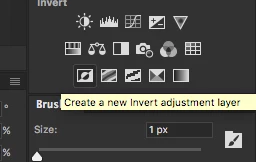
Unfortunately I don't know how to go about it. I tried adding 'title' attribute to the button, and it obviously works in browser, but fails in PS itself.

Would appreciate any help! Thank you.

This topic has been closed for replies.
Correct answer Trevor:

Title doesn't work as is on CEP on the Mac.

You can use an alternative like

v-tooltip - npm

https://getbootstrap.com/docs/4.1/components/tooltips/

https://jqueryui.com/tooltip/

Choose as per what framework you are using if any.

1 reply

Trevor:
Trevor:Correct answer
Legend
August 26, 2018

Title doesn't work as is on CEP on the Mac.

You can use an alternative like

v-tooltip - npm

https://getbootstrap.com/docs/4.1/components/tooltips/

https://jqueryui.com/tooltip/

Choose as per what framework you are using if any.