mihályp97080996
Participant
Nov 13, 2018 10:11 AM UTC
Answered

Photoshop CC 2019 shows diagonal lines in my extension!

Hi!
I'm developing a Photoshop extension on PC with CEP 6.0, and it showed my extension just fine in 2018, but in 2019 strange diagonal lines started to appear. The funny thing is, that i ran it on different computers, and this "error" only occured on computers with Nvidia cards in it!

Is it a know issue?

Is there any workaround that?

How should i approach this issue?
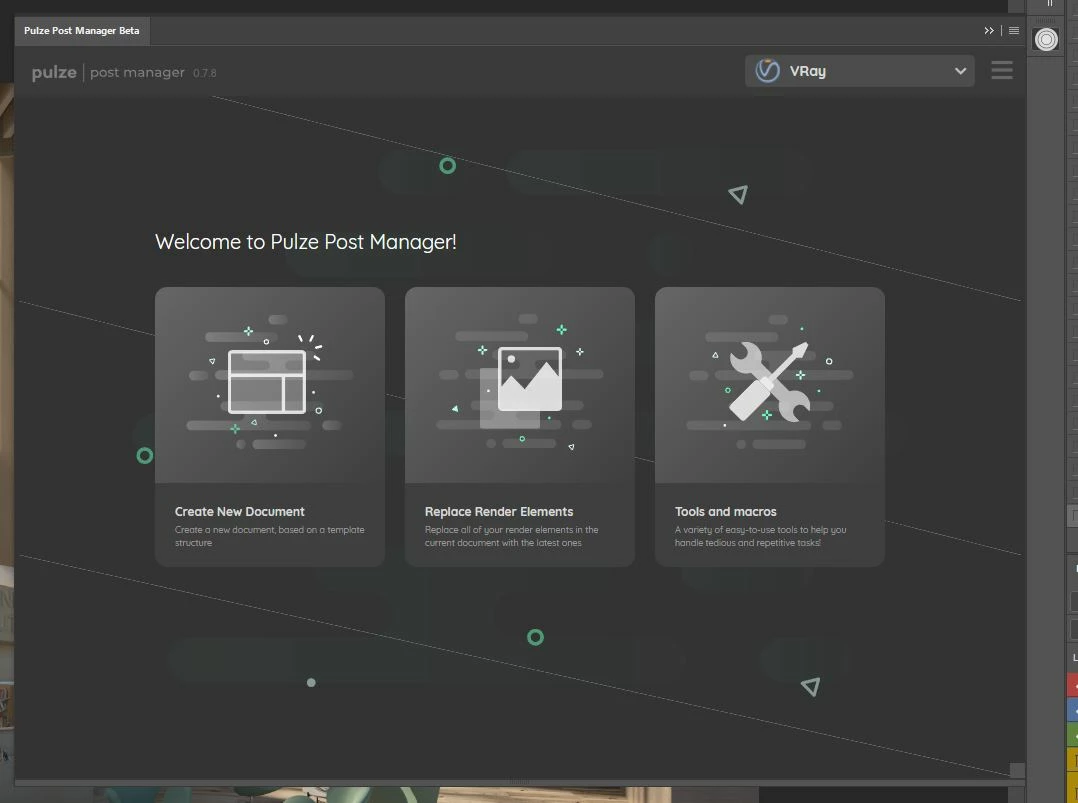
This topic is closed to new replies. Start a new post to keep the conversation going.
Jarda Bereza
Jarda BerezaCorrect answer
Inspiring
Nov 13, 2018 12:29 PM UTC

I think this is Chrome bug. I have seen long time ago in Chrome when this CEP version of Chrome was current version of Chrome.

2 replies

Jarda Bereza
Jarda BerezaCorrect answer
Inspiring
Nov 13, 2018 12:29 PM UTC

I think this is Chrome bug. I have seen long time ago in Chrome when this CEP version of Chrome was current version of Chrome.

Translate
mihályp97080996
Participant
Nov 13, 2018 2:34 PM UTC

Thank you!

The workaround is this, in the manifest.xml


<
CEFCommandLine>

  <Parameter>--gpu-rasterization-msaa-sample-count=0</Parameter>

</CEFCommandLine>

Translate