


Inspiring
August 13, 2019
Answered

Problems installing my new extension

  • August 13, 2019
  • 2 replies
  • 2980 views

Hi,

I am testing my new extension.

Once everything was working i packed it as follows:

ZXPSignCmd -selfSignedCert <country> <city> <company> <commonName> 123456 selfDB.p12

ZXPSignCmd -sign <patghtoPanel> <zxpFile>.zxp selfDB.p12 123456

ZXP file was created but when i tried to install it i got this:
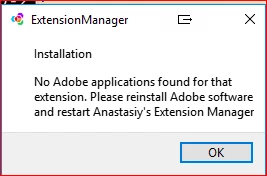
I tried to install another zxp from adobe exchange for photoshop and there where no problems.

My extension is for photoshop.

what can be the cause for this?

Why dose it now 'know' my extension is for PS? Where can i specify this?

Can there be anything missing in my manifest.xml? after all the panel is functioning as is should before packing.

it has this entry in it:

    <HostList>

      <Host Name="PHXS" Version="[14.0,99.9]"/>

    </HostList>

one more thing

How do you use the verify option for ZXPSigncmd?

I tried:

ZXPSignCmd -verify myzxp.zxp  |   <path to extension root>

That does run

Thanks

This topic has been closed for replies.
Correct answer karpiyon

Should be fine, I typically use a main.jsx to eval my app.jsx (which turns into app.jsxbin upon delivery), that way I can refresh changes without closing/re-opening my app.


It is working now.

The installation as well.

What was wrong...

I create a few scripts, in unix, which copy the files for me.

I think it had to do with new line char which is added in one machine - not sure.

2 replies

karpiyonAuthor
Inspiring
August 19, 2019

Yes, this is what happens.

As i mentioned in one of my replies, I tried to create the packaging process on 2 different machines.

My pre script - the one which copies all the files, merges them, rename etc runs on linux or kali.

on the kali machine it changes the attributes of the .debug and turn it to hidden.

This probably makes it invisible for the verify process.

Justin Taylor-Hyper Brew
Community Expert
Community Expert
August 13, 2019

Have you tried installing manually? (rename .zxp to .zip and move that folder into your extensions folder)

karpiyonAuthor
Inspiring
August 13, 2019

Do you mean to move and unzip?

If yes than i did it and it is working fine.

I added this to my xml:

    <HostList>

      <Host Name="PHXS" Version="[14.0,99.9]"/>

      <Host Name="PHSP" Version="[14.0,99.9]"/>

    </HostList>

in addition i packed it with time stamp and it created the zxp file.

this time i got this error:

I used a selfSignedCert

Justin Taylor-Hyper Brew
Community Expert
Community Expert
August 13, 2019

Yes, I was referring to unzip and move. If you turn off playerDebugMode and your extension launches then it should be signed correctly and good to go, not sure why ExtensionManager wouldn't install it. Maybe try aescripts' ZXP Installer