


Why my own button doesn't work?
Hi! I'm a rookie to PS scripting and now learning from others' project.
I'm trying to develop an dockable extension that allows me better manage layer renaming,
then stuck at here:
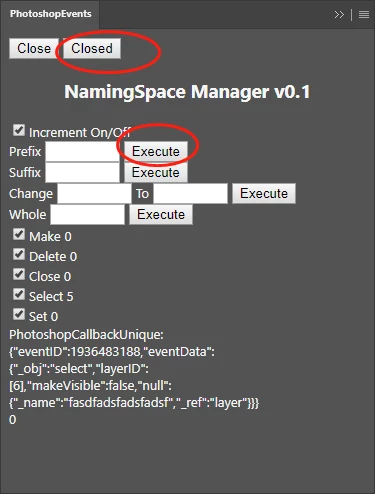
The 2 place where red circles has pointed out are my test adjustment.
The "Close" button does the what it should do---close and make this extension not persistent
I copied the same function to "Closed" button and it run well until I modified it into "alert(app.activeDocument.activeLayer)".
Q1: Why that API can't be called here while it can in ESTK?
I went to main.js to see if I could create the basic construct of my extension.
Then i found my own button didn't work anyway even I copied the code of the "Closed" button.
Q2: How to correctly create anything or check whether it is good to go? Is there a principle or something?
index.html--------------------
</style>
  <body onload="Initialize()">
    <button id="btnClose">Close</button> <!--This is the original one-->
    <button id="btndClose">Closed</button> <!--Q1:I did tiny adjustment to see what will happen-->
    <h3 align="center" >NamingSpace Manager v0.1</h3>

    <label for="PrefixStaticText">Prefix</label>
    <input type="text" id="PrefixInput" name="PrefixInput" size="6">
    <button id="PrefixExecute">Execute</button><br> <!--Q2:I created a button in imitation->
------------------------------
main.js-----------------------
    var PrefixInput = window.document.getElementById("PrefixInput")
    var SuffixInput = window.document.getElementById("SuffixInput")
    var ChangeInput = window.document.getElementById("ChangeInput")
    var ToInput = window.document.getElementById("ToInput")
    var WholeInput = window.document.getElementById("WholeInput")

    btnClose.onclick = function () {    <!--Original function-->
        Register(false, gRegisteredEvents.toString());
        Persistent(false);
        if (window.__adobe_cep__) {
            window.__adobe_cep__.closeExtension();
        }
    };
    btndClose.onclick = function () {    <!--Q1:My tiny adjusted function-->
        alert(app.activeDocument.activeLayer)    <!--Q1:Why this returns nothing-->
    }
    <!--Q2:I created a button named "PrefixExecute" in index.html,-->
  <!--Q2:and why this button is not working even I copied the code of the original func-->
    PrefixExecute.onclick = function () {
        Register(false, gRegisteredEvents.toString());
        Persistent(false);
        if (window.__adobe_cep__) {
            window.__adobe_cep__.closeExtension();
        }
    };
------------------------------
Here is my project file.
 AdChoices