
procuts2
Inspiring
September 1, 2022
Answered

Adding thicker outlines to text

  • September 1, 2022
  • 1 reply
  • 650 views

Does anyone know how to increase the Outline Thickness on text on FW CS 6 (Mac)?

This topic has been closed for replies.
Correct answer L e n a

Well, whether you are on Mac or Windows should not change anything.


Once your text is selected, from the property inspector you have access to these settings. This is the setting currently represented by a pencil, with the color well set to transparent.



Only when you have defined a color, you will have access to finer adjustments from the little pencil icon that will appear at the bottom of the color picker window
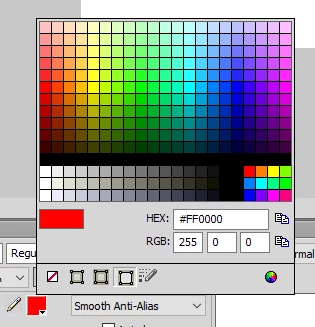


Then, from there, you'll find the icon of a double horizontal arrow with value 1 (default) which allows you to adjust the thickness of the colored outline.

As you can see, on the bottom, you also have access to advanced settings, which allow you to play with the appearance of this thickness.
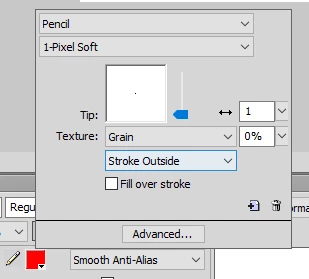


This new nested dialog box, allows you to act on advanced options, as well as the shape, or the sensitivity.

Play with it, sometimes because, the labels are not always explicit.
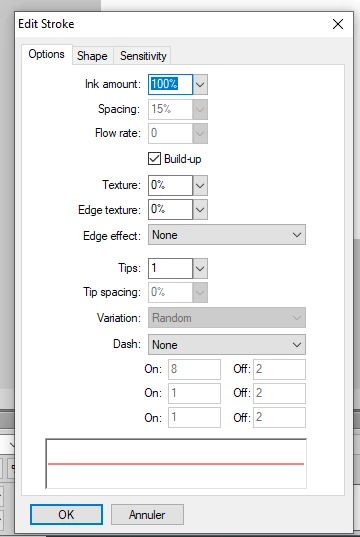
 

Although it seems nested like Russian dolls, these dialog boxes are quite ergonomic and their nesting meets the needs when they appear... like what, a simple icon can hide many , many… parameters.


To complete your question, Fireworkszone did a nice article about text and stroke some years ago

https://www.webdesign.org/raster-graphics/fireworks/create-a-thick-text-outline-with-adobe-fireworks.21540.html


And in an other side, John and Aaron made some nice extensions concerning text

https://johndunning.com/fireworks/about/ChangeTextSize

https://johndunning.com/fireworks/about/FillAndStroke

https://johndunning.com/fireworks/about/GreekedText


Aaron Beall - Fireworks Guru - Extensions (abeall.com)

1 reply

L e n aCommunity ExpertCorrect answer
Community Expert
September 2, 2022

Well, whether you are on Mac or Windows should not change anything.


Once your text is selected, from the property inspector you have access to these settings. This is the setting currently represented by a pencil, with the color well set to transparent.


Only when you have defined a color, you will have access to finer adjustments from the little pencil icon that will appear at the bottom of the color picker window


Then, from there, you'll find the icon of a double horizontal arrow with value 1 (default) which allows you to adjust the thickness of the colored outline.

As you can see, on the bottom, you also have access to advanced settings, which allow you to play with the appearance of this thickness.


This new nested dialog box, allows you to act on advanced options, as well as the shape, or the sensitivity.

Play with it, sometimes because, the labels are not always explicit.


Although it seems nested like Russian dolls, these dialog boxes are quite ergonomic and their nesting meets the needs when they appear... like what, a simple icon can hide many , many… parameters.


To complete your question, Fireworkszone did a nice article about text and stroke some years ago

https://www.webdesign.org/raster-graphics/fireworks/create-a-thick-text-outline-with-adobe-fireworks.21540.html


And in an other side, John and Aaron made some nice extensions concerning text

https://johndunning.com/fireworks/about/ChangeTextSize

https://johndunning.com/fireworks/about/FillAndStroke

https://johndunning.com/fireworks/about/GreekedText


Aaron Beall - Fireworks Guru - Extensions (abeall.com)

Community Expert
November 27, 2022

To simplify that that add a color for your stroke and then set how thick you want the stroke to be, 1 is default, making it higher will make the stroke thicker.