Participant
January 25, 2021
Answered

Adobe fireworks

  • January 25, 2021
  • 4 replies
  • 4473 views

Where can I download the Firewoks Adobe app, I am a piad subscriber. Thanks for the help

    This topic has been closed for replies.
    Correct answer Nancy OShea

    Hi @erwin15C2,

    Legacy Fireworks is discontinued 32-bit software that will NOT install on macOS Catalina or Big Sur.


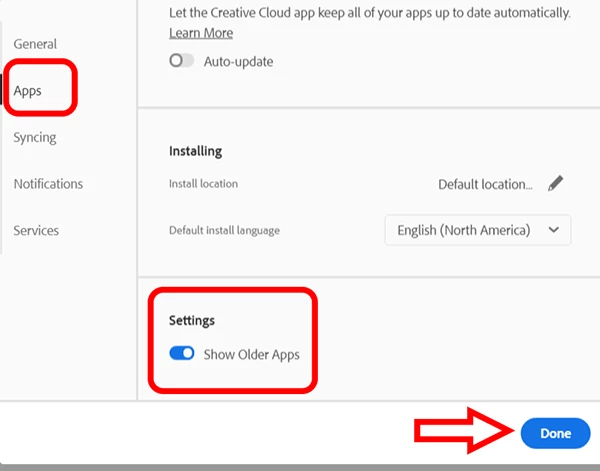
    If you have an older supporting OS and a paid ALL APP plan, open CC desktop app and click your Avatar (top right image) > Preferences.  Go to Apps > Settings and check the box to Show older apps.   See screenshots.


    NOTE:  For Teams & Enterprise users, contact your IT dept admin.  They will need to create a special Fireworks package for you from their end.


    Hope that helps.


    4 replies

    Participant
    March 22, 2023

    \FIREWORKS IT'S VERY COOL PLEASE UPDATE

    Nancy OShea
    Community Expert
    Community Expert
    March 22, 2023

    @Braulio Angel26189696kkh3,

    Fireworks is discontinued.  The developers left the building 11 years ago. Fireworks will never be updated. Use it at your own risk. Or switch to modern graphics software that's actively developed & maintained.

    • Adobe Express,
    • Photoshop Elements,
    • Photoshop CC,
    • Illustrator, 
    • or Adobe XD.


    Hope that helps.


    Nancy O'Shea— Product User & Community Expert
    drkoolcat
    Participant
    January 9, 2022

    Its disturbing to see Adobe keep burying the link to old app further and further.  The online downloads try to get you to do a browser extention.  


    I hope someone comes out with something that moves people away from Adobe.  PHOTOSHOP is so heavy. Just tried for ten minutes to import and enlarge a photo. I twas so horrible. It just delayed and delayed and was counter intuitive.


    Adobe bought the better product out and burried it.  I hope someone creates a real graphics editor that rocks.. This is HORRIBLE>

    erwin15C2Author
    Participant
    January 25, 2021

    I simply can't find it. I went to the avatar there's no option for settings. What App is compatibale to Fireworks that I can use?

    Thanks,

    rayek.elfin
    Legend
    January 25, 2021

    Are you on Windows 10? Some suggestions to make Fireworks work on Win10 are found here:

    https://community.adobe.com/t5/fireworks/compatibility-fireworks-and-windows-10/td-p/8908152?page=1


    But you do have to realize that Fireworks is slowly fading away, whether we like it or not. Since it is no longer developed or supported for a quite long time now, at some point it might stop working altogether on Windows as well.


    There is no replacement for Fireworks, unfortunately, and none of Adobe's apps will open Fireworks native files. That said, the developer of Photopea, an online Photoshop "clone" of sorts, added Fireworks layered PNG file support a few months ago. It does not retain everything, of course, but is a somewhat workable solution to open legacy FW files without Fireworks.

    Nancy OShea
    Community Expert
    Nancy OSheaCommunity ExpertCorrect answer
    Community Expert
    January 25, 2021

    Hi @erwin15C2,

    Legacy Fireworks is discontinued 32-bit software that will NOT install on macOS Catalina or Big Sur.


    If you have an older supporting OS and a paid ALL APP plan, open CC desktop app and click your Avatar (top right image) > Preferences.  Go to Apps > Settings and check the box to Show older apps.   See screenshots.


    NOTE:  For Teams & Enterprise users, contact your IT dept admin.  They will need to create a special Fireworks package for you from their end.


    Hope that helps.


    Nancy O'Shea— Product User & Community Expert
    erwin15C2Author
    Participant
    January 25, 2021

    I found it and downloading now. But for future reference, what app is compatibale?

    erwin15C2Author
    Participant
    January 25, 2021

    Not working. Internal error occured and it won't open