Participating Frequently
September 7, 2012
Question

Eyedropper pick up the wrong color

  • September 7, 2012
  • 11 replies
  • 54733 views

As you can see, when I pick up the color of the first square and assign it to the second square, the eyedropper clearly picks up the wrong color.

Any suggestion?
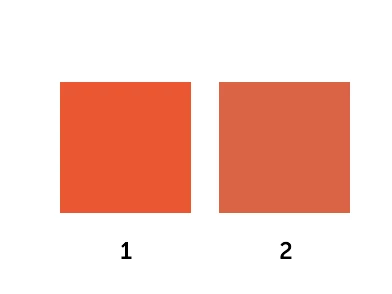
    This topic has been closed for replies.

    11 replies

    groove25
    Inspiring
    September 7, 2012

    Nice demonstration graphic!

    What version of Fireworks and what operating system are you using? Color picker discrepancies were a known issue with Fireworks CS4 on Mac OS 10.7 (Lion):

    http://helpx.adobe.com/x-productkb/global/known-issues-mac-os-10.html#main_Fireworks

    Participating Frequently
    September 7, 2012

    I run Fireworks CS6 on OS X Mountain Lion. I tried to install Fireworks CS5 and it doesn't show this problem.

    Here's a strange fact: I have Fireworks installed on a MacBook Air and on an iMac (both with Mountain Lion). On the MacBook Air, Fireworks behaves as in the image I attached, on the iMac it still picks up the wrong color but in a "different way".

    This is really odd and frustrating.

    groove25
    Inspiring
    September 7, 2012

    So are you using the eyedropper that appears after clicking on the Fill color chip?

    I've heard a few grumblings of washed-out color or color picker problems in Mountain Lion, but nothing very clear. I'm wondering if Mountain Lion has made some color management changes. According to one online source, "When an image lacks its own profile, the system now defaults to sRGB rather than the main display's color profile". Since Fireworks is not color managed, a change in the Mac OS's color management behavior might be affecting it. Flash and Dreamweaver use a similar color picking system, and I see a couple posts from Flash users reporting problems:

    http://forums.adobe.com/message/4655101

    http://forums.adobe.com/message/4675149

    [Incidentally, changing your monitor display to Adobe(1998), as in the second post, does NOT sound like a good solution to me.]

    You'll probably want to submit a bug report on this issue:

    https://www.adobe.com/cfusion/mmform/index.cfm?name=wishform

    Also, it would be a good idea to reference the URL of this discussion in your bug report, as it includes a demonstration graphic and links to other reports of the same problem, as experienced by other users.
