Participant
January 23, 2024
Answered

FireworkCS - I can't find it in Creative Cloud.

  • January 23, 2024
  • 2 replies
  • 381 views

Unfortunately I had to upgrade my PC, which now runs win11, and now I don't know how to reinstall my FireworkCS6. I can't find it in Creative Cloud. There used to be an option to update discontinued products, now there isn't. Does anyone have any idea how to proceed?
    This topic has been closed for replies.
    Correct answer L e n a

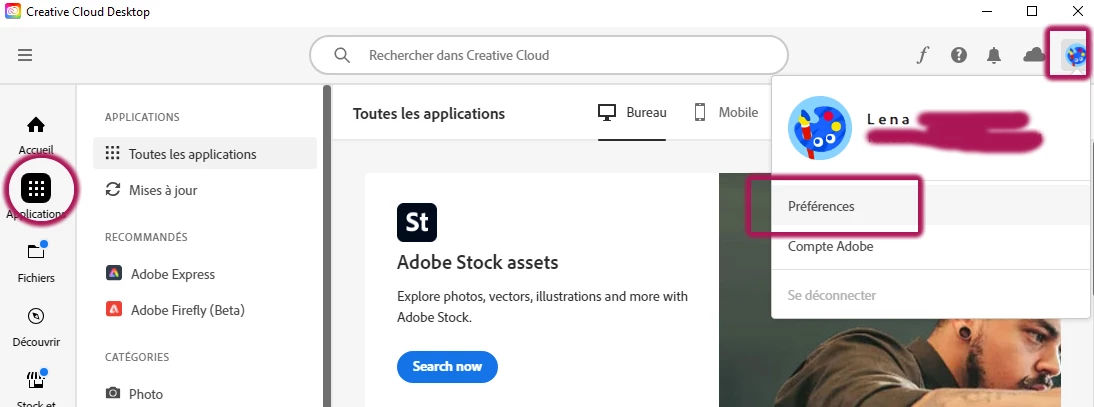
    Just connect to your CC account (desktop), and from your icon (top right) select Preferences in the drop down menu :


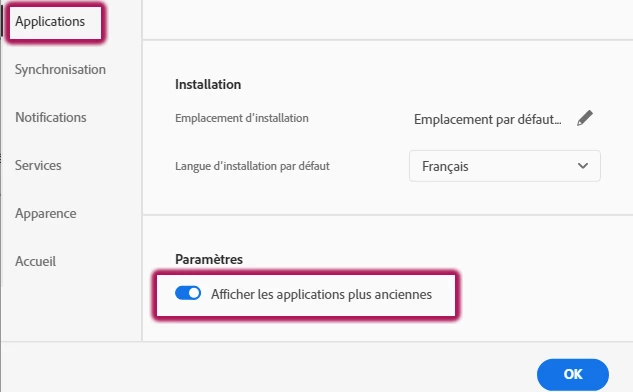
    Then in the new opening dialog box, select Applications (left column), and you'll get the option (down, bottom of the right part of the dialog box) to display the old versions of Apps :

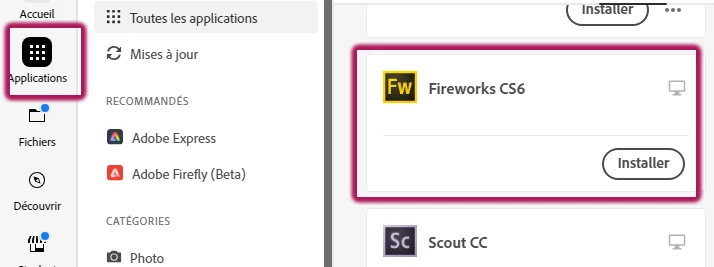
    Press ok. Now, select Applications on the main UI and Fw should display,  don't hesitate to scroll down : 


    2 replies

    Nancy OShea
    Community Expert
    Community Expert
    January 25, 2024

    Teams & Enterprise customers must contact their IT dept.  It depends on your organization's internal policies whether or not you can access discontinued apps.  32-bit software won't run on 64-bit Macs. In the absence of a supporting OS, you won't see the option to use discontinued apps in Creative Cloud.  Sorry. 


    A list of Fireworks alternatives can be found below.

    https://community.adobe.com/t5/fireworks-discussions/fireworks-cs6-won-t-open-since-janurary-2024/td-p/14344972


    Nancy O'Shea— Product User & Community Expert
    L e n aCommunity ExpertCorrect answer
    Community Expert
    January 24, 2024

    Just connect to your CC account (desktop), and from your icon (top right) select Preferences in the drop down menu :


    Then in the new opening dialog box, select Applications (left column), and you'll get the option (down, bottom of the right part of the dialog box) to display the old versions of Apps :

    Press ok. Now, select Applications on the main UI and Fw should display,  don't hesitate to scroll down :