

Participant
February 7, 2021
Answered

Fireworks cs6

  • February 7, 2021
  • 2 replies
  • 844 views

How can I enlarge the font (see attachment)?

Kind regards,

Jaap 

    This topic has been closed for replies.
    Correct answer Paul-M

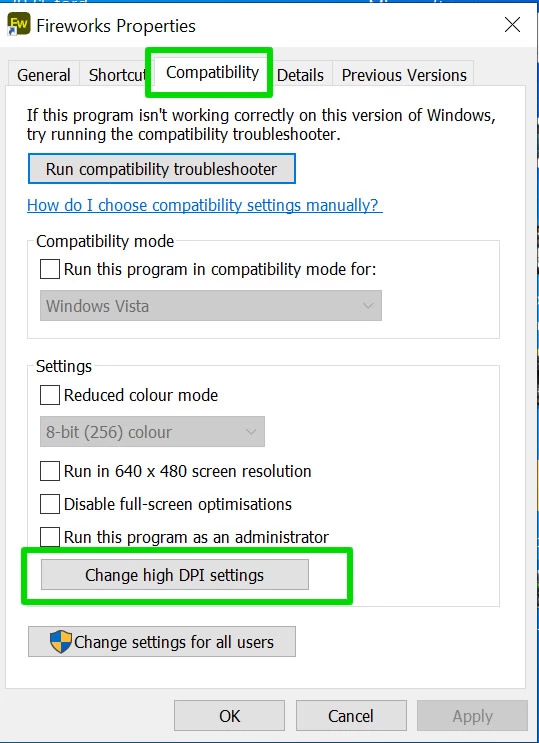
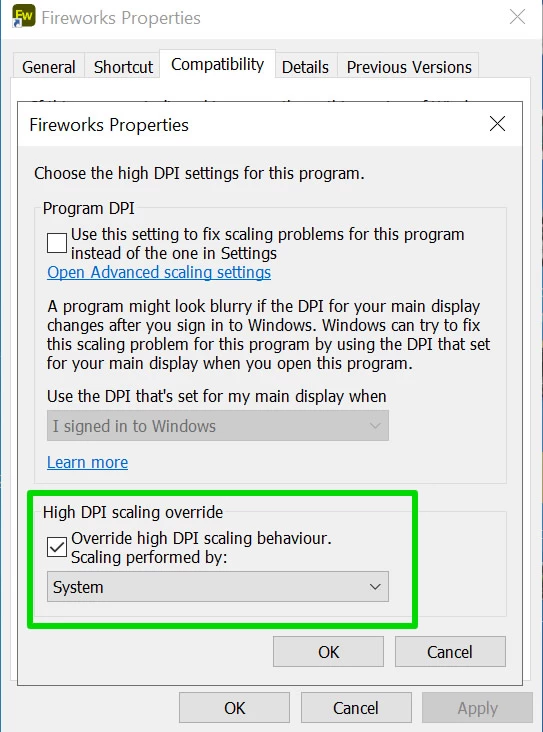
    I think you want to right click on the Fireworks shortcut icon and choose Compatability => Change High DPI Settings ... then choose override high DPI settings and select 'system' .... See screenshots:


    2 replies

    Nancy OShea
    Community Expert
    Community Expert
    February 10, 2021

    Unfortunately, CS6 has not been updated since 2012 and is NOT HiDPI aware, nor will it ever be.  Suggest you adjust your display's Scale and Layout from Windows System Settings (see screenshot).


    NOTE 1:  Increasing scale beyond 100% (normal) could result in some panels becoming truncated or clipped. Adjust accordingly.


    NOTE 2: Using discontinued software is at your own risk.  For best results, use modern software (Photoshop or Illustrator) that's no more than 2 versions back because it's more compatible with modern equipment. 


    Good luck! 🙂


    Nancy O'Shea— Product User & Community Expert
    Legend
    February 10, 2021

    The device probably has display scale for a reason, and changing it will likely not be helpul .... I've already given an explanation of how to change the High DPI settings of Fireworks.

    Paul-M - Community Expert
    Paul-MCorrect answer
    Legend
    February 7, 2021

    I think you want to right click on the Fireworks shortcut icon and choose Compatability => Change High DPI Settings ... then choose override high DPI settings and select 'system' .... See screenshots:


    Paul-M - Community Expert
