



Rudy CH
Inspiring
June 8, 2012
Question

Fireworks CS6

  • June 8, 2012
  • 2 replies
  • 21821 views

I discover a problem or bug in Fireworks CS6 while ago , posted in Fireworks forum  - no answer…report it like a bug to adobe – no answer,….call to technical support,…after been on hold ,described all info, on hold again, I got answer:  report it like a bug on adobe side  and support forum ,,,,,when I told support person , that I did that already, he told me, nothing else he can do for me…

I just guessing,  nobody give a s….t anymore, nowhere, and that seems to be a problem in all around us, that is why economy sucks and…..

I am old enough to still remember old good times, when people still care and if you call from English speaking country, you got help speaking English..

Anyway, problem is, if you create a new document, and create a small slice in the middle, then create a hot spot bigger then that slice, and preview it in MS explorer, you will see some blue borders, frames around slices. Google Chrome or Safari is OK.

You can just create only hot spot in empty document, and it happened too, just first description is better to see.

And old Fireworks is OK, CS5…………….

No big deal for me, just have to use CS5,…just try to help developers fix bags….if they care…

This is document how it look in Fireworks:
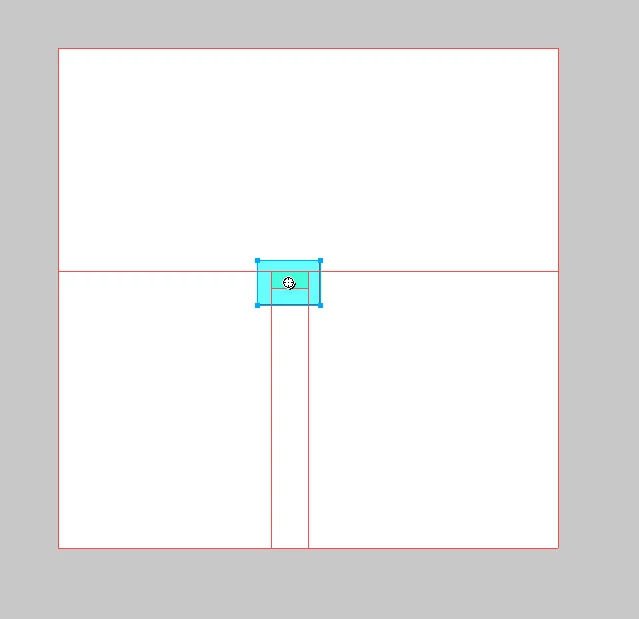
And here is explorer:

    This topic has been closed for replies.

    2 replies

    groove25
    Inspiring
    June 9, 2012

    Rudy,

    You've already made progress in isolating the problem: It occurs in CS6 but not in CS5. A good strategy would be to create a simple file in CS5, and then export it twice: first in CS5 and then again in CS6. When it comes to HTML output, the answer should be somewhere in the code. Compare the two versions. Use Dreamweaver's code view, or use the View Source option that's available in most web browsers.

    I tried this myself, using a simple Fireworks file containing just a single slice. I used the default export options for both CS5 and CS6, then opened both HTML files in Firefox and used its View Source option.

    This first graphic below shows the HTML output from CS5. The second shows the HTML output from CS6.

    See the difference? The CS5 version is riddled with border="0" attributes on every img tag. The CS6 version omits these attributes. Believe it or not, the CS6 version is probably better, from a contemporary coding standpoint. The use of style attributes on HTML tags (as in CS5) is deprecated in favor of using CSS rules. But then again, the use of slices, in general, is not a contemporary, standards-based method of web development—except, perhaps, in small doses.

    The good news: If you're looking for an easy fix for this, I think I've got one for you. Within Fireworks CS6, go to File > HTML Setup... and then under the HTML Style dropdown menu, select "Generic XHTML" instead of Dreamweaver XHTML. (Or choose Generic HTML.) This seems to bring back the border="0" attributes. And once you've made this change, it should become the new default for all your Fireworks CS6 documents.

    The bad news: Web development is a constantly moving target. When creating web designs and converting them to code, you're creating instructions for a design rather than the design itself. Each web browser has a tendency to interpret those instructions slightly differently. That's why Internet Explorer is showing you blue borders, where Google Chrome is not.

    I wouldn't trust Fireworks as a resource for contemporary web development practices. It's pretty much behind the times. But that doesn't mean it's not good for some things—like design, or certain aspects of the development process. And it's evolving, too.

    Much in line with Linda's suggestion (and my own on your previous post), you could instead opt to address this problem by adding a small CSS declaration to the existing style tag within the head of your HTML document, something like this:

    <style type="text/css">

        td img {display: block; border: 0;}

    </style>

    However, this would require modifying the code directly—and may require a bit of tweaking and experimentation—which may not be your preference. So my first suggestion might work better for you.

    Hope this helps. My fee for this consultation will be two bottles of scotch.

    Rudy CH
    Rudy CHAuthor
    Inspiring
    June 9, 2012

    Grove ,must tell you, you nail it like old pro …………….

    I did myself that experiment you describing, discover differences in code.  Compared all my setting in CS5 and CS6 and can’t find difference, so I supposed, and still believe that it is some flaw, bug, in CS6.

    I am not such expert in “code” or HTML, rather graphic artist, so I still don’t understand why each browser reading it differently, and wondering why would they try to put intentionally border around slices……

    GLAD you find that generic code set in html setup…that will work…..

    I using a fireworks for graphics, navigations buttons, animations,…..Company web is designed and running long time ago, and we keep changing names, adding, posting a specials…., so I just go from Dreamweaver directly to Fireworks to edit,. I can use old version of Fireworks with no problem, or adjust all (don’t know how many) graphics, inserted to pages like “server side included”.

    Anyway, glad is still somebody around like you, and try to solve a problem and help. Thank you for that,…. And believe you deserve two bottle of scotch (probably from ADOBE)  and I wiling to get you that, only my condition is, we have to drink it together, and warning I buying 1.75 gal size……maybe we will figure out more stuff afterwards

    chris.campbell
    Community Manager
    Community Manager
    June 8, 2012

    Moved post to the Fireworks forum

    Linda Nicholls
    Participating Frequently
    June 8, 2012

    It's not a bug. The blue border is an accessability feature added by the browser rather than by Fireworks. You can get rid of it in the published site by adding the following declaration to your style sheet in Dreamweaver.

    map area {

    outline:none;

    }

    The reason you are seeing the boxes added outside your slice is because Fireworks is automatically adding slices or hotspots to the empty parts of the canvas.

    Rudy CH
    Rudy CHAuthor
    Inspiring
    June 8, 2012

    Thank you Linda, glad you answer, but I know all of that ,…. It is obvious, that Fireworks is not compatible with MS explorer….maybe they did not bother to test it in it….

    And it not showing in other browsers, just explorer,.....we can't blame MS for everything

    I know about adding a code in Dreamweaver, but  bottom line is it’s not supposed to be there, it is some program flaw.

    THANKS…..