


Ush
Participant
May 19, 2020
Answered

Fireworks suddenly requires a subscription - despite an active Creative Cloud subscription

  • May 19, 2020
  • 2 replies
  • 1900 views

Here is the surprising launch dialog I get when launching Fireworks last week, despite having used it every week for the last 15+ years and never having been told at all that I was on a thirty day trial.

I have an active Creative Cloud subscription - and have done ever since CC was launched.  All the other apps work, but Fireworks has suddenly done this:
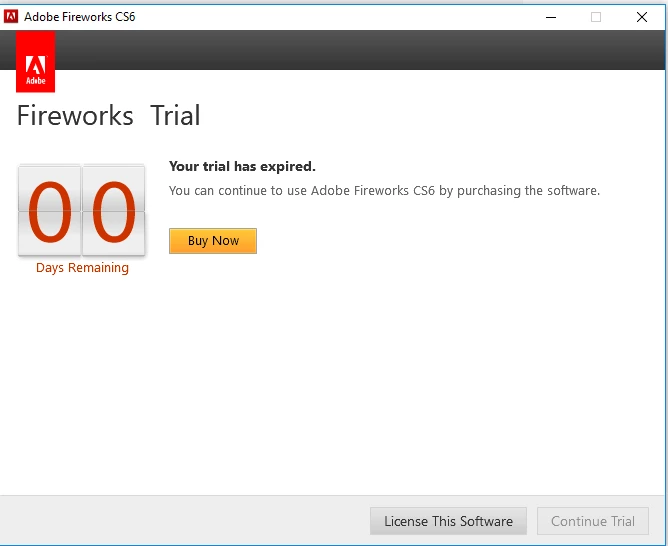


Clicking on [License This Software] prompts me to log in to Creative Cloud, confirms that my license is all good and...

...returns me to the screen above.


Similarly, in the Creative Cloud app (desktop and web), I get this:
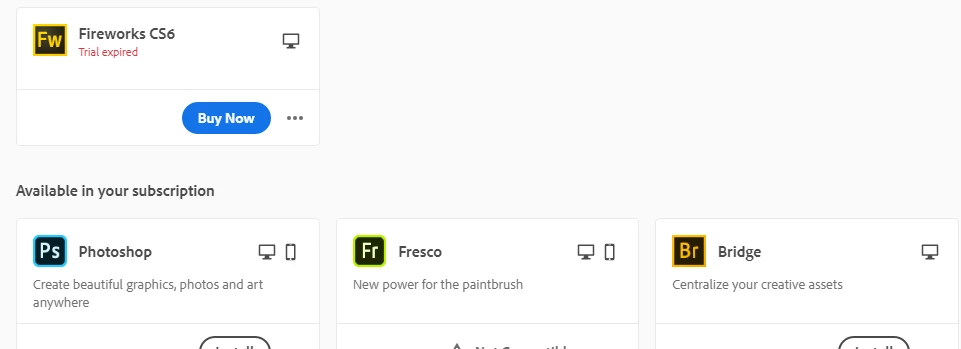
 

 If anyone has a clue what is going on... then I'm keen to hear. Most of my e-learning graphics work is in Fw - and there was zero warning of anything being withdrawn... 😲


Thanks for reading,


Ian.


This topic has been closed for replies.
Correct answer Paul-M

For people who are seeing this message and have a full or student/teacher Adobe Creative Cloud license the following should fix the issue in most cases:


1) Click  the 'License This Software' button


If you still see an activation failed message do this:


1) Close Fireworks CS6

2) Logout of the Creative Cloud application

3) Launch Fireworks

4) You should be prompted to login, nake sure you login with the correct credentials linked to your full or student/teacher Adobe Creative Cloud subscription.

5)  If you see the 'License This Software' button try clicking it again.

2 replies

Paul-MCorrect answer
Legend
October 13, 2020

For people who are seeing this message and have a full or student/teacher Adobe Creative Cloud license the following should fix the issue in most cases:


1) Click  the 'License This Software' button


If you still see an activation failed message do this:


1) Close Fireworks CS6

2) Logout of the Creative Cloud application

3) Launch Fireworks

4) You should be prompted to login, nake sure you login with the correct credentials linked to your full or student/teacher Adobe Creative Cloud subscription.

5)  If you see the 'License This Software' button try clicking it again.

Paul-M - Community Expert
Known Participant
November 7, 2020

This is the box I get, and clicking the OK box, just opens another one (and that, when clicked, closes without doing anything)


Someone please let me know what to do-- my client is dependent on these files!

Nancy OShea
Community Expert
Community Expert
November 8, 2020

@joseph_henderson,

Are you a PAID Creative Cloud ALL apps plan member?  If yes, then legacy AAM will automatically update to CC Desktop app from which you may access Fireworks.

https://helpx.adobe.com/creative-suite/kb/aam-troubleshoot-download-install.html


If you are NOT a Creative Cloud subscriber, use the Adobe Cleaner tools to wipe all traces of old Adobe products and then re-install CS6 with the installation media (disks or downloads) you received at purchase.

Adobe Cleaner Tools


Nancy O'Shea— Product User & Community Expert
Nancy OShea
Community Expert
Community Expert
June 2, 2020

To access End of Life titles like Fireworks, you must have a PAID All Apps plan. 


FREE, Trial, Single App and Photography Plan members don't have access to discontinued products.


1. Open CC Desktop App.
2. Click the Preferences (gear icon) > General tab > Settings.  Select "Always keep Creative Cloud up to date."

3. Click on your Avatar (top right image).
4. Sign-out of Creative Cloud.
5. Close all apps.
6. Restart your computer.
7. Open CC Desktop app.
8. Click your Avatar.
9. Sign-in with your paid All Apps Plan ID and password.

10.  Click Preferences (gear icon) > Apps > Settings.  Select Show Older Apps.


Also see Creative Cloud reverts to trial.

https://helpx.adobe.com/manage-account/kb/stop-creative-cloud-trial-mode-after-purchase.html


Nancy O'Shea— Product User & Community Expert