
Participant
Nov 18, 2019 10:21 PM UTC
Question

Fireworks wont paste image at 0,0

Hi all,


I've been experiencing this issue for ages and it's finally got to a point where I'm reaching out for some kind of solution!


I Googled the issue and a thread came up for this community, but presumably before the forum was changed as the link no longer works, the thread title was the same as I have posted above.


The issue is that if I take a screenshot, or have any image copied onto the Clipboard and then launch Fireworks, hit CTRL+N to create a new document, and then CTRL+V, whilst the Clipboard content does get pasted into the new image, it is always offset by a seemingly random amount.
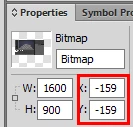


Larger images seem to get offset by more, smaller ones less, but they are never positioned at 0,0 which means the first task EVERY TIME is to reposition the image - the only case where this doesn't seem to happen is when the Clipboard content is smaller than the current editing viewport.

I would be eternally grateful if anyone has a solution to this issue.

Thank you in advance for your time and help 🙂

Kind regards,
Rob

This topic is closed to new replies. Start a new post to keep the conversation going.

8 replies

Participant
Mar 29, 2022 1:35 PM UTC

SIIIIIIIIUUIUIUIUIUIUIUIUUUUU

Translate
RobMeadeAuthor
Participant
Nov 19, 2019 12:41 AM UTC

Thanks both for your replies.

I'm a little concerned as to why I need to use the Fit Canvas etc, when I have an image on the Clipboard and press CTRL+N the new document dialog opens and the sizes indicated for the canvas are correct.  As an example, my laptop has a 1600x900 display, so if I press PRT-SCR to take a screenshot and place it on the Clipboard, when I press CTRL+N in Fireworks the dialog window does show 1600x900.

But the CTRL+V to paste then offsets it.

I'm happy to give your suggestions a try but the canvas size shouldn't be a problem as it is correct?

Update:  So, I've just tried that, with the CTRL+0 and the canvas gets scaled to fit the window and, yes, the pasting of the image is then perfectly fitted, at 0,0... 

I am lost for words!  This has annoyed me for so long, so it's great to have a fix for it, I am surprised how that I can't just simply paste the Clipboard content in without having to resize the canvas to the viewport.  Any ideas why I have to do that?

Translate
Legend
Nov 19, 2019 12:54 AM UTC

its a glitch in Fireworks, if you do CTRL+0 to fit the canvas to your workspace before pasting it sbould be OK.

Translate
Paul-M - Community Expert
Legend
Nov 19, 2019 12:30 AM UTC

CTRL+N for new document, then CTRL+0 TO fit canvas to screen, then paste.

Translate
Paul-M - Community Expert
Participant
Mar 29, 2022 1:34 PM UTC

Manchester is red!!!!!

Translate
AliciaWheatley
Inspiring
Nov 18, 2019 11:59 PM UTC

If you select have an image in your clipboard and then select new image. It should be set to the size of your canvas to the clipboard size. Then pressing past will paste it at 0,0.


If for whatever reason you have a image that does not fit.. there are these options.


Choosing Modify, Canvas, Trim Canvas (Option-Command-T/ Ctrl+Alt+T), removes extra space around an image on a Fireworks document. Say, for example, you create a large


In contrast, use the Fit Canvas command to expand the size of the canvas to accommodate an image that is too large to fit into the existing canvas. To do so, choose Modify, Canvas, Fit Canvas (or Option-Command-F/Ctrl+Alt+F).

Translate
Participant
Mar 29, 2022 1:34 PM UTC

Man uniteds better! SIIIUUUU

Translate
Legend
Mar 29, 2022 6:01 PM UTC

They really aren't, the table does not lie 😜

Translate
Paul-M - Community Expert