


Participant
July 5, 2021
Answered

FW reads a complex 7.2MB .fw.png file as an almost blank .JPG

  • July 5, 2021
  • 4 replies
  • 893 views

I tried to open the .fw.png file I've been working on and got one of those "internal error" messages. The file then opened as a JPG (Document) - written in the bottom left of the window - that is all blank execept for one tiny bitmap image that was part of the original project, the countless other layers with images and vectors are gone. If I try to "Save as", the new file then becomes the 200 KB blank image with only that tiny bitmap on the bottom.

When I open the original 7.2MB file on any other image viewer (windows photo viewer, paint, chrome, ...), I can vizualize the orignal image, in the same way it was before, but I need Fireworks to read it properly so I can continue editing its layers and etc. I tried to restart the machine, but FW keeps reading the file as that "blank" JPG.

    This topic has been closed for replies.
    Correct answer Jeff Arola

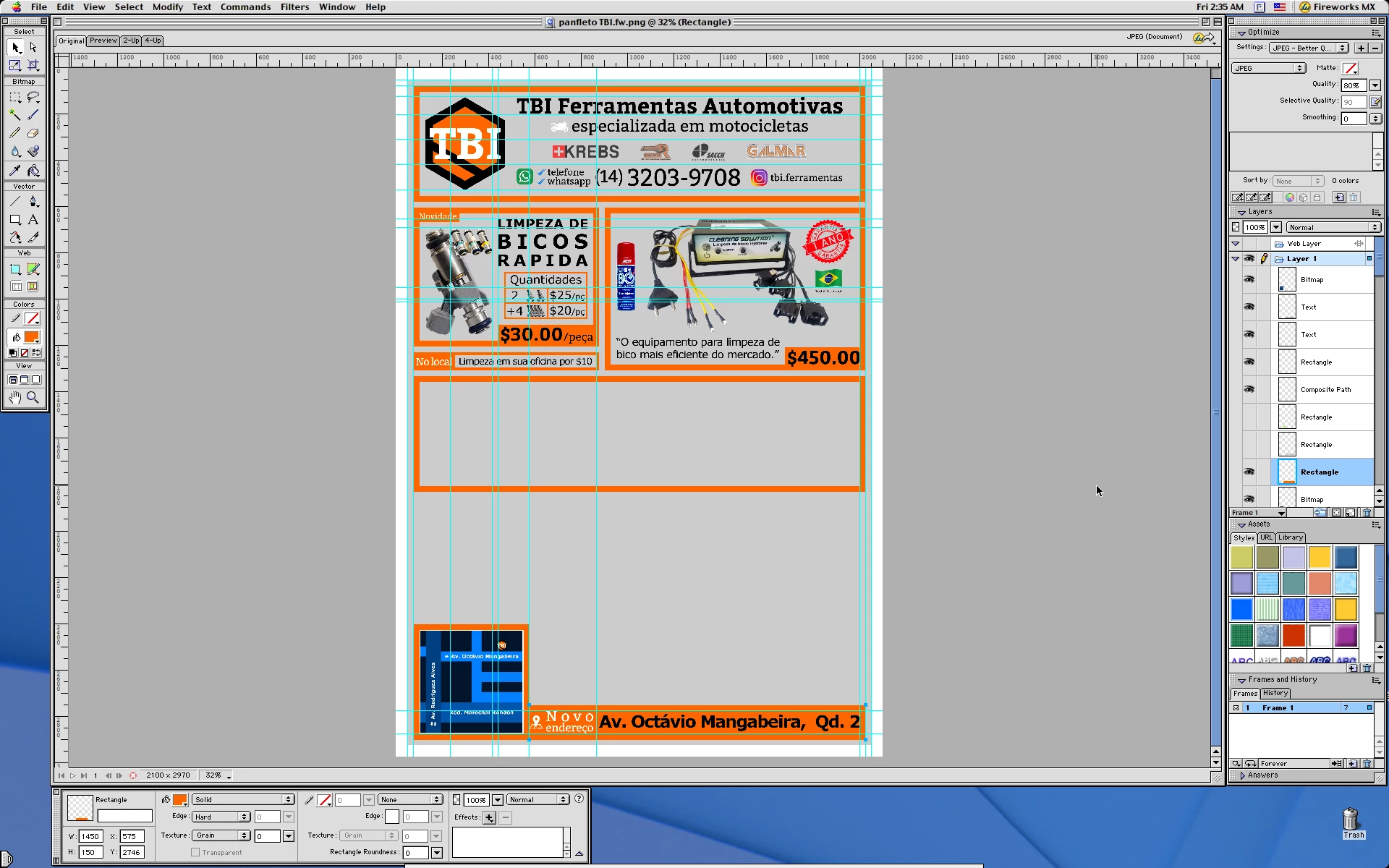
    Your file opens in Fireworks MX on MAC OS 9.2.2 with the layers, so i don't know how it got corrupted so it won't open right in Fireworks CS6, but the layers are still there in much older versions of Fireworks.


    4 replies

    Jeff Arola
    Community Expert
    Jeff ArolaCommunity ExpertCorrect answer
    Community Expert
    July 16, 2021

    Your file opens in Fireworks MX on MAC OS 9.2.2 with the layers, so i don't know how it got corrupted so it won't open right in Fireworks CS6, but the layers are still there in much older versions of Fireworks.


    Participant
    July 28, 2021

    It worked for me as well! It was still not working on CS6 even on the new machine I've started using since the original post, but this MX trick can save me if this ever happens again.

    Thank you! For the help and also for the nostalgia bonus. I think MX 2004 was the first image editing program I've ever used, when I was like 13.

    Nancy OShea
    Community Expert
    Community Expert
    July 6, 2021

    I hope you have file backups on cloud servers or external drives.   If not and you're on Windows, you could scan the storage volume with Win CHKDSK command to see if the corrupted file can be repaired.  Good luck!


    Nancy O'Shea— Product User & Community Expert
    Participant
    July 6, 2021

    I didn't had a backup, but I accepted my fate and went on with the uneditable image as a background and finished it. I don't think I have the knowledge to do this storage volume repair, but thank you for the reply, I'm sure it would help otherwise.

    rayek.elfin
    Legend
    July 5, 2021

    Try opening the file in Photopea, just to check if the file is readable as a layered FW PNG file.


    If that fails, like @Paul-M suggests: share the offending FW file with us for testing.

    Participant
    July 6, 2021

    I tried it on Photopea, but the file opened literally blank, no layers or anything, unlike on FW with the white background nd the lonely bitmap. I also download GIMP, and it opened the file as a layerless PNG, which was good because I used it to "Save As" a new layerless PNG, which I used as a background and finished the pamphlet.

    Thanks for the help! Also, Thanks to @Paul-M , which I forgot to add when I replied to him (sorry).

    Legend
    July 5, 2021

    Hi - Can you share the original Fireworks PNG?

    Paul-M - Community Expert
    Participant
    July 6, 2021

    Of course, I was lucky that almost everything I did up until that point was in its right place, but it's still a bummer to not be able to easily alter any of those images, vectors and texts. I ended up just treating this file as a JPEG background and completed the pamphlet.

    On a side note: If any of you wonder: "who hired this guy!?", I'm only doing the pamphlet is for my own shop, and I'm not a graphic designer or anything, haha.