
Participant
September 12, 2016
Question

Unable to install Fireworks CS6 on Mac OS X Sierra

  • September 12, 2016
  • 3 replies
  • 8713 views

This has been the case on the betas of the upcoming OS X Sierra (10.12), but even with the Sierra GM installed, Fireworks CS 6 will not install.

I have downloaded Fireworks CS 6 from:

Download Adobe Creative Suite 6 applications

and then when I run the installer on Sierra, I get:
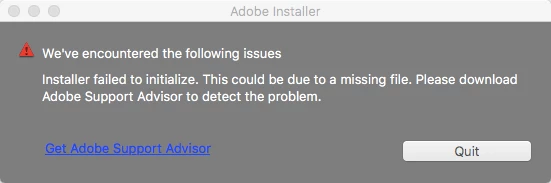
(and of course, clicking on the "Get Adobe Support Advisor" lets me know that Adobe Support Advisor is discontinued). I've tried to look in the Console for meaningful logs but can't find anything that points to a problem...

I reported it to Apple's beta feedback, but never heard anything back. Anyone know of a solution to get it to install on Sierra?

thanks,

Adam A

This topic has been closed for replies.

3 replies

Participant
November 21, 2016

Hi,

Since I upgraded to El Capitan Fireworks has a horrendous memory leak type issue. It can only stay open for a limited amount of time and crashes randomly when opening new blank canvases or existing documents. If anyone knows how to fix this I would be much obliged.

Mike

Participant
October 5, 2016

Can any of you tell me if the Fireworks Batch Processing is working in OS Sierra? That is the only feature I use it for (has some functionality that Photoshop's batching doesn't) and I never upgraded to El Capitan because I heard Fireworks batch processing wasn't working on it. I mostly use it for renaming or resizing/scaling batches of images. Would love your feedback, thanks guys!

Participant
October 9, 2016

Batching works for me fine in Sierra (as it did in El Capitan).

My only complaint since upgrading to Sierra that is that Fireworks runs slow. I hope Adobe can address this issue.

fredrikr19281469
Participant
December 15, 2016

Hi! Do you know if it still runs slow on the latest version of Sierra? Is it so slow that you practically can't use it for work? I need Fireworks on a daily basis, and I usually upgrade on the same day Apple releases a new OS, but Fireworks is the only reason I didn't this time..

Participant
September 18, 2016

Hi Adam,

There is a workaround this problem. You need to right click on "Installer" and use "Show package contents" go to folder "Contents" then "MacOS" and execute the Install from this folder.

I really don't know why this problem is happening using the usual way, but I was able to install this other way..

Best regards,

Pablo Salvanha

Participant
October 4, 2016

Pablo is correct. Just double click on the "Install" and it should run (mine is right now)