Known Participant
June 28, 2010
Question

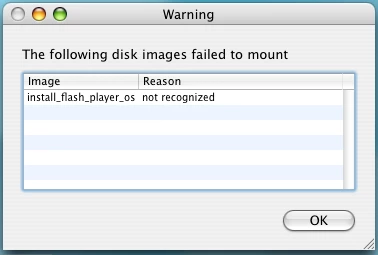
10.1 Mac Install Failure
  • June 28, 2010
  • 3 replies
  • 2185 views

I get this error when attempting to install.

On Mac OS 10.4.11, Firefox 3.6.6

This still after repairing permissions and several attempts.

Ideas ...?

Thx -

    This topic has been closed for replies.

    3 replies

    370H55V
    Inspiring
    June 30, 2010

    Whenever you see a "not recognized" message re: a dmg (disk image), the problem is the dmg file is corrupted and there is absolutely, unquestionably, undeniably no other answer for it. The download went bad. Repairing permissions will have no effect. Installing under another user account will have no effect. Crossing your fingers and spitting at a fan will have no effect.

    The ONLY way to solve a "not recognized" error is to redownload the dmg file again and install from the newly downloaded, uncorrupted dmg.

    June 30, 2010

    Hey IKNaa, I'm changing your name to I Know Most Everything About Mac (IKMEAM) That would be factually correct:-)

    eidnolb

    Message was edited by: eidnolb  correction

    Known Participant
    June 29, 2010

    Well apparently the new Flash just plain suggs.

    I thought Jobs was just being cranky and protective - NOT!!!

    He musta known the big mess that was coming.

    I finally successfully uninstalled 10.1, found 10

    and reinstalled that.

    And now, all is well.

    This place rocks!

    June 29, 2010

    Hi, glad you have it all working. Companies strive for perfection, but like man, they never attain it. The feud between  Apple, Adobe, Microsoft and others are not helpful nor necessary in my opinion. I'm glad they are all out there making great products and software for the consumers. Capitalism at it's best  Awesome!!!

    Regards,

    eidnolb

    June 28, 2010

    Hi, did you download and run the Uninstaller first?

    link: http://kb2.adobe.com/cps/141/tn_14157.html  In the instructions there is a note for Mac users as to where to SAVE it.

    This is the Installer site that has "different operating system or browser" and also Installation instructions that can be read before Installing. Just watch out for the google toolbar if you don't want it; I think it is offered in 2 places.

    You may want to try this method if it is not the one you were trying.

    I don't know what that reason message means since I'm not familiar with the Macs.

    eidnolb

    Known Participant
    June 28, 2010

    Nope.

    No uninstaller is required on Mac.

    Chip Hess

    June 29, 2010

    Hi, well Adobe must have made a terrible mistake. Following is from the Adobe Uninstall instructions:

    "You can uninstall the player only by using the Adobe Flash Player uninstaller. Follow these steps to download and

    run the appropriate uninstaller for your system:

    Mac OS X, version 10.4 and above: uninstall_flash_player_osx.dmg (238KB) (updated 6/10/10)

    Mac OS X, version 10.3 and below: uninstall_flash_player_osx_10.2.dmb(1.3MB) (updated 5/27/08)

    Mac OS 8.x, 9.x: uninstall_flash_player.hqx (33KB)

    Save the uninstaller file, choosing a location where you can find it-your Windows Desktop, for example.

    Macintosh users may need to open or unstuff the .hqx file."

    More instructions follow after that.

    Thanks,

    eidnolb