


Known Participant
January 6, 2018
Question

About Flash Player page not showing current version

  • January 6, 2018
  • 1 reply
  • 2217 views

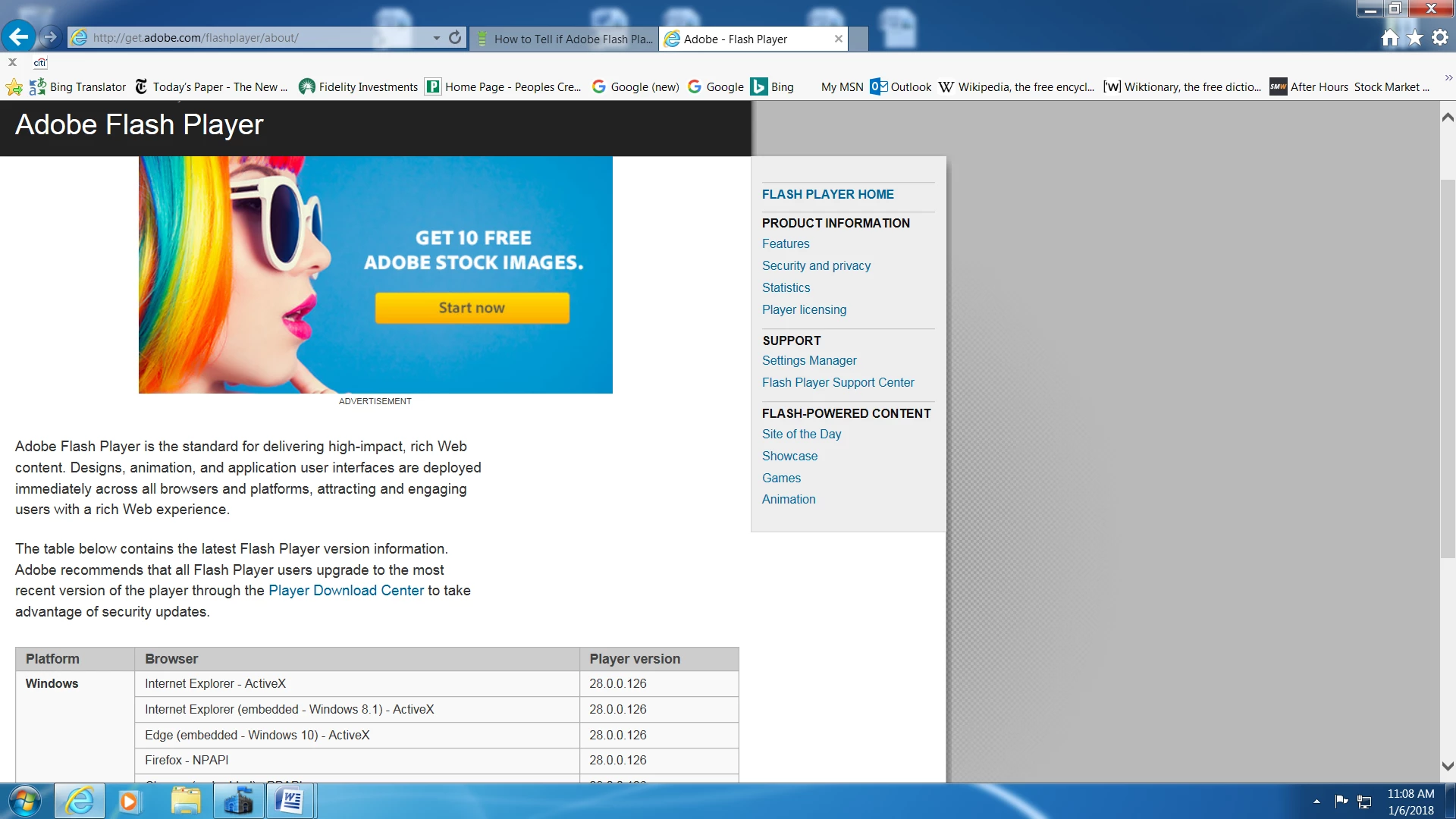
The ABOUT flash player web page is not showing the current version of Flash installed on my computer. It shows all the versions available but not the current version. It used to show a little square that said you had a certain version and I believe it told you if it was out dated. The current version was sometimes a little late in popping up on that page and now it doesn't show at all.

It does show on the Flash Player Manager page.

Here is a screen shot of the ABOUT page.

Thank you,

I am using Windows 7 SP1 with IE11

     TomS
This topic has been closed for replies.

1 reply

_maria_
Community Manager
Community Manager
January 8, 2018

Thank you.

I will notify the team responsible for this page.

<edit>
I was able to reproduce on Win7 w/IE - ActiveX Filtering disabled and Shockwave Flash Object enabled.

Known Participant
January 9, 2018

Thank you. Could you let me know when it will be fixed.

divya010193
Adobe Employee
Adobe Employee
January 9, 2018

Hi,

The "version information " is a swf that will be loaded only if you have Flash Player installed on your system. Please check if flash player is installed on your system or not, as I am able to see the widget.

Thanks!