


phil-0206
Participant
March 3, 2017
Question

Adobe Flash failing to install on ElCapitan

  • March 3, 2017
  • 3 replies
  • 553 views

Hi,

I've been trying to update Flash on my daughter's Mac, running ElCapitan,

Every time it seems to be fine but it gets to the end point and fails....
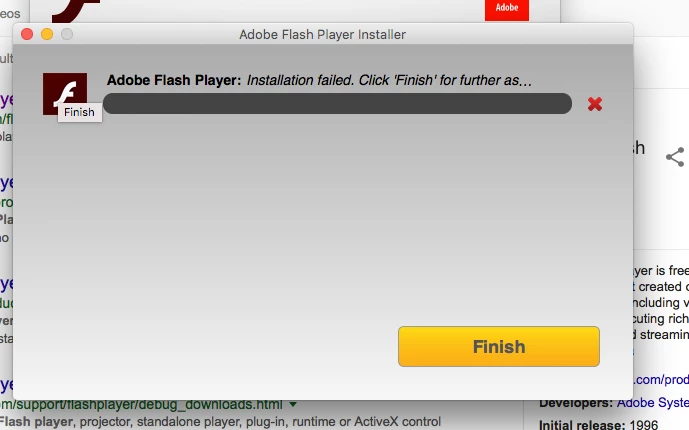
There is no reason shown and I'm guessing that the "click finish for further as... is assistance.

When I click on finish we just go round in circles.

I have followed some of the previous threads and navigated to the root folder to try and install from there and I have deleted the previous version to attempt a fresh install.

The security preferences on the mac allow a download from anywhere so it's not that.

Any help gratefully accepted.

Phil

This topic has been closed for replies.

3 replies

phil-0206
phil-0206Author
Participant
March 3, 2017

Hi,

Well that worked, I'm not sure what the difference was but the update is now working.

Thank you.

Phil

_maria_
Legend
March 3, 2017

Hi phil-0206

There are 2 installers:

  • Online (shim) installer:  this installer requires an internet connection and downloads and installs Flash Player silently in the background This is the installer that was returning the error.
  • Offline (full) installer:  this is the full installer, does not require an internet connection.

I'd like to troubleshoot the error with the online installer.  Please upload the Adobe_ADM.log and Adobe_GDE.log files, saved ~/Library/Logs/Adobe_ADMLogs (this is the users Library folder, not the system library folder) at to cloud.acrobat.com/send using the instructions at How to share a document and post the link to the uploaded files in your reply.


Thank you.

--

Maria

divya010193
Adobe Employee
Adobe Employee
March 3, 2017

Hi,

try the following steps:

1) uninstall flash completely

2) restart computer

3) install newest flash

4) restart computer

If you still face the issue please specify the following :

Is there an error or does the installation just hang at 95% percent? If it returns an error, what is the error?  We'll need the Flash Player installation log files to investigate further.  Please do the following:

  • Review the FAQ Where do I find the Flash Player installation log on the Macintosh?
  • Configure your system to obtain the install.log and FlashPlayerInstallManager.log files
  • Attempt to install Flash Player again.  When the installation hangs (or returns an error), close out of the installation window
  • Upload the install.log file (only the portion related to the Flash Player installation) and the FlashInstallManager.log (entire file) to cloud.acrobat.com/send using the instructions at How to share a document
  • Post the link to the uploaded log files in your reply

Thanks!

Participating Frequently
March 3, 2017

Please try the download link available in the still having problems section @ Installation problems | Flash Player | Mac

Thanks.