


May 10, 2017
Question

Adobe Flash Installation page in chinese?

  • May 10, 2017
  • 2 replies
  • 4457 views

I noticed that there was an Adobe Flash update for OSX and proceeded to download it via System Preferences. Upon clicking to update adobe flash player, i noticed the page was in chinese when the installer file was being prepared to download. I thought this was a fluke and proceeded to update flash via web on Adobe's check flash player page(https://www.adobe.com/uk/software/flash/about/). Through Adobe's own page the downloader was in english.

I had to download the new flash update on my second computer and the chinese lettering was the same when i went through System Preferences to update.
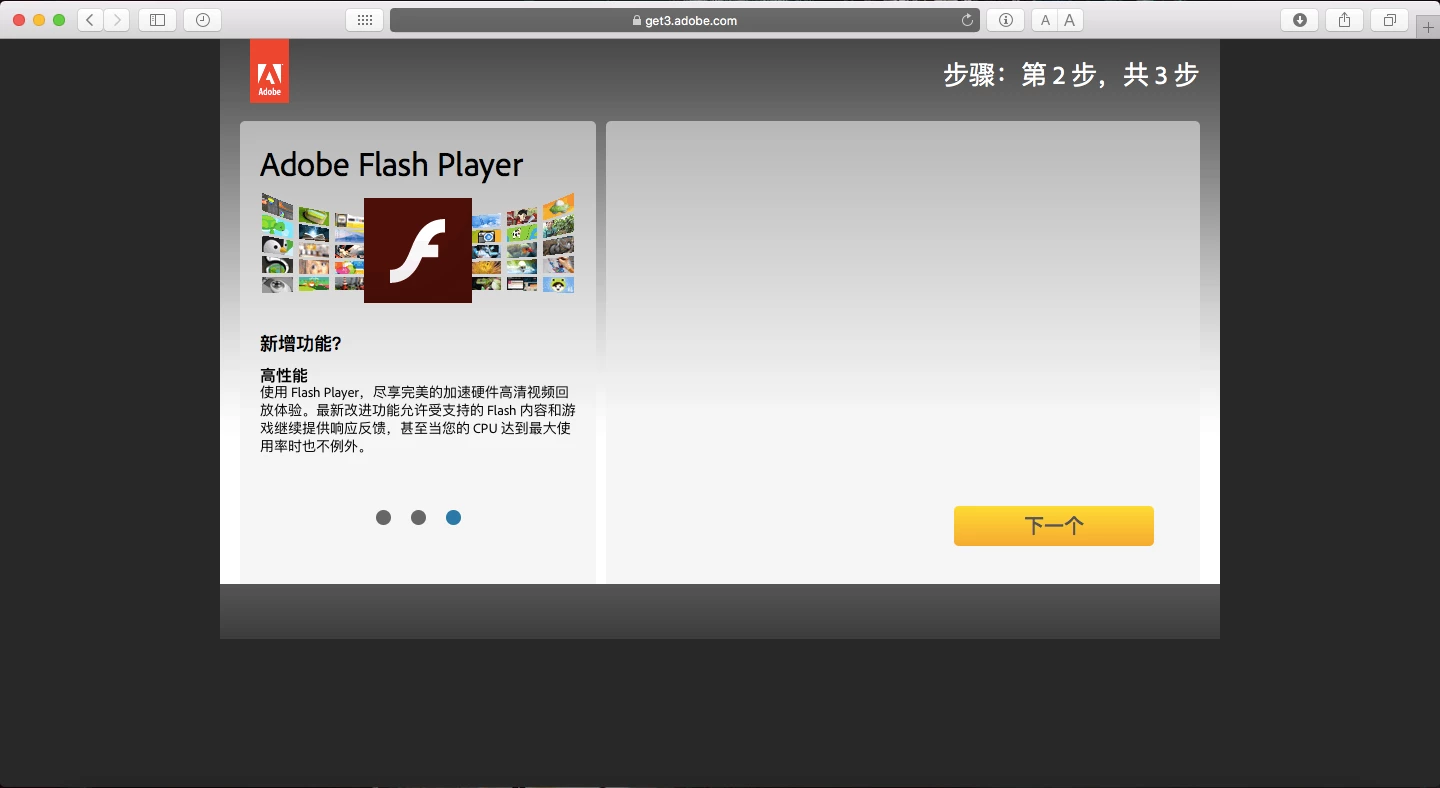
Is this just some random bug with the update, as this is the first ive actually seen the update page in chinese.

This topic has been closed for replies.

2 replies

jeromiec83223024
Inspiring
July 18, 2017

Based on the screenshot, it looks like we might have had a bug related to language detection on our distribution site.  It didn't make my radar and complaints are very limited.  I imagine that this was caught and fixed very quickly. 

To give you a sense of scope, we serve around 2.5 Billion Flash Player downloads in a given month.  I'd expect at least a few hundred identical complaints if this has persisted for even a few hours.

It's also possible that as part of that bug (I've seriously not heard anything about this, but it seems like a plausible mistake that could happen), we set "your" language preference when we incorrectly detected it, and now it's stuck on Chinese by default.  If that's the case, we probably set a cookie on your browser.  If you *are* still getting the page in Chinese, you can revisit the page using your browser's incognito or private browsing mode.  If you see it in English in private browsing mode, clearing your cookies will resolve that (and if you want to be super surgical about it, clearing your cookies for just *.adobe.com and/or *.macromedia.com should get it done).

chrispy104
Inspiring
October 11, 2017

Well that was July, it's now October 2017 and the Adobe page for the PPAPI installer doing the same thing again, meaning, it is presented in Chinese.  My settings for Language and Region have been the same for as long as I have had a Mac and are correct.  Despite the installer PPAPI page showed up in Chinese on the Adobe site I still downloaded the Installer anyway and it is now up to date.  Something is wrong with your language detection.

Chris

_maria_
Community Manager
Community Manager
October 11, 2017

Hi,

What Mac version do you have?

What is your geo-location?

Does the Adobe page you are downloading Flash Player from have a language code in it?  Please post the entire link to the Adobe page you downloaded the installer from.

Please post a screenshot of the following System Preference windows:

  • System Preferences > Language & Region
  • System Preferences > Language & Region > Advanced

Thank you.

--

Maria

_maria_
Community Manager
Community Manager
May 10, 2017

Hi,

Was the Flash Player installer itself displaying in Chinese, or was it just the download/completion page that displayed in Chinese?

Please provide the following two screenshots:

  • System Preferences > Language & Region
  • System Preference > Language & Region > Advanced

Once I receive your reply and screenshots I'll forward to the team that manages the download page.

Thank you.

--

Maria

May 10, 2017

It was just the download page for what i know

I actually used the installer from the chinese download page on my second computer and the installer was in english; im not sure why the page was in chinese.

_maria_
Community Manager
Community Manager
May 10, 2017

Can you post the second screenshot, of System Preference > Language & Region > Advanced?

Thank you.