
Adobe Flash Player 11 not working on Internet Explorer
Hello, I know this has been a question most people asked but it's not that simple for me
My computer is a Samsung Series 5 Laptop, with Windows 7 Home Premium K 64Bits.
The computer specs are as shown below:
DualCore Processor 2.2Ghz each with a 8 GB RAM. I put up a screenshot of it in the attachments (Sorry it's in Korean)
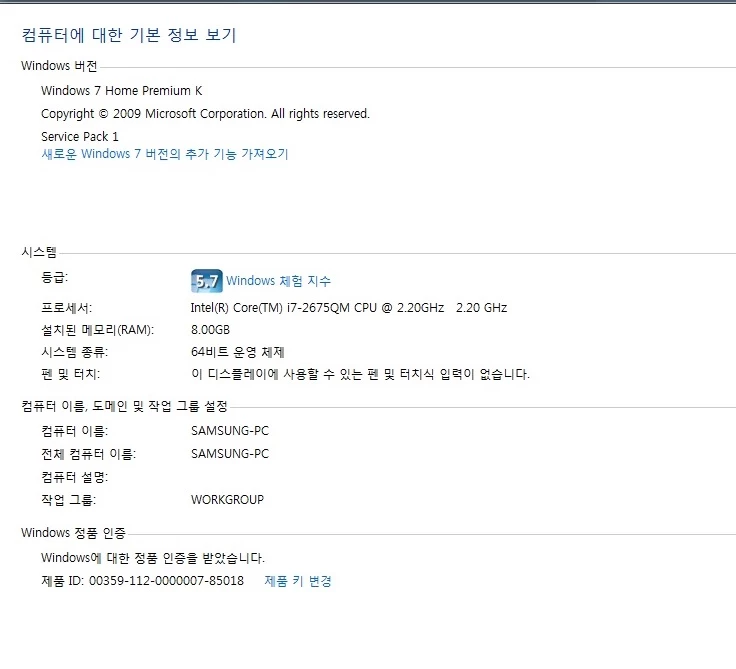
The problem is the fact that despite having successfully installed Adobe Flash Player, Korean websites do not show the areas where the Flash Players are involved!
I checked where most people look at first: I enabled shockplayer on the addon (Shockwave Flash Object), not to mention disabling Direct X Filtering
THe problems persisted... I checed my Java and it was up to date, not to mention working fine. THe interesting thing is some flash objects are working. THe places where
adobe flash player is involved in www.naver.com or uic.yonsei.ac.kr shows up BLANK!
It works fine in Google Chrome. It even works fine for some websites in IE 9 such as http://disneyworld.disney.go.com/new-fantasyland/ (I just tried this one, it's not a website I go to)
But somehow websites such as http://www.adobe.com/kr/products/flashplayer.html itself doesn't show flash player linked images/videos!
Here's proof of that (note that I right clicked on the blank spot to prove that the space is not meant for blank but for adobe flash as shown in the last option)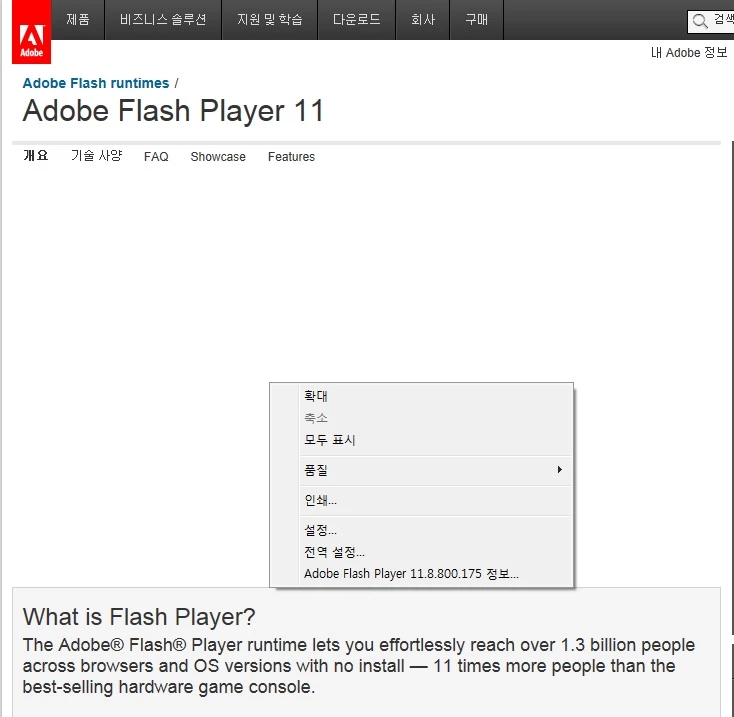
If there are more things I should elaborate on, please comment below!
I'm looking forward to a solution to my problems as well as hoping to talk to some really good Computer-Know-Alls 
I really need to understand my computer better to avoid such problems T.T
 AdChoices