


Participant
December 13, 2017
Question

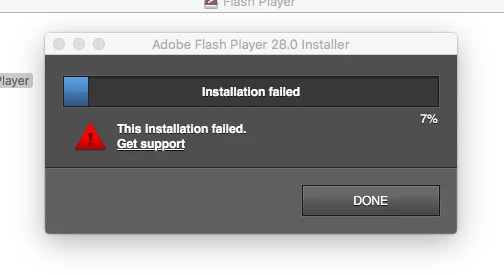
Adobe Flash Player 28.0 Installation fails on MAC

  • December 13, 2017
  • 1 reply
  • 1097 views

I've constantly struggles to install adobe flash player on Mac-- it always fails upon install.

Mac OS 10.11.6

Safari

I've downloaded  the whole filed directly which is19.2 MB.

[moderator: link removed]

I've un-installed/ re-installed.
    This topic has been closed for replies.

    1 reply

    _maria_
    Legend
    December 13, 2017

    Hi,

    I'll need to review the Flash installation log files to troubleshoot the error.  Please review the FAQ Where do I find the Flash Player installation log on the Macintosh? and configure your system to obtain the install.log and FlashPlayerInstallManager.log files for the same installation attempt. After configuring your system to obtain these 2 log files, run the installer again.  When it fails, click Done to close the UI window.  Copy the pertinent Flash Player information from the install.log file to a new text file and save the file as install.log.  Upload the install.log file you just created and the FlashInstallManager.log files to cloud.acrobat.com/send using the instructions at How to share a document and post the link to the uploaded files in your reply.

    Also, was the system upgraded from a previous version of OS X?  If so, how was the update performed - update or format disk and install 10.11?  Or is it a new system that has only ever had 10.11 installed?

    Thank you.

    --

    Maria

    Participant
    December 16, 2017

    This was an upgraded from a previous version-- and was not a disk install. There hasn't been any major upgrades. But I feel the flash install problem has been a major problem. I've been using Chrome for years now in part because of it.

    I did note that one of the logs suggest a certificate authorization problem-- I don't know how to troubleshoot.

    installer: Certificate used to sign package is not trusted. Use -allowUntrusted to override.

    2017-12-15 19:27:28 -0800   IM: [install failed: 1]

    2017-12-15 19:27:28 -0800   IM: Install failed with error code: 1.

    Here is the link to the files as instructed:

    Shared Files - Acrobat.com

    Thanks for the help

    _maria_
    Legend
    December 18, 2017

    Is this the only content in the install.log file for the installation attempt:

    Dec 15 19:43:10 Jonies-MBP installer[776]: JS: Flash Player Install: Performing volume check for /

    Dec 15 19:43:10 Jonies-MBP installer[776]: JS: Flash Player Install: Volume check passed.

    The "installer: Certificate used to sign package is not trusted. Use -allowUntrusted to override." error is going to be an issue with your system, not Flash Player.  Flash Player is correctly signed (it's installed on millions of machines daily - if it were incorrectly signed, we'd be receiving many, many more reports).   The application that is returning the error, 'installer' is an Apple application that is used to extract and install files (see Installer (macOS) - Wikipedia for more information).  This issue hasn't been reported in a while, but the following may be of assistance: