


Participant
October 9, 2018
Question

Adobe Flash Player

  • October 9, 2018
  • 1 reply
  • 544 views

Hi there,

I was wondering if anyone could help me out, I've recently tried to use Adobe Flash Player and I get a grey screen and a suggestion to download the newest version. After following the link and downloading the latest version, I still get the same message. I went onto the Adobe site and used their checker to see which version I had on my mac and this is what came up:
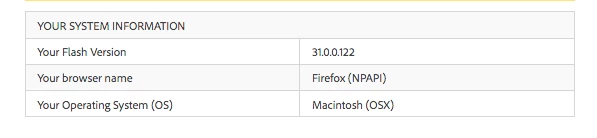
I'm unsure if this is the latest version of Flash. I have also read an article on the Adobe site saying that Firefox no longer uses the Flash plugin but you can still view things online that would have previously required it. Does anyone know how I can fix this?

Thank you,

Emily

This topic has been closed for replies.

1 reply

Legend
October 9, 2018

Hmm, you followed a link. Very probably a scam.  What you downloaded probably wasn't Flash at all,  but a big bunch of malware.

For Flash go to http://get.adobe.com/flash but you may have a MUCH bigger problem.

Participant
October 9, 2018

Hi there,

Thank you for the warning! I thought I'd be safe as both myself and my college got this link from the Adobe website itself.

I'll try that one,

Emily

Participant
October 9, 2018

I just checked the link that you gave me and its the same link I followed to try and get it previously but it still doesnt work, do you know why this might be?