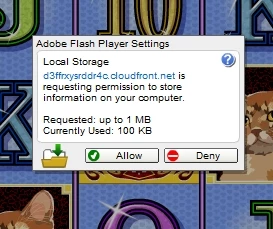
Firstly, there's no grand conspiracy here. This is a security dialog. It's working as intended.
Here's what's happening:
- You loaded a webpage.
- That web embedded some Flash content from somewhere.
- That Flash content wants to store data on your computer
- We open a security dialog that says "Hey, content from <name of the place the Flash content came from> wants to save some data on your computer.
- You get to choose Allow or Deny
- Also, what gets stored isn't executable code or anything. The original intent was to allow stuff like video games to save scores and game state, but advertisers figured out that they could use it to store persistent identifiers for ad targeting and tracking.
- It's also worth pointing out that if you're not paying for a game, someone is. That usually means that advertising is involved, and in order to get paid, the person buying the ad generally wants proof that the ad was shown to you. By blocking advertising tracking (which might require local storage), the game developers might just choose to not run. The logic works out to something like: If they're not getting paid, why should they let you play at their expense? You have control over your personal information, but that might mean that you have to choose between your privacy and access to certain games and websites. The good news is that there's probably a better paid alternative in the genre. This is that truism about "if you're not paying for a product, you are the product" in action.
Now, the reason that the button wouldn't take your click is a side-effect of the fact that Flash Player is running as a plug-in inside the browser. This is a long-standing, intractable problem. The right solution would have been to have the browser put these choices directly in their security UI, but that would require every single browser to do work to wire that in. Allowing browser plug-ins was a general regret in the browser ecosystem, so making a bunch of engineering investment to perpetuate plug-ins like Flash was a really tough sell (I made the pitch, but it was a non-starter).
Anyway, since we're showing you a security dialog, we want to make sure that you can actually see that dialog. Web developers can stack things in a browser like you would by placing pieces of paper on top of each other on a table (i.e. stacking along the z-index). The thing on top is visible (assuming it's opaque), and the other stuff is obscured, but still there. The problem is, if you have an obscured button lower on the z-index, that button can still catch a click.
Flash Player, because it's just some component embedded in the page, has no way to know where the browser puts it in the z-index. That's a big problem, because we need to know that you're seeing that security dialog. You don't want a scenario where an attacker puts a "Click Here to Win A Prize" button over the top of the. "Allow Camera and Mic Access" button. See https://en.wikipedia.org/wiki/Clickjacking for more on that.
So... the way that we figure this out is that internally is that we have a copy of the pixels make up our dialog that gets passed to the browser for rendering, and we know the coordinates and dimensions of the rectangle where it should be on the screen. We have a way to ask the browser whether or not our expectations for what should be in that rectangle match what the browser thinks is there. (The browser's view is more authoritative, but in modern rendering engines isn't necessarily 100% accurate, which makes this test kind of flaky.)
When you click the button, we take a couple samples and compare what we think should be there with what the browser says is there. If they match, and they were consistent, then we take the click. If they don't match, the safe thing to do is to assume that the dialog was obscured and ignore the click.
It's an imperfect solution for an intractable problem, and there are inherent false positives. This is exacerbated by the fact that if there's video or animation happening behind the dialog, there's a good chance that will capture some of the surrounding pixel data (because on today's modern high-density displays and underlying scaling logic in the OS, the boundaries aren't necessarily round numbers) and the motion will cause the test to fail.
While not the optimal user experience, we're choosing to fail in the most secure way in scenarios where we're not 100% sure that you were intentionally making a security choice. We do nothing, and leave that dialog up to make sure you know that we did nothing.
By clicking around a bunch, you caught a hit area and a state where everything lined up. In an ideal world, that's what would happen every time, but it doesn't.
We can't really do anything to make this better in the browser, but we did make a better way for most browsers (Chrome is the exception, because they have their own embedded copy of Flash Player with it's own settings).
Go to the Control Panel > Flash Player and open the control panel. Choose the Storage tab, and you can set both global and per-site preferences. If you choose Always Deny, you'll never see that dialog again, but you also lose the ability to see when a site might be asking for permission to store data. From apps that require the ability to store data, this may prevent them from running, and you'd need to either find something else to use, or explicitly allow that site to store data.



 AdChoices