Inspiring
December 5, 2016
Answered

Adobe Flash Player blocking Facebook and Youtube

  • December 5, 2016
  • 6 replies
  • 7609 views

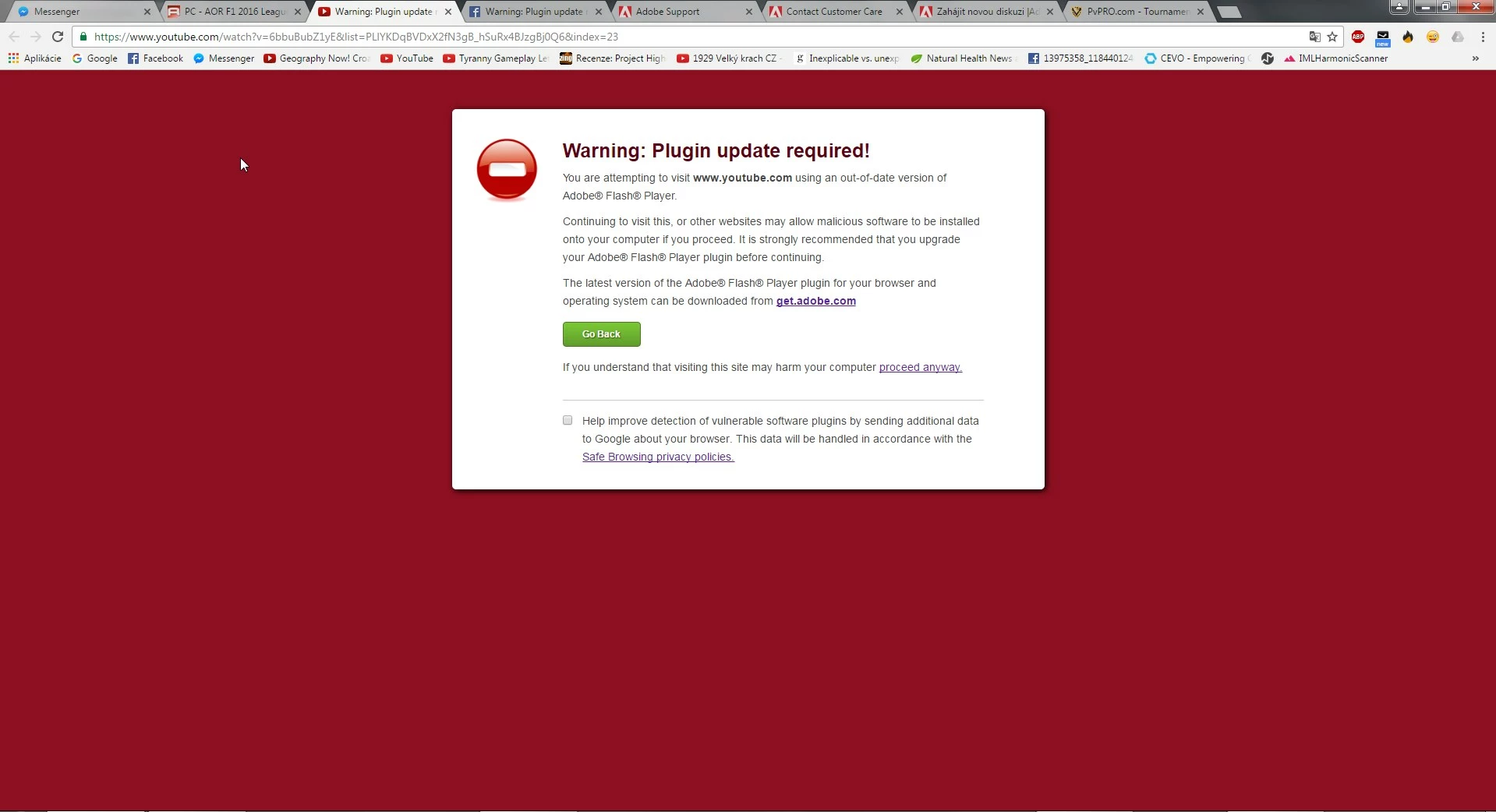
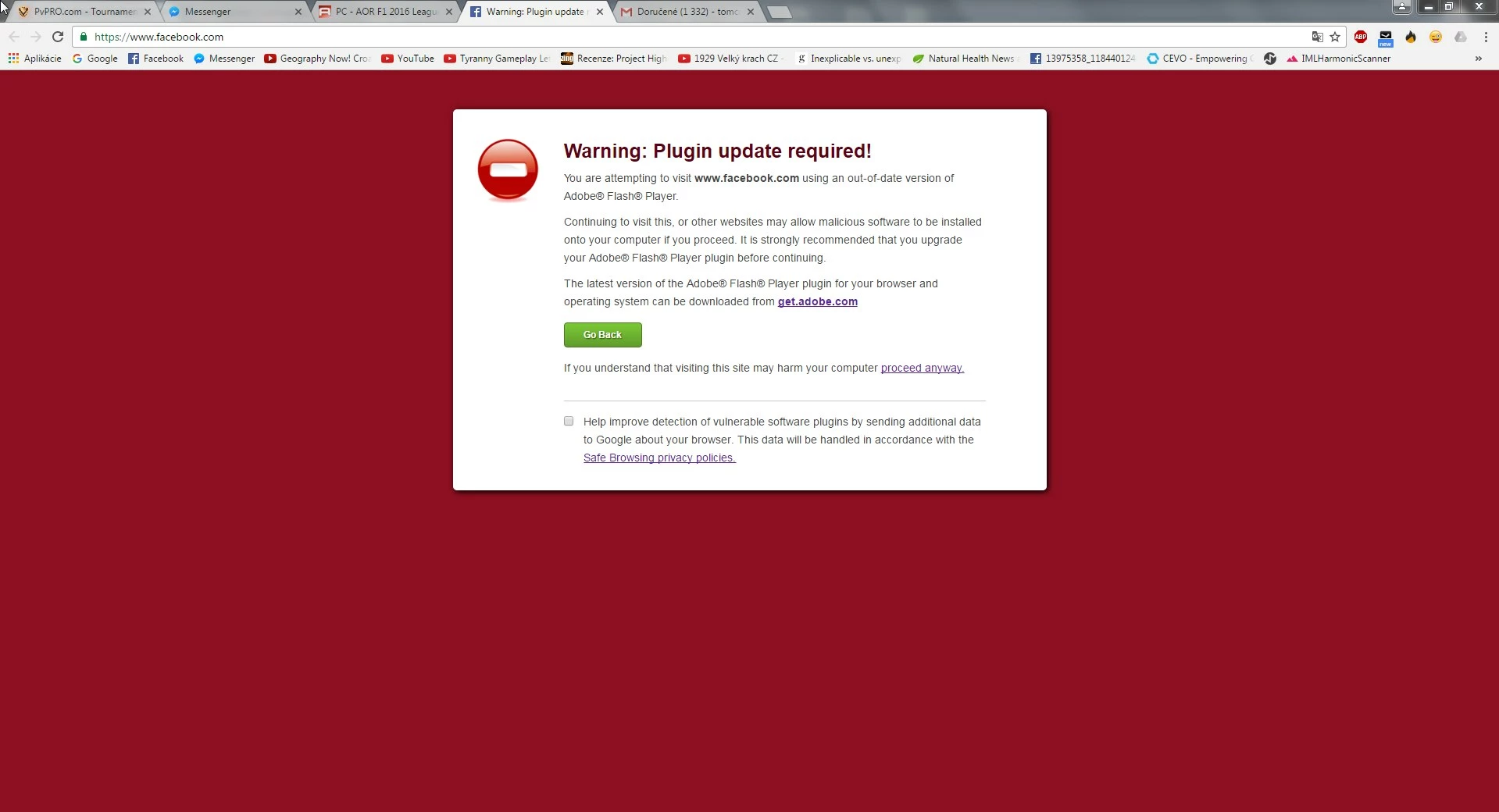
Hello, so today I wanted to open Facebook.com on computer as always and suddenly since today I am seeing the same thing all the time (picture in attachment). Thing is, when I open messenger (facebook's product) on chrome, it works, just facebook.com doesnt work. On other browsers - opera/firefox it works, just on chrome it doesnt, tried to disable all extensions, tried 2 antivirus programs, nothing helped it, even tried to download Flash Player multiple times and install it and still no help, dont you know a fix for that??

as of youtube, it doesnt work on chrome, but works on firefox/opera as well.

Adobe says I am using the newest Flash Player within Chrome and everything works fine..but it does not..if anyone can, I would appreciate any help!!

+PS: No other sites are doing that, just facebook and youtube exclusively.

PS2: I am a bit worried of reinstalling the Chrome as I dont want to lose all the bookmarks and passwords.

    This topic has been closed for replies.
    Correct answer tomco999

    The screenshot you posted is not a valid certificate from facebook.  Here is a screenshot of the valid certificate:
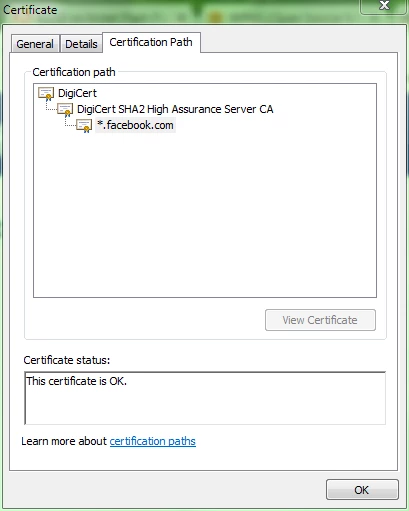
    Notice your screenshot has DO_NOT_TRUST_FiddlerRoot and mine does not. This is the cause of the behaviour you are observing.  Something you installed installed the FiddlerRoot certificate.  Performing a search for "do_not_trust_fiddlerroot"  will return many hits for this issue, including how to fix the issue.

    <edited>

    Note that while Fiddler is legitimate web debugging software that installs a certificate to enable debugging HTTPS sites, it's possible this was installed by some malware (according to some of the search results I got), especially if you've never installed Fiddler on your system.

    --

    Maria


    so I have fixed the problem, I followed a lot of steps from other sites, so I will post it here in case someone ever gets to that:

    "In fact you should delete all of DO_NOT_TRUST_FiddlerRoot certificates. There's an adware that installs those certificates and injects encrypted HTML advertising content from various websites, hence SSL certificate.

    To find more of your certificates:

    Open mmc.exe (hold windows logo and press R, write it in and press enter) --> Crtl + M --> Certificates --> Click Add > --> My User account --> Click Finish --> Click OK

    now just open every single folder and delete every single DO_NOT_TRUST_FiddlerRoot certificate you will find."

    after that, I downloaded from DigiCert Root Certificates - Download & Test | DigiCert.com three certificates:

    • DigiCert High Assurance EV Root CA
    • DigiCert SHA2 Extended Validation Server CA
    • DigiCert High Assurance CA-3

    Then I installed those three certificates just by doubleclicking them and clicking "Install certificate" (or so).

    After that was done, I went to Chrome's settings, opened advanced settings, clicked "Change proxy settings" and then "Settings of LAN Network" (or so) and found out I have box saying: "Use automatic configuration script" ticked and there was this address "http://localhost.domains/localhost.local"​ I have no idea what that is, so I deleted it, unticked the box and left only "automatically find out settings"(or so) ticked and refreshed Chrome, opened FB/Youtube and everything was working fine! So I guess one of those three things was the issue, but its all fixed, thank you for helping me to find out it is the certificate's fault! Couldnt find my problem anywhere, so I wrote here and now its fixed, thank you very much!

    6 replies

    Participant
    December 21, 2020

    Adobe is blocked in games on facebook and in using chat (messenger) will not open contact.  I followed your instructions on checking certificate and this is a screenshot of that certificate:


    Participant
    December 6, 2016

    The cleanup steps are incomplete; the PC is definitely infected with malware. It's running a proxy server on your PC to which your browser requests were being sent. Beyond running the proxy, the malware can adjust your proxy settings and add new certificates to your trusted store at will. If you open the "http://localhost.domains/localhost.local " url in your browser, you'll see something like "PROXY 127.0.0.1:8888" where the number is the port on which the proxy is running. You can then use netstat -o from a command line to see the process ID of the process running on that port, and then use the Task Manager to see the name and path of the executable running that proxy process.

    Background

    FiddlerCore is a library that allows developers to build Fiddler-like proxy functionality into their .NET applications. Sadly, there are a fair number of adware applications that use it (in violation of its license) and even though Telerik now charges a pretty penny to license it, the bad guys mostly just use the old freeware version from circa 2012.

    This usually hits the public radar when the adware's sloppily written code fails to trust its root certificate such that HTTPS to every site in every browser starts to fail. Users see "Fiddler" and go looking for that and complain to Telerik. Outright use by malware anecdotally seems rare, because most of the true malware isn't written in .NET.

    tomco999Author
    Inspiring
    December 6, 2016

    And how do I get rid of that malware or process that runs the server?

    _maria_
    Community Manager
    Community Manager
    December 10, 2016

    Hi,

    Unfortunately, cleaning malware/adware from someone's system is beyond the scope of the Flash Player forums.  You'll need to contact your friendly IT person, or someone who knows how to clean a system from malware.  If you're comfortable doing the work yourself, there are lots of legitimate support forums on the web who can assist you with this.

    --

    Maria

    tomco999Author
    Inspiring
    December 6, 2016

    will add picture of that:

    tomco999Author
    Inspiring
    December 5, 2016

    Restarting the computer havent helped either...

    Ive changed the language so you can understand..

    and no, I do NOT use any  network sniffers or anything else, just normal connection from my operator, no other programs involved.

    _maria_
    Community Manager
    Community Manager
    December 6, 2016

    Hi,


    Sorry, I  didn't give complete instructions yesterday.  Please do the following:

    1. Click on the padlock next to the URL, when the dialog window opens, click on the Details link:
    2. This will open the Developer Tools window pane
    3. In the Developer Tools section, click View Certificate
    4. When the Certificate Window displays, navigate to the Certificate Path tab
    5. Post a screenshot of the Certificate Path tab

    Thank you.

    --

    Maria

    tomco999Author
    Inspiring
    December 6, 2016

    the box says:
    This certificate is okay/alright..

    _maria_
    Community Manager
    Community Manager
    December 5, 2016

    Hi,

    This is not Adobe blocking the content.  Adobe doesn't block any content.  This is either Chrome or Facebook blocking the version of Flash Player you have on Chrome.

    Please do the following:

    1. Launch Chrome and navigate to chrome://plugins
    2. In the upper right corner click the +Details button to display plugin details (if they aren't already displayed)
    3. Look for the Adobe Flash Player item and post a screenshot of the entire plugin details - See How to I attach a screenshot?

    The latest Flash Player version is 23.0.0.207.  If you do not have this version installed, do the following:

    1. In Chrome, navigate to chrome://components
    2. Look for the Adobe Flash Player item
    3. Click the Check for updates button
    4. Chrome component updater will check for an update and download/install it.

    --

    Maria

    tomco999Author
    Inspiring
    December 5, 2016

    the untick box says "always allow startup" or how it is in english version.

    and the () next to PPAPI says "out of process" or so.. or not in process, I should change chrome to eng

    _maria_
    Community Manager
    Community Manager
    December 5, 2016

    According to the screenshot you posted you have the latest version of Flash Player installed.  Does this happen to all Flash Player sites when you use Chrome?  Please go to https://helpx.adobe.com/flash-player.html and click the 'Check Now' button.  Post a screenshot of the resulting system information.

    tomco999Author
    Inspiring
    December 5, 2016

    oh and if i try to click proceed anyway, I get that screen: