


Participant
October 4, 2018
Question

Adobe Flash Player fails to install

  • October 4, 2018
  • 1 reply
  • 1373 views

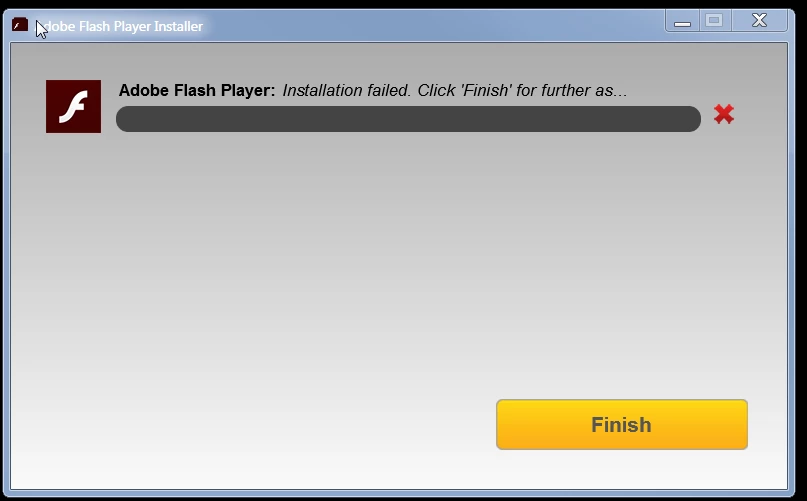
Here is m y 3 most recent log entries and a snapshot of the error I get, (at the 49% installation mark), all the time when attempting to install the updated flash version.  I am running Win 7 Pro:

=O====== M/30.0.0.154 2018-09-29+23-55-00.412 ========

0000 00001113 C:\Users\Dino\AppData\Roaming\Macromedia\Flash Player\www.macromedia.com\bin\* 3

0001 00000010 C:\WINDOWS\SysWOW64\Macromed\Flash\FlashUtil32_30_0_0_154_Plugin.exe -check plugin

=X====== M/30.0.0.154 2018-09-29+23-55-00.853 ========

=O====== M/30.0.0.154 2018-09-30+00-55-00.495 ========

0000 00001113 C:\Users\Dino\AppData\Roaming\Macromedia\Flash Player\www.macromedia.com\bin\* 3

0001 00000010 C:\WINDOWS\SysWOW64\Macromed\Flash\FlashUtil32_30_0_0_154_Plugin.exe -check plugin

=X====== M/30.0.0.154 2018-09-30+00-55-01.162 ========

=O====== M/30.0.0.154 2018-10-04+00-35-31.646 ========

0000 00001113 C:\Users\Dino\AppData\Roaming\Macromedia\Flash Player\www.macromedia.com\bin\* 3

0001 00000010 "C:\Windows\SysWOW64\Macromed\Flash\FlashUtil32_30_0_0_154_Plugin.exe" -update plugin

=X====== M/30.0.0.154 2018-10-04+12-22-06.630 ========
This topic has been closed for replies.

1 reply

_maria_
Legend
October 4, 2018

I branched your post to a new discussion topic to not confuse your issue with the issue you posted to.

The log file entries you posted are for a Background Update check and are not related to the installation you are attempting using the online installer.

What is the exact name of the installer file you are using? 

Please provide the following files:

  • FlashInstall32.log saved at C:\Windows\SysWOW64\Macromed\Flash
  • FlashInstall64.log saved at C:\Windows\System32\Macromed\Flash
  • Adobe_ADM.log and Adobe_GDE.log saved at C:\Users\<YourUserID>\AppData\Local\Temp\Adobe_ADMLogs

Upload all files to cloud.acrobat.com/send using the instructions at How to share a file using Adobe Document Cloud or some other file sharing service of your choice that doesn't require user account login to access.  Post the link to the uploaded files in your reply.  Do NOT post the content of the log files in your reply.

AstrodinoAuthor
Participant
October 4, 2018

Attached.

Note that the ADM and GDE log files were located in C:\temp\Adobe_ADMLogs

Best, Dr. K.

Constantine (Dino) M. Koursaris, PhD

[personal information removed per policy - https://forums.adobe.com/docs/DOC-3731]

[This is a public forum, not Adobe support, please do not post personal information]

[If you are posting using email, please turn your 'sig file' function OFF for posting]

_maria_
Legend
October 4, 2018

Forums does not accept email attachments.  Please upload the files as requested.  Also provide the exact file name of the installer file as requested.