Participating Frequently
June 5, 2018
Answered

Adobe Flash Player not reading mms.cfg file

  • June 5, 2018
  • 1 reply
  • 6616 views

Operating system: Windows 7 Enterprise SP1

Internet Explorer 11

Flash Player ActiveX 29.0.0.140 & Flash Player NPAPI 29.0.0.140


It does not appear that Flash Player is reading the mms.cfg file.

I have the mms.cfg file in both System32 & SysWOW64 folders under > Macromed > Flash.

The settings in my MMS.CFG file are as follows:

AutoUpdateDisable = 1

SilentAutoUpdateEnable = 1

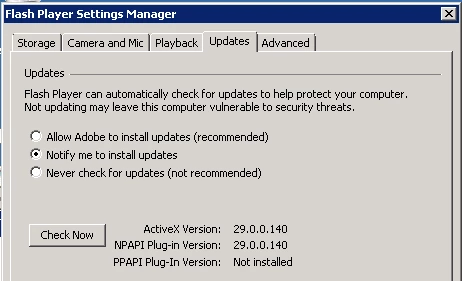
However, the flash player settings manager still is set to Notify me to install updates (which creates questions from users).  There does not seem to be a pattern, and some of our impacted PC's only have the file located under SysWOW64.  This issue first surfaced in version 29.0.0.113.  Any thoughts, advice, or things to check would be most helpful!
This topic has been closed for replies.
Correct answer _maria_

Shared Files - Acrobat.com

Zipped file + Transform & CAB file.

The user's accounts are not permitted to install software.  They are a regular account with no administrator permissions.  If they double click / run an executable, it will fail.  Unsure what specific permissions I should search for.


Hi beng22671927

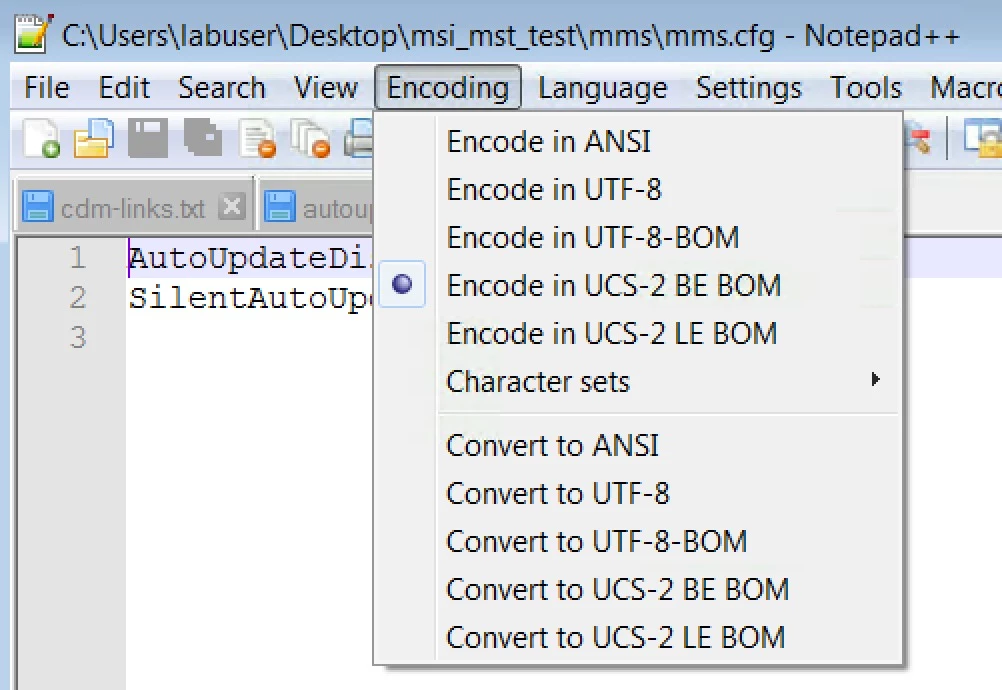
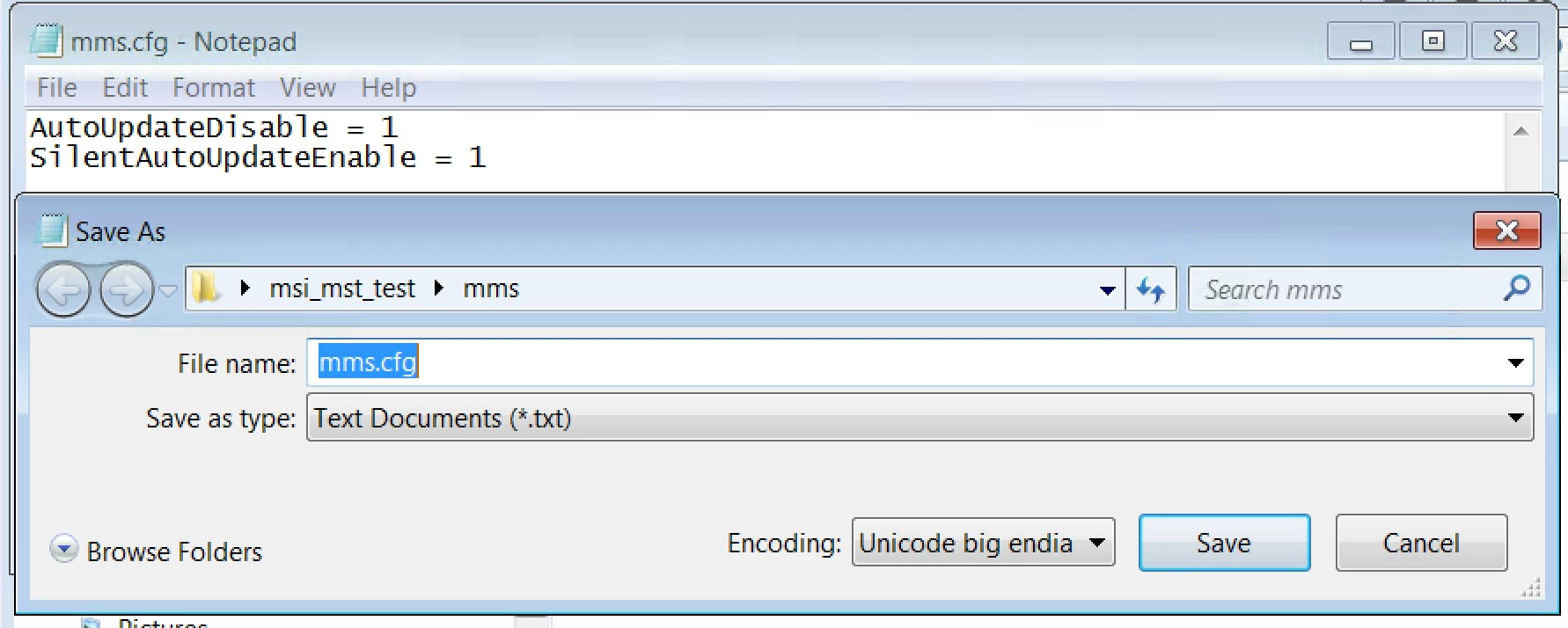
We investigated further and found the mms.cfg file you're using is not saved in UTF-8 format.  We checked the mms.cfg file you have in the CAB file and in the mms.zip file.  Both are incorrect.

Using Notepad++ and viewing the file encoding, it returns:

when viewing the file in Notepad, and selecting 'save as', it returns:

These are incorrect.  Please edit the file, save it with encoding UTF-8, or ANSI, and deploy it to your system.  The Flash Player Settings Manager > Updates tab should then report the correct settings from the mms.cfg file, and the update workflows should also work correctly.


Essentially, right now, since the file is saved with the incorrect encoding, the settings are being ignored, and it's falling back to the default update workflow, which is Notification Updates (this is the legacy update workflow that is used in the event there is no mms.cfg file, or it's encoded incorrectly).

1 reply

_maria_
Legend
June 5, 2018

Hi beng22671927 ,

How are you deploying Flash Player?

Which installer you using, the MSI or EXE?

How, exactly are you deploying the mms.cfg file?

AutoUpdateDisable = 1

SilentAutoUpdateEnable = 1

This is an invalid setting.

AutoUpdateDisable = 1 completely disabled Flash Player updates including Silent AutoUpdates (Background Updates).  If you want your users to update via Silent AutoUpdat (Background Updates), AutoUpdateDisable must be set to 0

On a 64-bit OS, Flash Player reads the mms.cfg file saved at C:\Windows\SysWOW64\Macromed\Flash, not at the System32 location.  Deploying it to System32 location is irrelevant.

--

Maria

Participating Frequently
June 5, 2018

I see.  Flash is being deployed via SCCM from an MSI provided from Adobe, and the config file is applied via a Transform.  I will take note that the first setting invalidates the previous.  So the config file is only needed in SysWOW64?

_maria_
Legend
June 6, 2018

and the config file is applied via a Transform

Please do not apply the mms.cfg file to the MSI via transform.  This results in the mms.cfg file being a payload of the MSI installer and when Flash Player is subsequently uninstalled (which it is for every update) the mms.cfg file is also removed, since it was installed as a component of the MSI file.  This may lead to unintended consequences.  Adobe Flash Internal Update Server - mms.cfg replaced and new schedule task is from a customer that was doing the same thing (adding the mms.cfg file as a payload of the MSI via transform).  You can refer to this for more detailed information.  The Administrator Guide will be updated soon with this information.

The reason the Flash Player Settings Manager Updates tab is not reflecting the entries in the mms.cfg file is that the act of simply deploying a file to the client doesn't automatically update the Settings Manager.  However, you can rest assured that the update mechanism queries the mms.cfg file, not the Settings Manager entry to determine what update type the system is configured for.

So the config file is only needed in SysWOW64?

That is correct