
Inspiring
July 2, 2012
Answered

Adobe Flash Player Security Prompt

  • July 2, 2012
  • 1 reply
  • 2662 views

I'm aware of the fix for this but I need some help in understanding a few things:

  1. Why do some users get to the prompt & others don't?
  2. Why is the process of applying the fix different for some users?
  3. How can we proactively ensure the masses won't get this prompt when we get ready to release the product/service?

History

We're preparing to roll out a new product/service so a small team of IT folks have been creating video's using eLearning Suite.  Before we roll out the final product to our users they wanted to confirm the videos were playing fine.

The folks with the eLearning Suite reported receiving the Adobe Flash Player Security prompt (see below) when they attempted to play one of the videos they created.
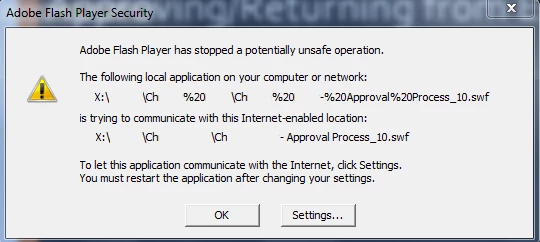
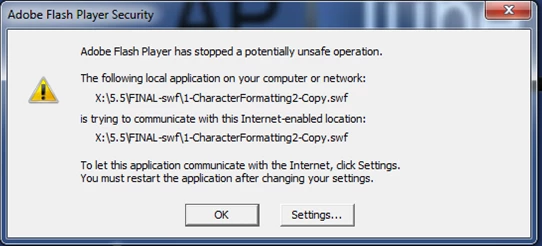
My first thought was maybe the spaces had somethign to do with it, so I made a copy of another file (that was also having the same problem) & removed all the spaces, yet the problem persisted. (See below)
I emailed them some instructions on how to fix...
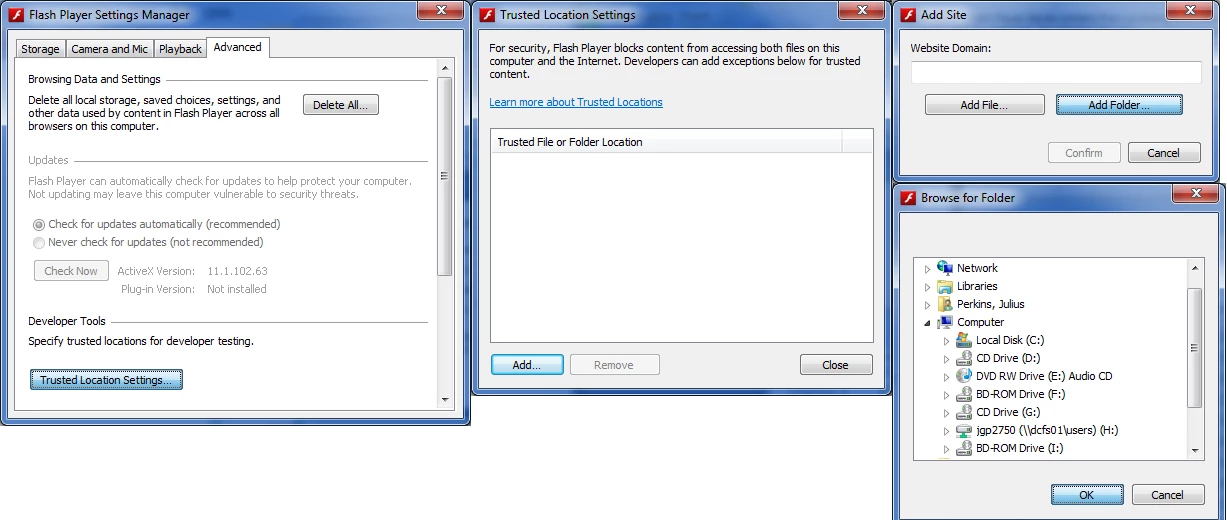
But on another machine, the person said their process was is entirely different:

  • "Click Settings…
  • Go to the Advanced Tab
  • Click Check Now
  • After clicking on Check Now it should bring you to this site: http://www.adobe.com/software/flash/about/  follow the remain steps below.
  • Right click the Version Information text - it should bring up a context menu
  • Select "Global Settings"
  • Click the "Advance" tab in the resulting Flash Player Settings Manager window
  • Scroll down to Developer Tools and click "Trusted Location Settings...:
  • Click "Add Folder..."
  • Select your APTUBE  drive
  • Confirm
  • Close the windows and retry playing the video"
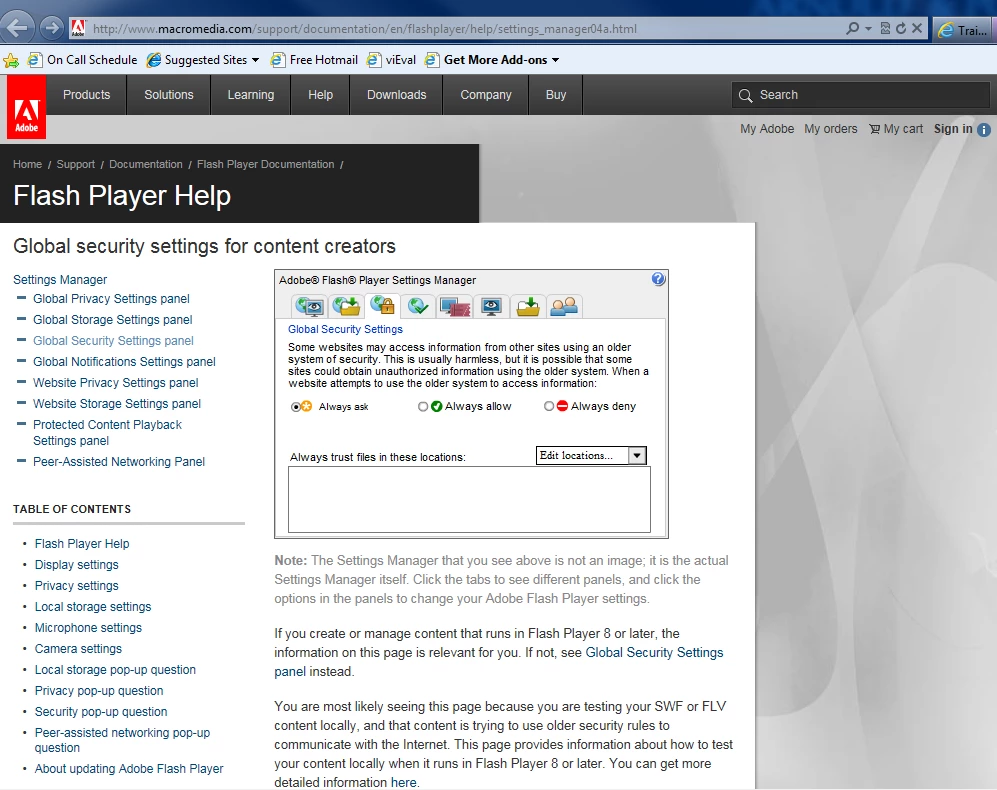
Again, myself and several others (the majority) do *not* receive the security prompt; The video loads & plays fine.  Yet the group that created the video's are receiving this prompt.

We want to make sure its not a widespread configuration problem that will result in several hundred calls to our Help Desk when we advertise this!

This topic has been closed for replies.
Correct answer jeromiec83223024

I think you're going to find that you're talking to a combination of people with the standard release version of Flash Player, and people with the Flash Player Debugger installed.  It sounds like you have the Flash Player Debugger installed.

You can confirm this by checking out the "Find Flash Player version type and capabilities" section on this page:

http://helpx.adobe.com/flash-player/kb/find-version-flash-player.html

The debugger is shipped with Flash Professional and Flash Builder.  Flash Professional ships as part of the Adobe eLearning Suite. 

When you're authoring Flash content, we expect you to be doing weird stuff with local files.  We also show you pop-up ActionScript errors.  For the average end-user, we tighten the security down and we suppress all those messages to provide the smoothest experience possible.

I'd recommend that you install and test with Google Chrome, just as a convenience thing.  It ships with it's own version of Flash Player bundled it.  That makes it nice for testing, because you have an easy way to keep a release version of the player installed, while maintaining the Debugger in the other browsers for ease of testing and content authoring.

You can always uninstall the debugger and revert to a Release target of Flash Player by uninstalling Flash Player and downloading the latest from http://get.adobe.com/flashplayer

Uninstallation Instructions:

http://helpx.adobe.com/flash-player/kb/uninstall-flash-player-windows.html

If you're not debugging Flash content on your system, the release player is WAY faster.  You want to use it for general web surfing.

So, back to that error message.  It sounds like your customers are going to see that the way things stand now, and you'll definitely want to fix it before you ship.  You can confirm by checking with a browser with the release player installed (Chrome).

Flash Player is saying that you're trying to run a SWF (a compiled Flash movie), but that the SWF is running off your local filesystem and is calling a network API.

When compiling a SWF, you can define how that SWF behaves when run from the local filesystem.  It can a.) Talk to the Internet or b.) Access Local Files.  You cannot cross the streams.  This prevents a malicious attacker from reading information from your machine and sending it to themselves.

I'm pretty sure that if you recompile the SWF, but go to File > Publish Settings > Local Playback Security and set it to Access Network Only, the error message will go away for the people with Release versions of Flash Player.

Senocular has an excellent breakdown of this here:

http://www.senocular.com/pub/adobe/Flash%20Player%20Security%20Basics.html

Thanks!

1 reply

JuliusPIVAuthor
Inspiring
August 24, 2012

Two things

  1. Bump?
  2. It appears that only eLearning Suite 2.5 users are experiencing this issue.  What is it about the eLearning suite that changes the system configuration to cause this issue?
JuliusPIVAuthor
Inspiring
October 3, 2012

Sufficient time has past to warrant a bump here.

Furthermore, while testing a Flash 11 upgrade I discovered the presense of a FlashAuthor.cfg file in C:\Windows\System32\Macromed\Flash.  Its a simple file that contains a small wall of text followed by one line and it goes a little something like this:

# FlashAuthor.cfg

#

# This file was automatically installed with one or more

# Macromedia applications. This file directs Macromedia Flash

# Player to provide alternate messaging for violations of the

# security rules for local .SWF files. The alternate messaging

# is designed for users who are authors of .SWF files rather

# than only consumers of them.

#

# If you are creating .SWF files for deployment as local files

# rather than for Web delivery, and you need to simulate the

# end-user experience for local security problems, try changing

# the value of "LocalSecurityPrompt" below to "User" rather

# than its default of "Author".

#

# For more information, see:

# http://www.macromedia.com/go/flashauthorcfg

#

LocalSecurityPrompt=Author

I stumbled upon some light documentation for the file here - will review later: http://help.adobe.com/en_US/AS2LCR/Flash_10.0/help.html?content=00000460.html

jeromiec83223024
jeromiec83223024Correct answer
Inspiring
October 4, 2012

I think you're going to find that you're talking to a combination of people with the standard release version of Flash Player, and people with the Flash Player Debugger installed.  It sounds like you have the Flash Player Debugger installed.

You can confirm this by checking out the "Find Flash Player version type and capabilities" section on this page:

http://helpx.adobe.com/flash-player/kb/find-version-flash-player.html

The debugger is shipped with Flash Professional and Flash Builder.  Flash Professional ships as part of the Adobe eLearning Suite. 

When you're authoring Flash content, we expect you to be doing weird stuff with local files.  We also show you pop-up ActionScript errors.  For the average end-user, we tighten the security down and we suppress all those messages to provide the smoothest experience possible.

I'd recommend that you install and test with Google Chrome, just as a convenience thing.  It ships with it's own version of Flash Player bundled it.  That makes it nice for testing, because you have an easy way to keep a release version of the player installed, while maintaining the Debugger in the other browsers for ease of testing and content authoring.

You can always uninstall the debugger and revert to a Release target of Flash Player by uninstalling Flash Player and downloading the latest from http://get.adobe.com/flashplayer

Uninstallation Instructions:

http://helpx.adobe.com/flash-player/kb/uninstall-flash-player-windows.html

If you're not debugging Flash content on your system, the release player is WAY faster.  You want to use it for general web surfing.

So, back to that error message.  It sounds like your customers are going to see that the way things stand now, and you'll definitely want to fix it before you ship.  You can confirm by checking with a browser with the release player installed (Chrome).

Flash Player is saying that you're trying to run a SWF (a compiled Flash movie), but that the SWF is running off your local filesystem and is calling a network API.

When compiling a SWF, you can define how that SWF behaves when run from the local filesystem.  It can a.) Talk to the Internet or b.) Access Local Files.  You cannot cross the streams.  This prevents a malicious attacker from reading information from your machine and sending it to themselves.

I'm pretty sure that if you recompile the SWF, but go to File > Publish Settings > Local Playback Security and set it to Access Network Only, the error message will go away for the people with Release versions of Flash Player.

Senocular has an excellent breakdown of this here:

http://www.senocular.com/pub/adobe/Flash%20Player%20Security%20Basics.html

Thanks!