Participant
May 24, 2012
Question

Adobe Flash Player Settings on Chrome

  • May 24, 2012
  • 1 reply
  • 3527 views

I'm trying to understand the settings better and wonder why I have such difficulty changing or applying settings from the Adobe Flash Player Settings Pop-up when I am using Chrome but when I use Firefox or Internet Explorer I have no problem. In Chrome I got to click the crap out of something to get something to change or close. Also the settings pop-up's look different.
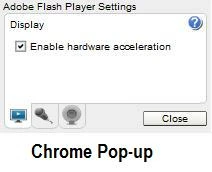
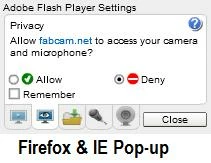
Also I noticed the camera settings on Chrome and Internet Explore have an option for Google Camera Adapter 0 and  Google Camera Adapter 1. What the heck is Google Camera Adapter, where is it and why do I have two of them

This topic has been closed for replies.

1 reply

chris.campbell
Legend
May 25, 2012

I'm not sure what the Google Camera Adapters are, I suspect they might be part of gtalk.

As for not being able to click, what operating system are you using?  Have you changed your monitors default DPI (to make fonts larger)?

Participant
May 28, 2012

Hi Chris,

Thanks for your prompt response. I found out the Google Camera Adapter is for Google Talk and Google Voice. I may have changed the monitor DPI. I don't think so, but that shouldn't matter. I mean the pop-up window is the same size on all three browsers. I am having this problem while using the following;

  • TOSHIBA Satellite L305D PSLC8U- 03G01U
  • FabCam, Version: 1.3 (A Chrome App)
  • Windows Vista Home Premium Version 6.0 (Build 602: Service Pack 2)
  • Google Chrome Version 19.0.1084.52 m
  • Chicony USB 2.0 Camera (Built in)

I think I have this issue on other applications as well.  I'll try another and see if thats true

chris.campbell
Legend
May 30, 2012

If you can, try to set the DPI back to the default just so we can see if it's to blame.