Participant
Nov 19, 2017 12:47 PM UTC
Answered

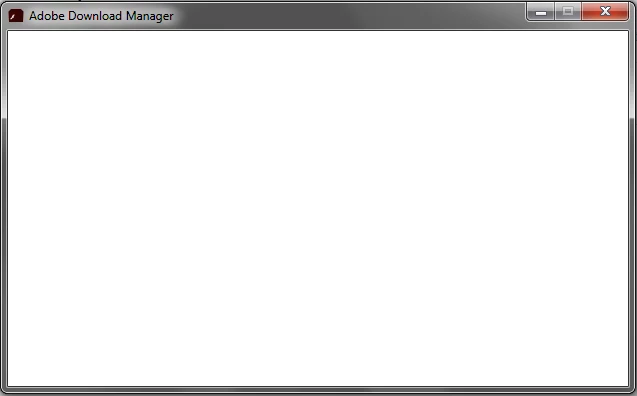
Adobe Flash Player stays white screen and does not install.

Appeared for me to update the flash player, when I download and try to install it gets that white screen and does not exit, and when I close this window the installation application is automatically deleted from the computer. Can anyone help me to solve?
    This topic is closed to new replies. Start a new post to keep the conversation going.
    _maria_
    _maria_Correct answer
    Legend
    Nov 27, 2017 4:34 PM UTC

    Please do the following:

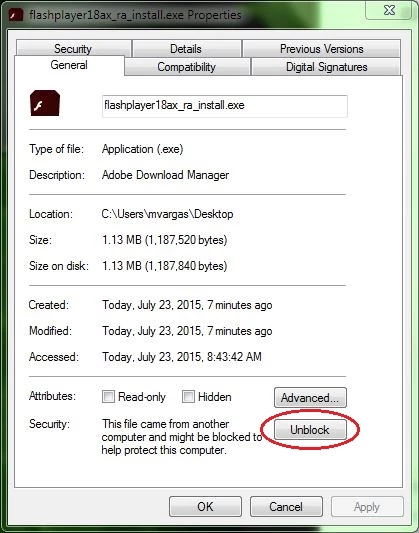
    1. Right-click on the installer file and select Properties
    2. In the General tab click the Unblock button
    3. Click Apply
    4. Click OK to close the window
    5. Double-click on the installer file to launch the installer

    2 replies

    _maria_
    _maria_Correct answer
    Legend
    Nov 27, 2017 4:34 PM UTC

    Please do the following:

    1. Right-click on the installer file and select Properties
    2. In the General tab click the Unblock button
    3. Click Apply
    4. Click OK to close the window
    5. Double-click on the installer file to launch the installer
    Translate
    jeromiec83223024
    Inspiring
    Nov 23, 2017 12:04 AM UTC

    https://helpx.adobe.com/flash-player/kb/installation-problems-flash-player-windows.html

    Links to the offline installers are at the bottom of the guide.

    Translate