
kiwitweet
Participant
March 17, 2015
Question

Adobe Flash Player upgrade

  • March 17, 2015
  • 1 reply
  • 789 views

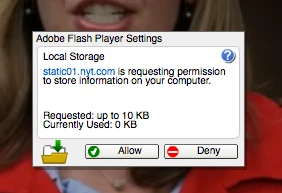
I have recently installed AdobeFlashPlayerInstaller_17au_ltrosxd_aaa_aih.dmg on mt Mac 10.10.2. When I open a web video on Safari I now get an annoying box in the center of the picture that asks that the site "is requesting permission to store information on your computer". There is an "Allow" and a "Deny" button.  When I click 'deny' nothing happens and I cannot close the box off my center screen.  What's happening here and how do I fix this? 
This topic has been closed for replies.

1 reply

jeromiec83223024
Inspiring
March 18, 2015

I've posted really long answers to this on other threads.  If you want more technical context, please feel free to check my activity feed. 

Here's the short answer:

Go to Control Panel > Flash > Storage and choose Allow websites to store information on my computer.  Disabling local storage doesn't buy you any privacy in 2015.


When you want to browse the web without accumulating identifying trackers, using your browser's Private Browsing/Incognito mode is a far more comprehensive defense (although not a panacea), and it doesn't degrade the user experience.