


Participant
September 10, 2015
Question

Adobe Reader + Flash - Not enough permissions to write to disk

  • September 10, 2015
  • 1 reply
  • 2026 views

Good morning,


My name is Albert, I am writing to you as a last option to solve my problem.


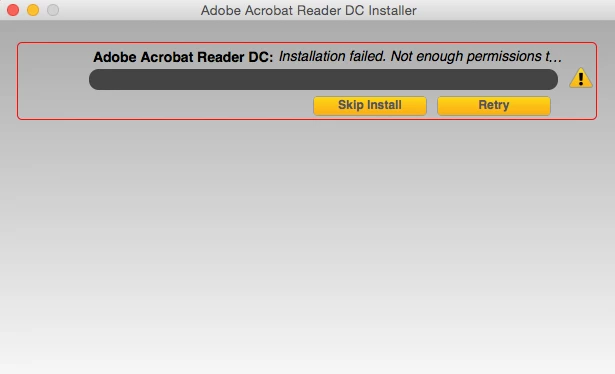
I've been trying to install Adobe Reader and update Flash Player for ages and it says there are not enough permissions to write to disk. I've tried a clean install, a disk permissions repair, to install it through a different link, I checked the Application Support folder's permissions... but it does not work. Every single time, I get the image I send you.


My Mac has recently been restored so I do not understand which could be the problem.


I would be grateful if you could help me with this.


Kind regards,


Albert
This topic has been closed for replies.

1 reply

Anubha Goel
Participating Frequently
October 2, 2015

Hi puigfa,

Please let me know if you have any other Adobe application installed on your machine.

If yes, then please check the permissions for the folder under ~/Library/Application Support/Adobe

Right-click on the Adobe folder and choose "Get Info" from the menu, expand the Sharing and Permissions tab at the bottom of the window and check that your user account has Read & Write permissions.

Also, ensure that if there is a previous version of Reader installed on your machine, then uninstall it completely and then install Reader DC from here:

Adobe - Adobe Acrobat Reader DC Distribution

Try launching Flash Player as well and see if it works fine or not.

Let me know.

Regards,

Anubha

puigfaAuthor
Participant
October 2, 2015

Hello Anubha,

Apart from the Flash Player, I have Photoshop CS6 installed on my computer. The thing you said about Sharing and Permissions, I had already tried. I do not need Adobe Reader anymore but I still cannot update the Flash Player correctly through the website (it gives me the same problem as before).

Thanks for your help,

Albert

Anubha Goel
Participating Frequently
October 5, 2015

Hello Albert,

Please try performing a clean install.

Refer: How to perform a "clean install" of Flash Player in Mac OS X

Let me know if that helps.

Regards,

Anubha