
Participant
January 8, 2017
Answered

Adobe Software Distribution File Error

  • January 8, 2017
  • 2 replies
  • 428 views

Dears,

regarding to my request Adobe Software Distribution Request - {moderator: Deleted Track ID#] i've already install the file on my Windows Laptop but having Error as below .

anyone could help please !
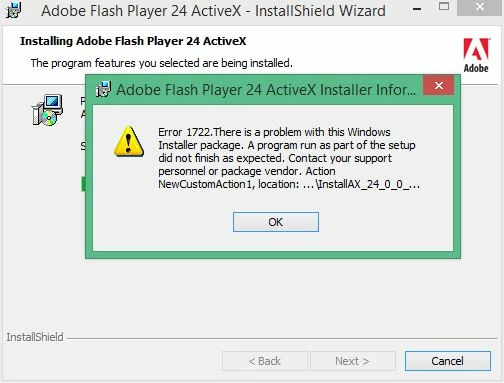
[moderator note: deleted track ID # so someone else doesn't try to use your distribution license]

This topic has been closed for replies.
Correct answer ridhij4208356012135538

Hi,

As you have stated above that you are observing the issue on Windows 8.1 for ActiveX player type. This is an expected behavior as Flash Player updates for IE are released by Microsoft as part of Windows updates. In order to update Flash Player for IE browser on Windows 8 and above please run Windows update.

You can go ahead and install the ActiveX.msi on Windows 7. If you see any issues there please let us know.

Similarly Adobe Flash Player updates for Google Chrome are pushed by Google as part of chrome updates.

Thanks!

2 replies

Participant
January 10, 2017

Hello Vargas,

the error appeared on Win 8.1 and the distribution file required to be install on many devices in our network which includes 7,8.1,10 OS as the Adobe Security Released the below Updates which applicable on most of our machines :

- Adobe Flash Player Desktop Runtime

- Adobe Flash Player for Google Chrome

- Adobe Flash Player for Microsoft Edge and Internet Explorer 11

the problem just in the first update (Desktop Runtime) as the Screenshot taken above, the rest of them are working fine .

this is the link contains the updates released for security issue ----> Adobe Security Bulletin .

should i install the Desktop Runtime on Win 8.1 to prevent any hacker from taking control on affected device !

appreciate your help .

Best Regards,

Ehab Salih .

ridhij4208356012135538
Adobe Employee
Adobe Employee
January 10, 2017

Hi,

As you have stated above that you are observing the issue on Windows 8.1 for ActiveX player type. This is an expected behavior as Flash Player updates for IE are released by Microsoft as part of Windows updates. In order to update Flash Player for IE browser on Windows 8 and above please run Windows update.

You can go ahead and install the ActiveX.msi on Windows 7. If you see any issues there please let us know.

Similarly Adobe Flash Player updates for Google Chrome are pushed by Google as part of chrome updates.

Thanks!

Participant
January 10, 2017

I'll let You know if any .

Thanks for your Kind Support .

_maria_
Legend
January 9, 2017

Hi,

What Operating System are you trying to install Flash Player ActiveX on?  If this is on Windows 8 and above (including Server 2012/2016), Microsoft embeds Flash Player in IE (and Edge in Windows 10) and all Flash Player for IE/Edge updates are released by Microsoft via Windows Updates.  If this is on Window 7 or below, please provide the following log files:

  • FlashInstall.log file saved at C:\Windows\System32\Macromed\Flash.  If this is a 64-bit OS, the FlashInstall.log file saved at C:\Windows\SysWOW64\Macromed\Flash is also required.
  • A verbose MSI install log file with the option v and x (verbose with additional debugging enabled)

Upload the log files to cloud.acrobat.com/send using the instructions at How to share a document and post the link to the uploaded files in your reply.

--

Maria