


ivikavik
Inspiring
August 23, 2016
Question

AFP integrated in Google Chrome doesn`t work on my Windows 10

  • August 23, 2016
  • 2 replies
  • 979 views

Hello , guys!

My name is Victoriia. I have some problems with my Google Chrome Adobe Flash Player. You see, my Youtube videos and Ted videos, and many others don`t work too. I`ve checked my browser for update, and it`s true. The plugins in chrome are enable. The selection of checkbox    "Always allowed to run" isn`t matter. I`ve already restarted my browser, my machine and nothing changes. Have any ideas what is it?
 

This topic has been closed for replies.

2 replies

Carm01
Legend
August 24, 2016

Any error messages, what happens.

Can you be a little more descriptive besides wont play?

_maria_
Legend
August 23, 2016

YouTube videos use HTML5 video by default.  Ted videos appear to use Flash Player (at least the one I tried).


Please go go https://helpx.adobe.com/flash-player.html and click the 'Check Now' button.  What are the results?

ivikavik
ivikavikAuthor
Inspiring
August 25, 2016

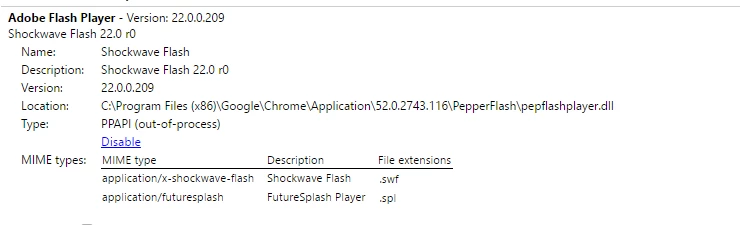
I`ve done this. Picture is below. These problems touch not only the video, the music is not played too. To solve it I try to install the system version of AFP, and this had helped only before the restart my machine. After this it did not work. The system AFP is set up, but the video, as well as music don't playback. I can the reinstall the AFP and my media content again plays till until next restart.

I have also issue with my Axure program and its share preview as HTML. When I set up the system version this share feature doesn't work well more. The most weird thing, that when my video and music don't play this feature-share works as normal, and when I set up the system version the feature stop normal working and restore its activity only if I delete the system version of AFP and restart the machine. 

_maria_
Legend
August 25, 2016

Based on your screenshot, Chrome is correctly detecting Flash Player and it is enabled.

These may be of assistance:

Do you have the latest video/sound drivers installed for your system?  If not, check to see if there are updates.

Is the problem only in Flash Player on Chrome, or can you reproduce with Flash Player on IE/Edge?