Participating Frequently
March 1, 2013
Question

After updating to Flash version 11.6.602.171 - can no longer play any embedded videos..and worse

  • March 1, 2013
  • 8 replies
  • 26520 views

To begin with, I'm running a clean AMD 64 Bit Windows 7 System.  Never any problems with any of my video playing scenarios - until now - with this version 11.6.602.171.

After downloading and installing both versions - both for Firefox (other browsers) and IE, none of my browsers can play videos unless they are at their lowest resolution of 240.

So I used the Adobe Flash Uninstaller and ensured that the last vestages of Flash Player were removed - and reinstalled - all to no avail.

Then I downloaded the archived version of 10.3 to see if a previous version would work.  But that wouldn't work either.  None of my browsers will play videos now and I'm talking:

IE 10

Firefox 19.01

Avant Browser

Google Chrome

Google Chromium

Commodo Dragon

Commodo Ice Dragon

Opera

Waterfox

Pale Moon

None will play the video.

What you get is the video screen but unless you have a 240 option (lowest resolution), all you get is a green screen.  You hear the talking/music, but there is no picture and all the green screen does is flash.  Here's a JPG of the screen.  If you put your cursor anywhere on the progress meter (arrow) it will show you a small image of what's supposed to be playing (see below), but the screen remains green and flashes while playing.
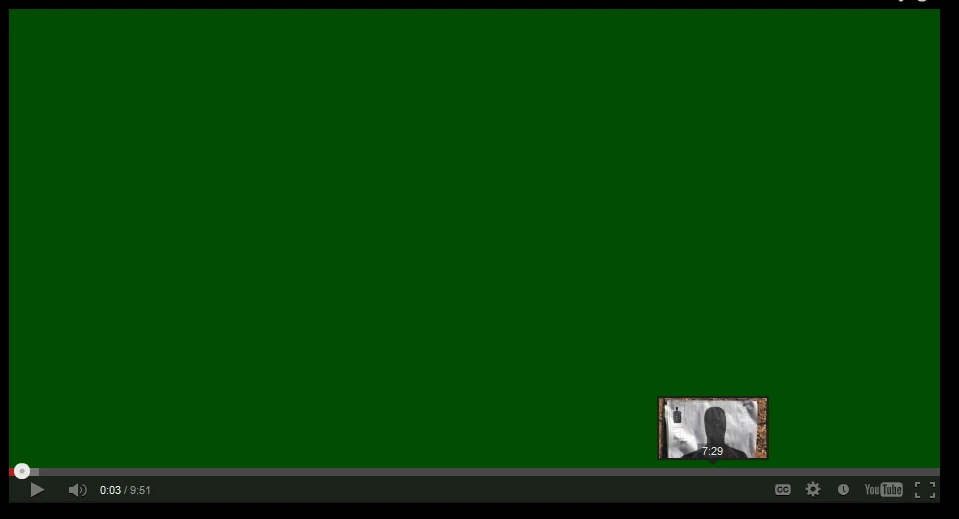
Now here is where it gets interesting.  When I completely uninstall Adobe Flash Player and then go to a You Tube embedded video (on any site), there first appears a screen that tells you that you need a plug-in - but then within seconds (without downloading anything), the movie starts playing normally.

I then checked my Firewall (Zone Alarm) - turned it off temporarily - that wasn't the problem.  Then checked my latest version of Avast AntiVirus software and temporarily turned it off - that was not the problem either.  The videos still won't work and remain green unless you use the lowest resolution.

So this new version 11.6.602.171 has become a nightmare - but I'm afraid it messed up my system big time and I don't know what to do to alleviate this.

Crying HELP!!!!!!!!!!   Is there something I'm overlooking.  I'm now screwed - way to go Adobe for releasing such a faulty software product.

Ben Herrmann

North Carolina

    This topic has been closed for replies.

    8 replies

    Participant
    April 17, 2013

    The solution is by upgrading to Adobe Flash ver 11.7.700.169

    The problem is with the Adobe Flash ver 11.6.602.xxx  I had the same problem until the newest version came out.  When it first occurred I had the version just before 11.6.602.171.  All you had to do then was to right click on the video screen, click settings and turn off hardware acceleration.  The next version 180 had the same problem but turning off hardware accleration had no effect.

    The newest version appears to have fixed the problem although it is still a bit buggy.  A buffering delay occurs, first the screen goes white, then black, then white, then black, then green like it did before, then sounds plays but no video, just a green screens with a buffering circle, then the video plays after buffering is finished.  I noticed hardware acceleration was off by default.  Turing it on has no noticeable effect on performance

    Chris Campbell, I realize you are proud of your troubleshooting skills, but if you do not have a clue as to how to fix an issue stay off this page or any tech site.  All you do is add to the clutter and confusion.  You made poor benherrmann buy a new video card when the real problem was what he suspected all along Adobe.

    Adobe please don't put a new product or upgrade  out until you have tested it and worked out the bugs first.

    Participant
    December 1, 2013

    I am with you this is an adobe flash problem.  If you turn on compatibility in Explorer running windows 7  the players will begin working again.  This problem also happened with MP3 Players embedded in web sites.  DO NOT replace any hardware.  Adobe you need to fix this as web designers do not want to have to redesign all of there flash players on their various web sites! Signed; One pissed off web designer!

    March 4, 2013

    Hi everyone, this is my first post  here.

    I am having the same problem. Green screen when playin videos on youtube (Opera x64 12.4, Firefox x86 19.01) but sound is ok. My operating system is Windows 8 x64 and I have ATI Mobility Radeon HD5470.

    Disabling hardware acceleration solved problem for me. I just hope it will be possible for me to use hardware acceleration again.

    --

    Good day.

    chris.campbell
    Legend
    March 4, 2013

    It sounds like we've got a number of *different* problems on this thread.  I'll try and respond to a few of them.

    @filter 2.5 and everyone else running into a green screen issue.  Please try the solution outlined in the post below to see if it will allow you to use hardware acceleration.  The other alternative is to try a different ATI driver.

    http://forums.adobe.com/message/4865912#4865912#4865912#4865912

    @pipseer - Somehow Internet Explorer's activex filtering was enabled on your system.  This troubleshooting is also described in this FAQ: ActiveX Filtering in Internet Explorer

    @Sahloknir - For the sound issue, we're going to want your system specs.  Please start a new thread with:

    Sometimes video and audio problems are caused at a lower level and not directly related to Flash Player.  I recommend trying both of the links below to see how they perform.  If the problem exists with both, then Flash Player is most likely not the culprit as the HTML5 video link does not use Flash Player when playing.  You can verify the use of HTML5 by right clicking the HTML5 video and looking for the words "About HTML5" at the bottom of the context menu.

    @mem2013 - The Flash Player update service will not impact Flash Player's performance.  This is a separate service that runs for just an instant on your system once an hour (if you have automatic updates enabled.)  Changing it from manual to automatic shouldn't make any difference.

    March 5, 2013

    I have a related problem with my Flash Website showing a Black screen after updating to Flash Player version 11.6.602.171. I have tried this on 3 different windows computers and with both FireFox and Explorer on each system. I still had 1 computer running Windows XP with an older version of the Flash player, and it worked fine today. I then tried upgrading this to version 11.6.602.171, and immediately got a black screen on my home page instead of of the normal content! I tried uninstalling this and going back to an earlier build, but this did not work. This problem now exists on 3 windows computers (all different video cards, 2 Wondows 7 and 1 Windows XP).

    The fact that I was able to reproduce the problem by updating an older version of the Flash Player, and immediately have this problem without rebooting or changing any other software tells me that there is a problem with version 11.6.602.171!

    Please let me know what else I can do to completely remove this version of the player?

    Thanks

    George

    Participant
    March 4, 2013

    I've always found these sort of sites very helpful but until now, I've never been able to contribute -thanks to everyone everywhere who's ever written a helpful tip!

    Here's my SIMPLE SIMPLE FIX: in Internet Explorer 9 (probably earlier versions too), I just went to the main menu, selected Tools, and unchecked ActiveX Filtering. I think thatt the new version of Adobe must now use ActiveX when maybe it didn't before.

    Unfortunately, I didn't notice if this was checked prior to upgrading to the latest Adobe Flash Player version 11.6.602.171. If anyone has the older version installed on a 2nd computer, they can see if this is actually the fix by noticing whether or not ActiveX Filtering is checked prior to installing the latest 11.6.602.171 version. If so, then you can post a follow up here. Also, if so, then Adobe made a significant change to the way the latest version functions. If not, then I have no idea if installing the latest version triggered I.E. 9 to make a change (which I don't think it ever changes itself), or something else is at work.

    Sorry I couldn't be more definitive, I do hope that someone can confirm this and I really hope my tiny bit has helped someone else.

    Peace All.

    Deb

    Participating Frequently
    March 3, 2013

    to add more to this problem there seems to be sound issues too like wile watching a video with 11.6.602.171 the sound cut off 50% of the time do you guys at adobe even test this before releasing it? cus its just  full of bugs. bugs that will never go away like the green screen

    in all of my years of using a computers since I was 8 years old I never had problems with flash player till now

    Participating Frequently
    March 2, 2013

    Well, I've solved the problem - but it cost me money.....

    Before purchasing a new Video card today, I did the following:

    1.  Uninstalled and reinstalled various versions of Flash Player - all to no avail.  Also went into the registry after the next to the last uninstall to remove any last vestiges of Flash.  That didn't work either.  The frustrating part here is that none of this was an issue with previous versions of Flash.

    2.  I also double checked to see if my Antivirus or Firewall was doing anything to interfere.

    4.  I then checked to see what software that I may have installed, plug-ins, etc., within the same time I updated flash to see where any conflicts might be possible - no luck here.

    3.  I then rebooted into safe mode - same scenario - just the green screen (sound was OK, but that was it).

    Now please note - I have an ATI video card with 1 Gig of RAM and it has always functioned superbly - until this latest version of flash came out.

    So after much frustration, I went to Best Buy today and purchased another video card - with 2 Gig's of DDR5 RAM.  Installed it.  Then I reinstalled both versions of Flash Player (the plug-in version for Firefox and other browsers, and the AX version for IE).  Then I tried the videos and they were all back to normal.

    I took my other video card (which was 1.5 years old and just to be inquisitive, installed it in another PC I have (with a previous version of Flash Player), and all functioned fine there.

    So I don't know what to tell you - but the culprit (on some systems) seems to be this newest version of Flash Player.  I really didn't want to dish out another $175 for a new video card when the other one functioned just fine - but I did it anyway.  Call it obsessive compulsive, or whatever - but in the end, Flash Player is now working.

    But on my system - and after everything I've tried - the problems didn't start happening until I downloaded and installed this newest version of Flash.

    Oh well.....

    Participating Frequently
    March 2, 2013

    I just disabled hardware accelerateion and everything works.  I went to Microsoft and downloaded Mr fixit to disable hardware acceleration, I went back to adobe and the placeholder that shows my operating system and flash version finally showed up.   It works now on 32 and 64 bit versions.

    Participating Frequently
    March 2, 2013

    i am all so have the same problem. have the latest video drives 13.1for HD 4670 i think it has nothing to do with hardware and more like flash it self. the only way to temporarily fix it is to turn off  hardware acceleration in flash settings by right clicking on the video and click settings a box will pop up you'll see tabs click on the first one un check the hardware acceleration check box. the last version of flash i used was like 11.5 don't remember the rest of the version number but it was working fine. i believe this happened with 11.2 of flash with nvidia cards cus they took something out of flash player and now the same thing has happened with the amd cards or to random people.

    chris.campbell
    Legend
    March 2, 2013

    @sahloknir - If possible, try going back to the previous version of Flash Player, or our 10.3 release to see if that resolves the issue for you.  Please let me know how it works out.

    How do I revert to a previous version of Flash Player?

    Participating Frequently
    March 2, 2013

    so far nothing seem to work i even tired to reinstall my video drivers and ran CCleaner still dos the same thing what ever flash player 11.6.602.171 change it messed with all of the flash players even 10.3 and it stuck on my computer the only fix that works is turn off hardware acceleration for flash

    Participating Frequently
    March 1, 2013

    I am having the same issue. I am running windows7.  Everything was fine until flash updated.  I did an uninstall and install of the previous version and I still get nothing. I am going to regedit to make sure all files are gone.  I will let you know, it seems the new update is conflicting with something.

    chris.campbell
    Legend
    March 1, 2013

    @benhermann - If reverting to a previous version doesn't help, then it sounds like something else on your system is interfering.  This sounds like a problem other users have encountered with ATI and a couple of Microsoft KB updates.  Please see this post for details.

    http://forums.adobe.com/message/4865912#4865912#4865912

    @woodsd81200 - Are you also getting a green screen when playing videos?

    Participating Frequently
    March 1, 2013

    No I was not. I was not getting anything.  I uninstalled those windows update and I will re install adobe and let you know I hope it works.

    pwillener
    Legend
    March 1, 2013

    benherrmann wrote:

    way to go Adobe for releasing such a faulty software product.

    I do not have any problems with 11.6.602.171 on IE10, Firefox 19.0.1, or Waterfox.

    Your screenshot (green) could indicate a conflict with your graphics driver; what is your display adapter, device driver version & date?  See http://forums.adobe.com/thread/945765

    Participating Frequently
    March 1, 2013

    Actually, I keep my ATI drivers up to date and I'm running the latest version (13-1_vista_win7_win8-64_dd_ccc_whql).  I've had no issues whatsoever with that video driver.  It was only when I updated my flash players for both IE and other browsers, that this issue immediately began.

    What's confusing now is that although I've completely uninstalled and reinstalled the flash players on several occasions (all to no avail), the problem remains.  And even when reverting back to an earlier flash player, the problem now seems set - across all browsers. 

    There must be a setting or something I'm overlooking but I cannot find out which one - thus the request for suggestions.