


cpcent
Known Participant
February 26, 2020
Question

Always permit flash player camera and microphone access for a particular website

  • February 26, 2020
  • 1 reply
  • 1029 views

I am wondering if it is possible to always permit flash player camera and microphone access for a particular website?


Right now when I access a particular internal website I see a window similar to the following:
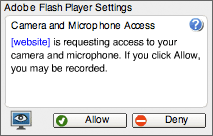


I want to always allow access ONLY for the website in question. Is this possible?


Also, if the above is indeed possible, can I do it without making users manually configure some setting through a GUI? For example, change a registry value, change a value in a configuration file, etc.


This topic has been closed for replies.

1 reply

jeromiec83223024
Inspiring
February 29, 2020

Assuming your users are members of an enterprise, and you can manage the Flash deployments on their machines, you can totally do this. 


Please check out the Flash Player System Administrator's guide, here: 

https://www.adobe.com/devnet/flashplayer/articles/flash_player_admin_guide.html


It's also worth pointing out that browser restrictions on both Flash loading and Camera/Mic access complicate things.  Chrome mediates all access between Flash and the camera/mic as an example, such that they'll only prompt users if all components of the page are loaded over HTTPS, and Flash can only detect the presence of a camera and microphone after the user grants access to the camera and microphone in Chrome's UI.  If you wanted to smooth all of that out, you'd need to do some administrative magic for both Chrome and Flash.  This generally applies to most major western browsers at this point.

cpcent
cpcentAuthor
Known Participant
March 2, 2020

Thank you for your reply.


I looked at the documentation you provided and tried adding the following parameters to %SystemRoot%\System32\Macromed\Flash\mms.cfg and %SystemRoot%\SysWOW64\Macromed\Flash\mms.cfg  on the client:


AVHardwareDisable = 1
AVHardwareEnabledDomain = myserv01.mydomain.local


Surprisingly, nothing seems to have changed? I still see the window I posted above when I access the flash site on the server. (I restarted the client, of course). Did I miss a step somewhere?


jeromiec83223024
Inspiring
March 2, 2020

What browser are we talking about?