


Participant
November 1, 2017
Question

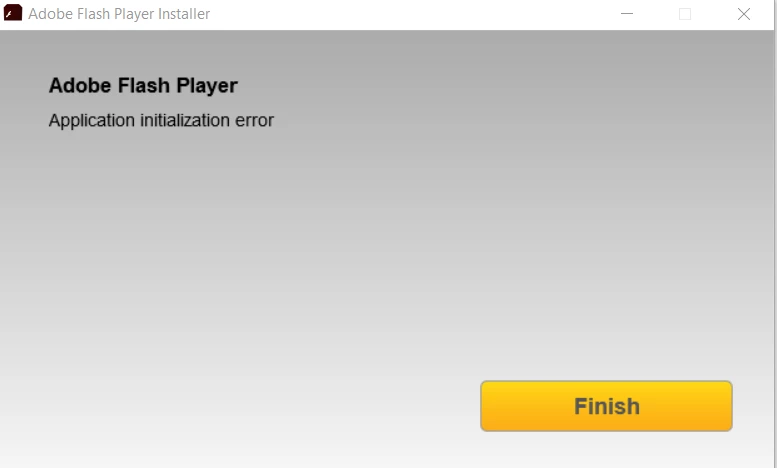
'Application initialization error' installing Flash Player

  • November 1, 2017
  • 1 reply
  • 1744 views

[moderator: edited title to accurately summarize issue]

Hi, I am currently having issues with my Adobe Flash Player. It seems that it is NOT working on my PC but are working with all browsers installed (Chrome, IE, Firefox, etc.). When I checked, a Adobe Flash (32-bit was installed) although my PC is running in 64-bit. So, I tried to install a 64-bit for Windows 10 Adobe Flash and it prompted me with this error.  I could not find any solution on the web, they are all about browser issues. I hope someone could help me with this. Thank you.
This topic has been closed for replies.

1 reply

_maria_
Legend
November 1, 2017
It seems that it is NOT working on my PC but are working with all browsers installed (Chrome, IE, Firefox, etc.).

This comment is confusing, as it seems to be contradictory.  What is it not working on?

a Adobe Flash (32-bit was installed) although my PC is running in 64-bit

I suspect you are referring to the 'Flash Player (32-bit)' item listed in the Control Panel.  If so, this is the Flash Player Settings Manager, which is a 32-bit application (but manages setting for both 32-bit and 64-bit versions of Flash Player).

For the 'application initialization error', I'll need to review the installation log files.  Please review the FAQ Where do I find the Flash Player installation log on Windows? and upload the two files, Adobe_ADM.log and Adobe_GDE.log, to cloud.acrobat.com/send using the instructions at How to share a document .  Post the link to the uploaded files in your reply.

November 13, 2017

Here's the log file

Shared Files - Acrobat.com

_maria_
Legend
November 13, 2017

You provided the FlashInstall32.log file.  I need the Adobe_ADM.log and Adobe_GDE.log files.