theresac66546418
Participant
March 29, 2017
Answered

Auto Update Failure

  • March 29, 2017
  • 3 replies
  • 885 views

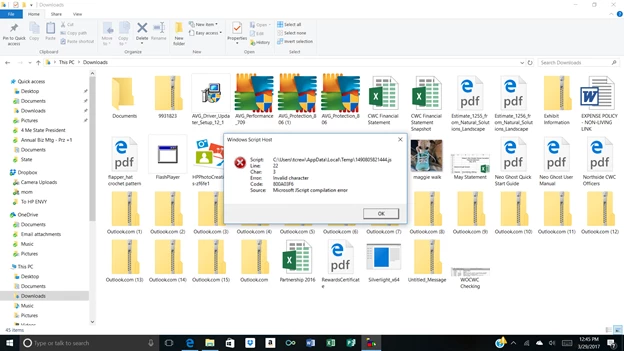
When Adobe tries to automatically install updates I'm getting system errors.  They are:

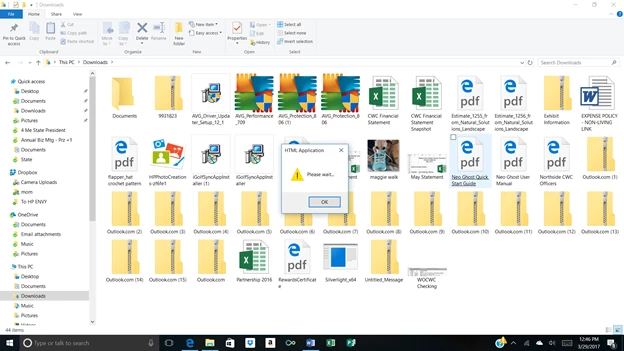
Followed by

This topic has been closed for replies.
Correct answer _maria_

Thank you for posting the screenshots.  I'm not familiar with those errors in regards to the Flash Player update mechanism,  Silent or Notification.

Based on the Flash Player Setting Manager Update tab screenshot, no version of Flash Player that would be updated by Flash's update mechanism is installed.

If you only have Flash Player for IE/Edge, Microsoft embeds Flash Player for IE/Edge and all updates Flash Player for IE/Edge via Windows Update and you'd need to report update issues to Microsoft.

If you did have Flash Player NPAPI (for Firefox/Safari) or PPAPI (for Opera and Chromium-based browsers) installed at some point I'd like to review the FlashInstall.log file.  The file is saved at C:\Windows\System32\Macromed\Flash and, if this is a 64-bit system, there's another file saved at C:\Windows\SysWOW64\Macromed\Flash directory.  Upload the file(s) to cloud.acrobat.com/send using the instructions at How to share a document and post the link to the uploaded files in your reply.

3 replies

theresac66546418
Participant
March 29, 2017

Oh, yeah, the operating system is Windows 10 Version 1607

Thanks again

_maria_
_maria_Correct answer
Legend
March 29, 2017

Thank you for posting the screenshots.  I'm not familiar with those errors in regards to the Flash Player update mechanism,  Silent or Notification.

Based on the Flash Player Setting Manager Update tab screenshot, no version of Flash Player that would be updated by Flash's update mechanism is installed.

If you only have Flash Player for IE/Edge, Microsoft embeds Flash Player for IE/Edge and all updates Flash Player for IE/Edge via Windows Update and you'd need to report update issues to Microsoft.

If you did have Flash Player NPAPI (for Firefox/Safari) or PPAPI (for Opera and Chromium-based browsers) installed at some point I'd like to review the FlashInstall.log file.  The file is saved at C:\Windows\System32\Macromed\Flash and, if this is a 64-bit system, there's another file saved at C:\Windows\SysWOW64\Macromed\Flash directory.  Upload the file(s) to cloud.acrobat.com/send using the instructions at How to share a document and post the link to the uploaded files in your reply.

jeromiec83223024
Inspiring
March 29, 2017

Yeah, those aren't our error dialogs.

theresac66546418
Participant
March 29, 2017

Thank you!

_maria_
Legend
March 29, 2017

Hi,

The error dialogs are way to small to read.  Please repost screenshots of just the error dialog window.  You can use Windows Snipping Tool to take a screenshot of just the error dialog window.

Please also provide the following information:

  • Operating system, including version
  • Screenshot of the Flash Player Settings Manager > Updates tab
    • Launch Control Panel  > All Control Panel Items > Flash Player > Updates tab

--

Maria

<edited>

theresac66546418
Participant
March 29, 2017

Here's the info.  I'm using Windows 10 Version 1607.  The error screen shots are attached.  they are not great.  Enlarging causes some distortion, but hopefully they will help.

Theresa

      From: m_vargas <forums_noreply@adobe.com>

To: Theresa Crew <moderator:  deleted personal information>

Sent: Wednesday, March 29, 2017 1:36 PM

Subject:  Auto Update Failure

Auto Update Failure

created by m_vargas in Using Flash Player - View the full discussionHi, The error dialogs are way to small to read.  Please repost screenshots of just the error dialog window.  You can use Windows Snipping Tool to take a screenshot of just the error dialog window. Please also provide the following information:

  - Operating system, including version

  - Screenshot of the Flash Player Settings Manager > Updates tab    

      - Launch Control Panel  > All Control Panel Items > Flash Player > Updates tab

--Maria If the reply above answers your question, please take a moment to mark this answer as correct by visiting: https://forums.adobe.com/message/9423115#9423115 and clicking ‘Correct’ below the answer Replies to this message go to everyone subscribed to this thread, not directly to the person who posted the message. To post a reply, either reply to this email or visit the message page: Please note that the Adobe Forums do not accept email attachments. If you want to embed an image in your message please visit the thread in the forum and click the camera icon: https://forums.adobe.com/message/9423115#9423115 To unsubscribe from this thread, please visit the message page at , click "Following" at the top right, & "Stop Following"  Start a new discussion in Using Flash Player by email or at Adobe Community For more information about maintaining your forum email notifications please go to https://forums.adobe.com/thread/1516624.  This email was sent by Adobe Community because you are a registered user.

You may unsubscribe instantly from Adobe Community, or adjust email frequency in your email preferences

_maria_
Legend
March 29, 2017

Hi,

The forums do not accept attachments from email replies.  Please log onto the forums to post the screenshots.

Thank you.

--

Maria