
marekk40835215
Participant
December 8, 2016
Answered

Can not install flash player update

  • December 8, 2016
  • 2 replies
  • 333 views

hi, I have this problem with latest installation file:
After PC restart there was a window that update is available. It opened adobe website for download after clicking to it. I executed downloaded installer but there was only a clean window and nothing was installing. You can see it in a printscreen.

https://s23.postimg.org/928zj4g0r/flash.jpg

I let this window several minutes running, but there was no other activity. What is wrong? It was downloaded directly from the correct adobe site.

This topic has been closed for replies.
Correct answer _maria_

Hi,

Please try the following:

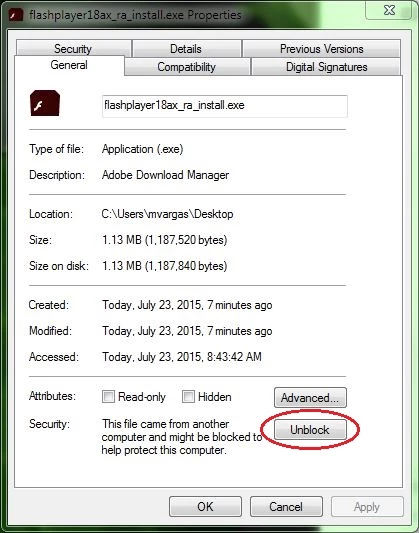
1. Right-click on the installer file and select Properties

2. In the General tab click the Unblock button

3. Click Apply

4. Click OK to close the window

5. Double-click on the installer file to launch the installer

6. Proceed with installation

--

Maria


2 replies

marekk40835215
Participant
December 8, 2016

thanks, it is ok now

_maria_
Legend
December 8, 2016

you're welcome.

_maria_
_maria_Correct answer
Legend
December 8, 2016

Hi,

Please try the following:

1. Right-click on the installer file and select Properties

2. In the General tab click the Unblock button

3. Click Apply

4. Click OK to close the window

5. Double-click on the installer file to launch the installer

6. Proceed with installation

--

Maria