


June 12, 2017
Question

Can't Install the Flash player for Opera Browser

  • June 12, 2017
  • 3 replies
  • 1724 views

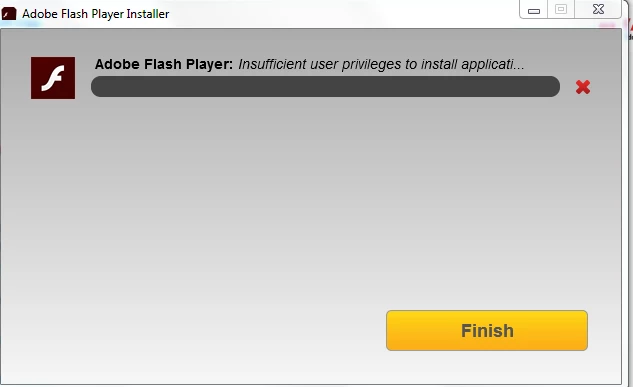
So i have been trying all day to install the Flash player for my opera and it keeps giving me this error of insufficient user privileges to install application and i tried turning off my anti virus i though maybe its because of that and then i tried it to run it as administrator which i am in this user profile btw and i tried all the ways of fixing this problem from forums i tried everything but didnt work anyone know how can i fix this problem Please and thank you
This topic has been closed for replies.

3 replies

June 12, 2017
_maria_
Legend
June 12, 2017

Thank you for posting the log file.

The PAPPI plugin installation is failing due to an ACCESS_DENIED error on one of the files.  It appears the latest PAPPI version, 250.0.171, was installed, but may not have been a successful installation.  There have been numerous attempts at re-installing, all faililng due to a conflicting process error (e.g. Opera is open and needs to be closed to re-install the PPAPI plugin) or an ACCESS_DENIED error on the PPAPI DLL file, and thus can't be deleted.

Please follow the instructions at How do I do a clean install of Flash Player - Windows? to perform a complete uninstall of Flash Player and then re-install it.  Make sure you don't have anything running that may use Flash Player (e.g. browsers, IM clients, etc).  According to the log file you also have Flash Player ActiveX control (for iE) and Flash Player NPAPI plugin (for Firefox) installed.  You will need to re-install these after performing the clean uninstall/install. When asked to delete files, please be sure to NOT delete the FlashInstall.log file.

--

Maria

June 12, 2017
_maria_
Legend
June 12, 2017

Hi,

I'll need to review the installation log files to investigate further.  Please review the FAQ Where do I find the Flash Player installation log on Windows?  and provide all file listed:  Adobe_ADM.log, Adobe_GDE.log, and FlashInstall.log (if this is a 64-bit OS, there will be 2 of these).  Upload the files to cloud.acrobat.com/send using the instructions at How to share a document and post the link to the uploaded files in your reply.

Thank you.

--

Maria