
christines70721421
Participant
January 25, 2017
Answered

Can't Save or Run Flash Vista 64 IE9

  • January 25, 2017
  • 1 reply
  • 237 views

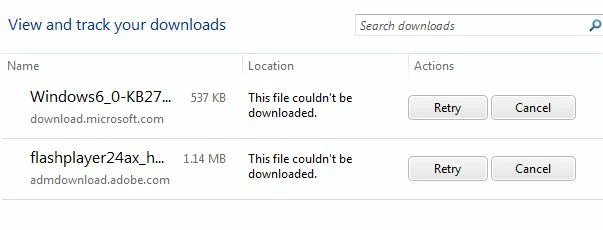
Windows Vista x64. Internet Exlorer 9. I followed the links to install a Windows update that's supposed to remedy a certificate issue (don't know if that's my problem) and it won't save either. The options I'm given when trying to download is Save and Save As but when I try either, neither works. I have adobe reader and it works fine. When I try to download flash in Chrome, it says Chrome already runs it automatically so no action needs to be taken but when I try to download it to my computer using IE, I can't. I tried looking up the toolbars and extensions and there's nothing listed for Adobe. This is a vicious circle.
This topic has been closed for replies.
Correct answer _maria_

Hi,

Sounds like you issue is with your system.  You first need to figure out why it's not saving files.  Microsoft Vista is still supported until April 2017 (https://support.microsoft.com/en-us/help/13853/windows-lifecycle-fact-sheet)  You can try contacting Microsoft for support or a local trusted IT business.  Once that is resolved, the Flash Player installer should be able to download onto your system.

Alternatively, you can try using a different browser to download the installers.   The main download page detects to OS/browser and offers the appropriate installer for the OS/browser combination, but you can go to get.adobe.com/flashplayer/otherversions and select the OS and browser you want to download Flash Player for.

Either way not being able to download/save a file is not a problem we can assist you with.

--

Maria

1 reply

_maria_
_maria_Correct answer
Legend
January 25, 2017

Hi,

Sounds like you issue is with your system.  You first need to figure out why it's not saving files.  Microsoft Vista is still supported until April 2017 (https://support.microsoft.com/en-us/help/13853/windows-lifecycle-fact-sheet)  You can try contacting Microsoft for support or a local trusted IT business.  Once that is resolved, the Flash Player installer should be able to download onto your system.

Alternatively, you can try using a different browser to download the installers.   The main download page detects to OS/browser and offers the appropriate installer for the OS/browser combination, but you can go to get.adobe.com/flashplayer/otherversions and select the OS and browser you want to download Flash Player for.

Either way not being able to download/save a file is not a problem we can assist you with.

--

Maria