

November 26, 2017
Question

Can't unmount the OSX flash player dmg without admin

  • November 26, 2017
  • 2 replies
  • 708 views

Hi, I want to unmount the flash player DMG but I don't have admin power, here is the error it gives me when I try to unmount it:
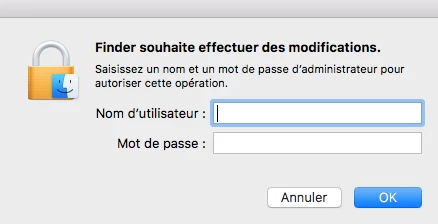
is there a way to fix it without being admin ?

    This topic has been closed for replies.

    2 replies

    _maria_
    Legend
    November 27, 2017

    Are you sure you're trying to unmount the DMG?  The translated text in the screenshot states "Finder wishes to make changes", this indicates that you're either attempting to install, or uninstall, a program, not unmount a DMG.

    Flash Player installation/uninstallation does require Admin permissions.  If this is what you're attempting to do, then you'll need to provide the Admin credentials to proceed with the operation.

    Colin Holgate
    Inspiring
    November 26, 2017

    Look at the answer given here:

    Mac Forums

    The part that seemed to work for that user was:

    "Could be an issue with Finder. Move ~/Library/Preferences/com.apple.Finder.plist (~ = shorthand for your home folder) to the Desktop for now, log out and back in. Try ejecting an image after logging back in."

    If that doesn't work out you could also open Disk Utility, and see if the DMG can be ejected from there.