Participant
February 19, 2011
Answered

Can't watch videos correctly

  • February 19, 2011
  • 5 replies
  • 2641 views

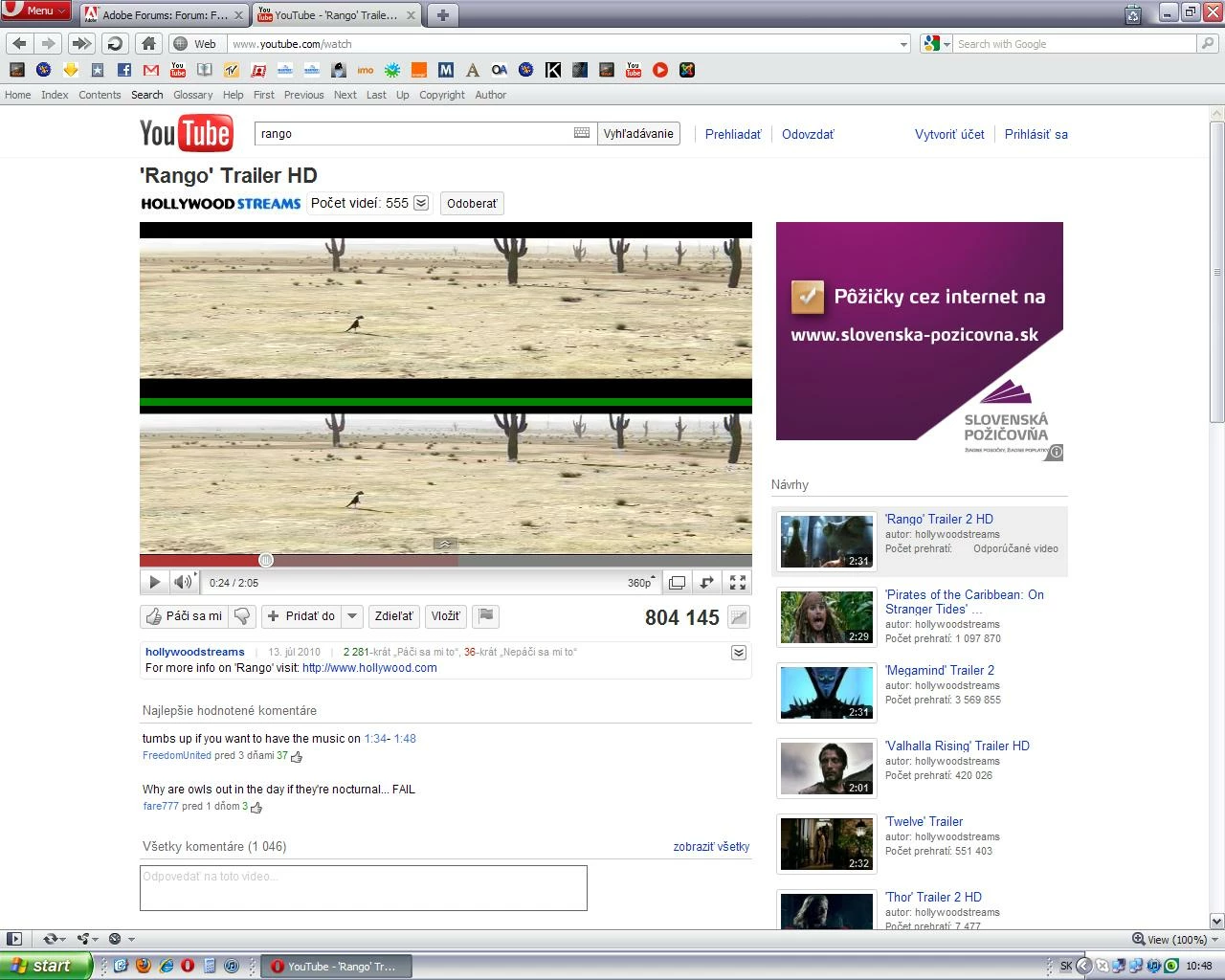
Hi.Since I downloaded latest Flash Player (version 10.2.152.26),I can't correctly watch videos - i see them all twice,splitted in a half.Like on the picture:                                                                                                               It's happening in every browser I've tried - Opera,FF,Chrome,IE.Also it's happening on every page with flash videos,not just YouTube. I've tried installing older version of flash player,but when I try to watch video with older version,it says that I need to upgrade my Flash Player.Also I've tried reinstalling Flash,uninstalling and installing Flash,no change.Is anyone able to help me?
    This topic has been closed for replies.
    Correct answer

    Hi, Try this and see if it helps.

    Hardware Acceleration

    You may want to go to this site: http://www.adobe.com/software/flash/about/. Right click on the Flash logo, Settings,
    then UNcheck the hardware acceleration in Display Settings.

    Let me know,

    Thanks,

    eidnolb

    5 replies

    February 21, 2011

    eidnolb,

    Thanks, that did it!  I didn't even think about that!  We take our drivers forgranted sometimes!!!

    Thank you again!

    February 22, 2011

    Hi epcot1988, That sounds great!! Yes, I agree on the drivers too.

    Glad that worked!!

    eidnolb

    February 20, 2011

    eidnolb

    Thanks, yes I was a ware of that. I don't know what to say!  YOUTUBE works and a site or 2 still have the line.  I double checked to see that it was still off.  I tried restarting the computer just to make sure that it was set, but still, some still did itI!  I thought it was strange.

    February 20, 2011

    Hi epcot1988, Just a bit of info, since I don't want to post anymore to this thread as email notifications are received each time and this thread has been answered.

    Updating the graphic video card drivers sometimes is needed. You can read this article:

    http://www.macromedia.com/support/documentation/en/flashplayer/help/help01.html  

    Thanks,

    eidnolb

    February 20, 2011

    Thanks, that helped on YOUTUBE.  But there are other websites that it didn't help.  I am running XP sp3.  So I still have a partial issue!

    February 20, 2011

    Hi epcot1988, The hardware acceleration feature is turned on by default with the version of Flash Player. It's either ON or OFF and not per website. Glad this thread and info was able to help you, but if you have any other issues, please start your own thread/discussion.

    Include other info as browser(s) & versions.

    Thanks,

    eidnolb

    Correct answer
    February 20, 2011

    Hi, Try this and see if it helps.

    Hardware Acceleration

    You may want to go to this site: http://www.adobe.com/software/flash/about/. Right click on the Flash logo, Settings,
    then UNcheck the hardware acceleration in Display Settings.

    Let me know,

    Thanks,

    eidnolb

    mazpiziAuthor
    Participant
    February 20, 2011

    Well,I unchecked it,and it actually helped.

    Thanks a lot.I gave you + karma or whatever they have here.You're hero:)

    February 20, 2011

    Hi, Glad to hear that worked for you. It seems to be an issue for some users, depending on their OS and the system requirements for the hardware acceleration.

    Thanks mazpizi for marking your thread as answered I'm sure other users will benefit also!!

    Regards,

    eidnolb

    Message was edited by: eidnolb  adding info

    February 19, 2011

    I am having the same problem.  The image below the green line has the colors off position, not aligned with the image.  That is to say that it appears that the reds are an inch or two below where they should be.  As mentioned in the other post, this has only happened recently when I uploaded the update to 10.2.  I have removed. shutdown, and restarted the computer, then installed either an older version or the current version of Flash Player to no avail, also just removed and installed with the same results.

    I guess that it is a case that once you've updated you can't go back!

    mazpiziAuthor
    Participant
    February 19, 2011

    Well,we probably have to wait for next release of flash player..hope it will help.