Question
Cannot Click "Accept" Adobe Flash Settings
When your webcam settings box wont let you click accept, try the following, this is now working for me:
1). Go to the Adobe Flash Settings Manager Link:
http://www.macromedia.com/support/documentation/en/flashplayer/help/settings_manager06.html
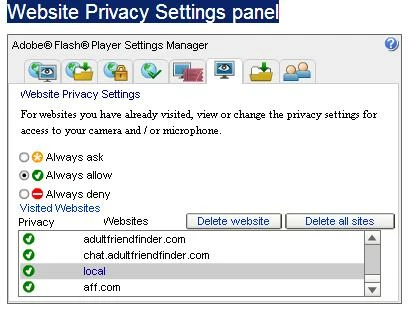
2). Left Click the Website Privacy Settings panel
3). If you see the site you are having trouble with click "Always Accept"
4). Do the same thing for "Local" and click Always Accept
5). Close your browser and come back in. It should stop prompting you for permission and just work automatically now for the site(s) you specified
Happy Camming! 😃
 AdChoices