
2rosegold
Participant
May 17, 2017
Answered

Cannot find Flash Player in Chrome Settings under Content

  • May 17, 2017
  • 1 reply
  • 11210 views

I am trying to follow the instructions on enabling Flash Player in Chrome on my Mac. Step 2 says to "On the Content settings screen, find the Flash Player listing. Check the status." The Flash Player is not even on that list for me. I have the Pepper Flash Player downloaded. How else can I enable Flash Player?

This topic has been closed for replies.
Correct answer _maria_

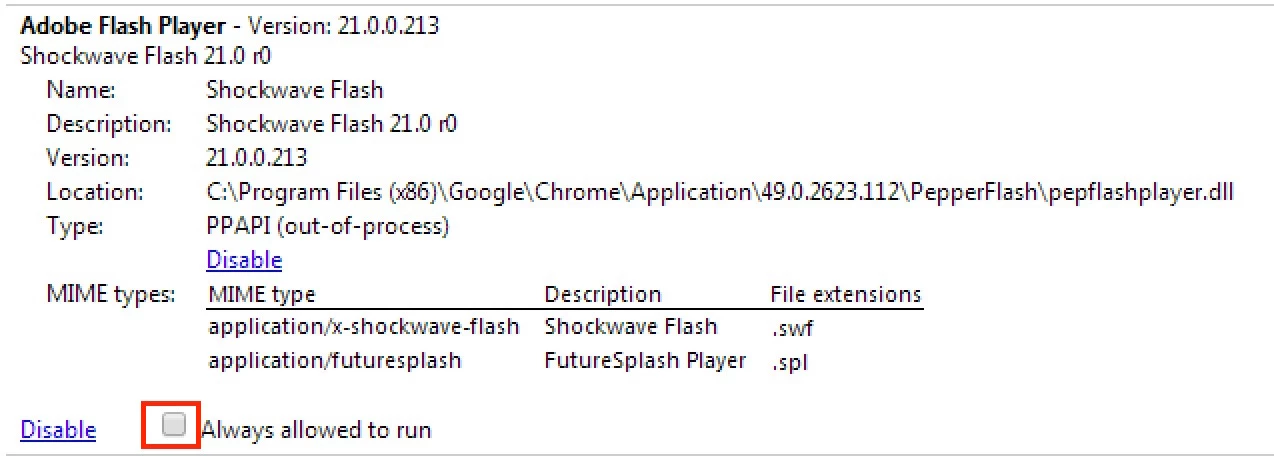
The 'Enable Flash Player in Chrome' tech note instructions have been updated for the latest version of Chrome.  On Chrome 49, do the following:

  1. Launch Chrome and navigate to chrome://plugins
  2. Locate Adobe Flash Player
  3. Click the check-box next to 'Always allowed to run'

This screenshot is from Chrome 49 on Vista, but the UI is the same for Mac:

1 reply

_maria_
Community Manager
Community Manager
May 17, 2017

What version of Chrome do you have?

2rosegold
2rosegoldAuthor
Participant
May 17, 2017

I have version 49.0.2623.112. I have an old Mac so I do not receive anymore Chrome updates.

_maria_
Community Manager
_maria_Community ManagerCorrect answer
Community Manager
May 17, 2017

The 'Enable Flash Player in Chrome' tech note instructions have been updated for the latest version of Chrome.  On Chrome 49, do the following:

  1. Launch Chrome and navigate to chrome://plugins
  2. Locate Adobe Flash Player
  3. Click the check-box next to 'Always allowed to run'

This screenshot is from Chrome 49 on Vista, but the UI is the same for Mac: