


Participant
May 19, 2016
Answered

Cannot open AdobeFlashPlayer installer

  • May 19, 2016
  • 2 replies
  • 2570 views

I was prompted to install the newest version of Adobe Flash Player on my MacBook Pro (OS 10.11.5).  I am using the Safari browser (version 9.1.1 /11601.6.17).  After downloading the installer, I double-clicked on the .dmg file but then got an error message indicating that the disk image could not be opened with the given reason "Protocol wrong type for socket".  Here's a screen shot of the warning:
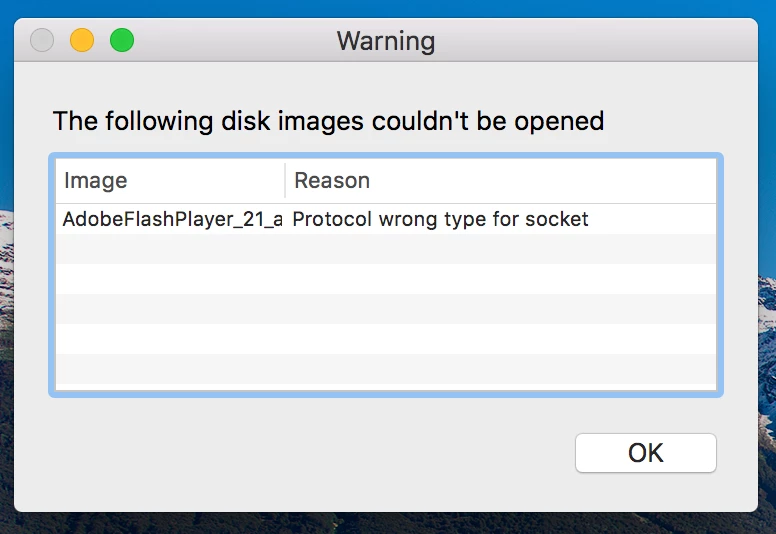
I tried downloading the installer directly from the Adobe website and got the same error message.  Any ideas on how to resolve this problem?

The version of the Flash Player currently installed on my computer is 21.0.0.226.

Many thanks.

This topic has been closed for replies.
Correct answer _maria_

when you downloaded the file directly from the Adobe website, what link did you use to download the installer?

have you tried rebooting your system and running the installer again?

2 replies

Participant
May 19, 2016

I have no idea why this worked, but rebooting my computer did the trick - the .dmg file opened up without error and I was able to install the Flash Player.  Should have just tried this first, I guess.

Thanks!

_maria_
Legend
May 19, 2016

I'm glad that worked.  I've not seen the error before and am not familiar with it.  Many times a system reboot will fix issues.

tribunusplebis
Participant
May 26, 2016

Hello!

Same problem here, on my Safari Version 9.1.1 (11601.6.17). OS 10.11.5

I did reboot the system, but the problem remains the same

_maria_
_maria_Correct answer
Legend
May 19, 2016

when you downloaded the file directly from the Adobe website, what link did you use to download the installer?

have you tried rebooting your system and running the installer again?