Participant
November 14, 2017
Answered

Cant complete install

  • November 14, 2017
  • 1 reply
  • 214 views

I have an old computer that runs XP I cant get my upgrades to Adobe flash (or any other Adobe other than reader) and I cant play videos or games or anything else. I download fine, but when I go to install,  the Adobe screen is completely blank and so I cant see the buttons and doesnt install

When I go to tools on Firefox it seems that some versions (earlier ones I assume) have been disabled due to "vulnerabilities" and cant update them

Cant seem to progress to get this to work... any ideas?

    This topic has been closed for replies.
    Correct answer _maria_

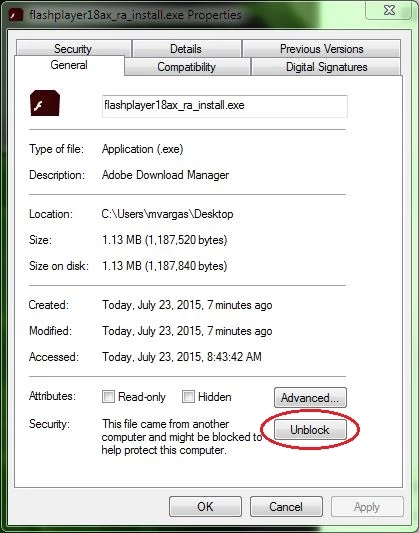
    For a blank installer dialog window, please try the following:

    1. Right-click on the installer file and select Properties
    2. In the General tab click the Unblock button
    3. Click Apply
    4. Click OK to close the window
    5. Double-click on the installer file to launch the installer

    When I go to tools on Firefox it seems that some versions (earlier ones I assume) have been disabled due to "vulnerabilities" and cant update them

    XP is very old.  Most browsers no longer support it, including Firefox, which dropped support for XP in September (Important - Firefox is ending support for Windows XP and Vista | Firefox Help )

    1 reply

    _maria_
    _maria_Correct answer
    Legend
    November 14, 2017

    For a blank installer dialog window, please try the following:

    1. Right-click on the installer file and select Properties
    2. In the General tab click the Unblock button
    3. Click Apply
    4. Click OK to close the window
    5. Double-click on the installer file to launch the installer

    When I go to tools on Firefox it seems that some versions (earlier ones I assume) have been disabled due to "vulnerabilities" and cant update them

    XP is very old.  Most browsers no longer support it, including Firefox, which dropped support for XP in September (Important - Firefox is ending support for Windows XP and Vista | Firefox Help )