


Participant
August 15, 2019
Répondu

Cant see my webcam in flash player settings
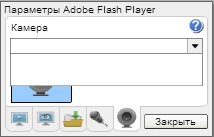

The flash player has stopped recognizing my camera. Usually everything worked fine but now the name of the camera looks like empty box. I tried this on latest version of mozilla, chrome and opera. I also installed latest version of adobe flash player. And I cant see my mics in adobe flash player too. The camera works fine when I disable adobe flash player. What should I do?

Ce sujet a été fermé aux réponses.
Meilleure réponse par jeromiec83223024

A couple things:

  • Depending on the browser/OS target, Flash Player asks either the OS or browser for a list of available cameras.  We display what we get back, which in this case, appears to be any empty list.
  • Most browsers now require that any page that wants access to the webcam and microphone must be served over HTTPS and connect only to HTTPS endpoints.

  • For browsers like Chrome, which mediate access to the camera and microphone, you'll need to Allow Flash to have permissions to the Camera and Microphone through the prompts in Chrome's UI, before it will send us a populated list of cameras, and Chrome will only prompt if the site meets Chrome's security criteria for allowing camera/mic access (see above).

Details on your configuration are always helpful:
https://forums.adobe.com/thread/1195540

That said, I'd start with:

  • When in doubt, reboot
  • Confirm that the camera is available in other desktop applications

1 commentaire

jeromiec83223024
Inspiring
August 20, 2019

A couple things:

  • Depending on the browser/OS target, Flash Player asks either the OS or browser for a list of available cameras.  We display what we get back, which in this case, appears to be any empty list.
  • Most browsers now require that any page that wants access to the webcam and microphone must be served over HTTPS and connect only to HTTPS endpoints.

  • For browsers like Chrome, which mediate access to the camera and microphone, you'll need to Allow Flash to have permissions to the Camera and Microphone through the prompts in Chrome's UI, before it will send us a populated list of cameras, and Chrome will only prompt if the site meets Chrome's security criteria for allowing camera/mic access (see above).

Details on your configuration are always helpful:
https://forums.adobe.com/thread/1195540

That said, I'd start with:

  • When in doubt, reboot
  • Confirm that the camera is available in other desktop applications